이 페이지에서: 개체 수준 액세스 제어를 사용하여 액세스 레이블이 있는 여정, 캠페인 및 오퍼와 같은 개별 개체를 제한하면 중요한 콘텐츠와 개인 데이터를 인증된 사용자로 제한할 수 있습니다.
액세스 레이블에 따라 오브젝트에 대한 액세스를 제한할 수 있습니다. 이 접근 방식은 민감한 디지털 자산을 무단 사용자로부터 보호하고 개인 데이터에 대한 보안을 강화합니다.
OLAC(객체 수준 액세스 제어) 기능을 사용하면 객체 선택에 대한 데이터 액세스를 관리할 권한을 정의할 수 있습니다.
- 여정
- 캠페인
- 템플릿
- 조각
- 랜딩 페이지
- 오퍼
- 정적 오퍼 컬렉션
- 오퍼 결정
- 채널 구성
- IP 준비 계획
사전 요구 사항 prereq-labels
레이블을 만들기하려면 사용 레이블 관리 권한이 있는 역할에 속해야 합니다.
레이블을 할당하려면 관리 권한(예: Manage journeys, Manage Campaigns 또는 Manage decisions)이 있는 역할에 속해야 합니다. 이 권한이 없으면 액세스 관리 단추가 회색으로 표시됩니다.
이 섹션에서 권한에 대해 자세히 알아보십시오.
레이블 만들기 create-labels
레이블을 통해 해당 데이터에 적용되는 사용 정책에 따라 데이터 세트와 필드를 분류할 수 있습니다. 언제든지 레이블을 적용할 수 있으므로 데이터 관리 방법을 유연하게 사용할 수 있습니다.
레이블을 사용하여 사용자에게 액세스 권한을 제공하고 데이터 거버넌스 및 동의 정책을 시행합니다. 이러한 거버넌스 레이블은 다운스트림 소비에 영향을 줄 수 있습니다.
Permissions 제품에서 레이블을 만들 수 있습니다. 자세한 내용은 Adobe Experience Platform 설명서를 참조하세요.
Journey Optimizer에서 직접 레이블을 만들 수도 있습니다. 레이블을 만들려면 다음 단계를 수행합니다.
-
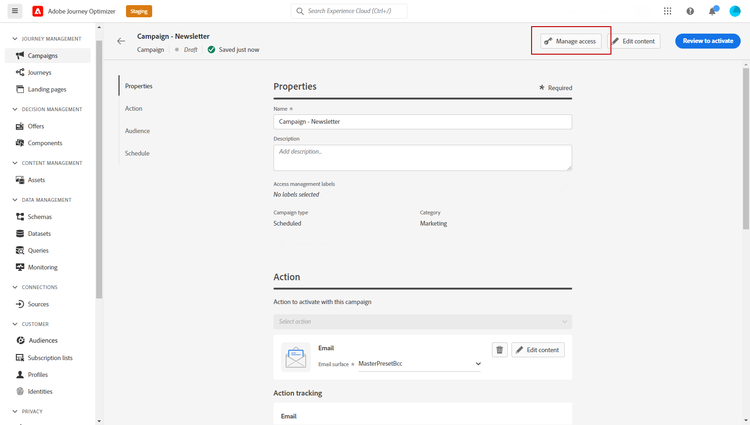
새로 만든 Campaign과(와) 같은 Adobe Journey Optimizer 개체에서 액세스 관리 단추를 클릭합니다.
-
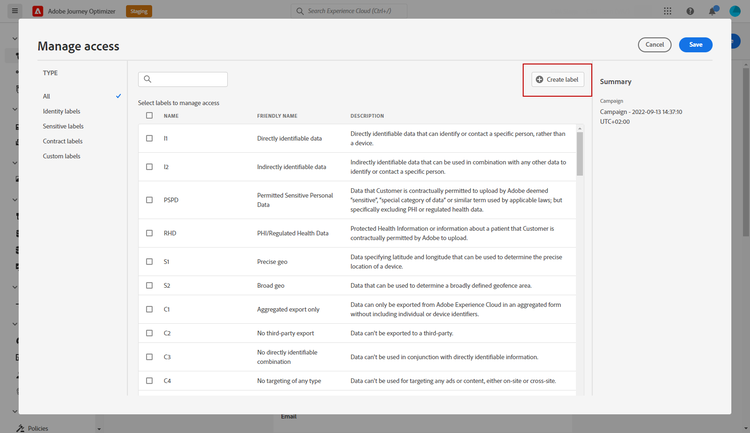
액세스 관리 창에서 레이블 만들기를 클릭합니다.
-
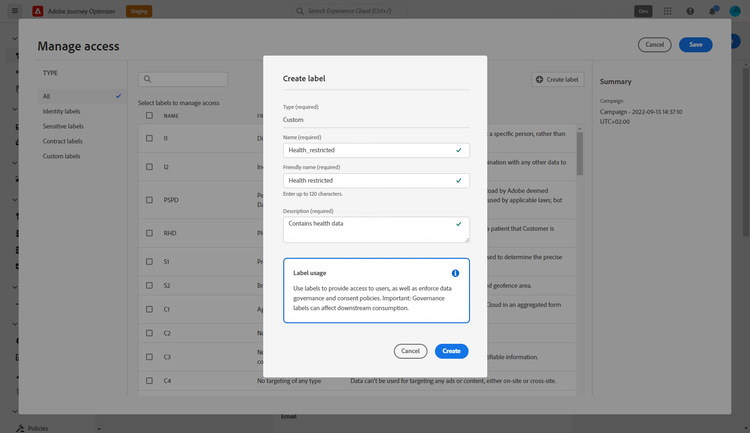
레이블을 구성합니다. 다음을 지정해야 합니다.
- 이름
- 친숙한 이름
- 설명
-
만들기를 클릭하여 레이블을(를) 저장합니다.
새로 만든 레이블을(를) 이제 목록에서 사용할 수 있습니다. 필요한 경우 Permissions 제품에서 수정할 수 있습니다.
레이블 할당 assign-labels
Journey Optimizer 개체에 사용자 지정 또는 핵심 데이터 사용 레이블을 할당하려면 다음을 수행하십시오.
-
새로 만든 Campaign과(와) 같은 Adobe Journey Optimizer 개체에서 액세스 관리 단추를 클릭합니다.
-
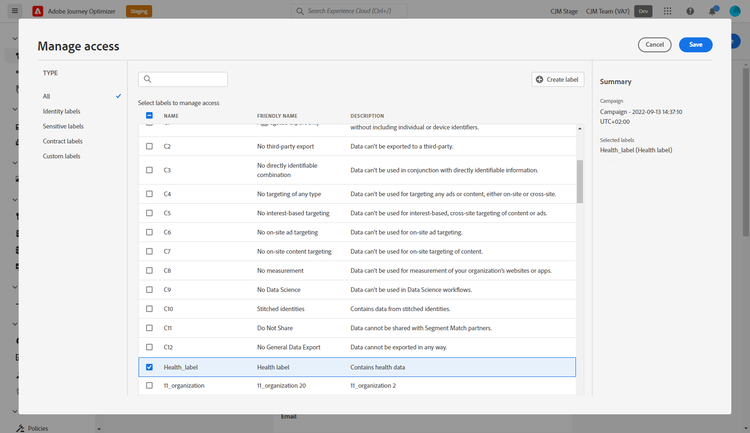
액세스 관리 창에서 이 개체에 대한 액세스를 관리할 사용자 지정 또는 핵심 데이터 사용 레이블을 선택합니다.
핵심 데이터 사용 레이블에 대한 자세한 내용은 이 페이지를 참조하세요.
-
이 레이블 제한을 적용하려면 저장을 클릭하십시오.
이 개체에 액세스하려면 사용자의 역할에 특정 레이블이 포함되어 있어야 합니다. 예를 들어 C1 레이블이 있는 사용자는 C1 레이블이 있거나 레이블이 지정되지 않은 개체에만 액세스할 수 있습니다.
역할에 레이블을(를) 할당하는 방법에 대한 자세한 내용은 이 페이지를 참조하세요.
This section contains structured knowledge intended to support interpretation, retrieval, and question answering related to this topic.
For complete understanding, this information should be combined with the documentation on this page. Neither source is intended to stand alone; the page describes the feature, while this section provides additional context that helps disambiguate terminology, intent, applicability, and constraints.
- TL;DR: Object level access control (OLAC) lets you apply access labels to specific Journey Optimizer objects — such as journeys, campaigns, and offers — so only users whose role includes the matching label can view or interact with those objects.
Intents:
- Create a custom access label directly in Journey Optimizer or via the Permissions product
- Assign access labels to Journey Optimizer objects (journeys, campaigns, offers, etc.)
- Restrict sensitive content to authorized users only
- Understand which permissions are required to create and assign labels
Glossary:
- OLAC (Object level access control): A capability to define authorizations to manage data access for a selection of specific Journey Optimizer objects (product-specific)
- Label: A tag applied to an object to categorize it by usage policy and restrict access based on role membership (product-specific)
- Manage access: The button or interface available on supported Journey Optimizer objects for creating and assigning access labels (product-specific)
- Core data usage labels: Pre-defined labels provided by Adobe Experience Platform, as opposed to custom labels created by the organization (product-specific)
Guardrails:
- Creating labels requires the Manage usage labels permission (prerequisite)
- Assigning labels requires a Manage permission for the object type (e.g., Manage journeys, Manage Campaigns, or Manage decisions); without it, the Manage access button is greyed out (prerequisite)
- Supported objects for OLAC labels: Journey, Campaign, Template, Fragment, Landing page, Offer, Static offer collection, Offer decision, Channel configuration, IP warmup plan
Terminology:
- Canonical name: Object level access control — Acronym: OLAC — variants: object-based access control, object-based access management
- Do not confuse: OLAC (restricts access to specific AJO objects like journeys and campaigns using labels) ≠ ABAC (attribute-based, applies label policies to schema fields, datasets, and audiences at the platform level)
- Do not confuse: “core data usage labels” (pre-built labels from Adobe Experience Platform) ≠ “custom labels” (labels created by the organization)
FAQ:
- Q: Can I create a label directly in Journey Optimizer without going to the Permissions product? — Yes; use the Manage access window on any supported object and click Create label.
- Q: Which object types support OLAC labels? — Journey, Campaign, Template, Fragment, Landing page, Offer, Static offer collection, Offer decision, Channel configuration, and IP warmup plan.
- Q: What permission is needed to assign a label to a journey? — The Manage journeys permission; without a Manage permission, the Manage access button is greyed out.
- Q: If a user has only the C1 label in their role, which objects can they access? — Only C1-labeled or unlabeled objects.