기간 간 보고
Report Builder를 사용하면 시간 경과에 따른 트렌드를 쉽게 확인하고 비교할 기간에 대한 관점을 변경할 수 있습니다. 이 항목에서는 주 단위, 월 단위 및 년 단위 분석을 위한 보고서를 만들 수 있도록 대시보드를 설정하여 더 깊이 있게 구성하는 방법을 보여 줍니다.
시작하기 전에 더 자세한 여기 및 독립 시간 옵션 여기를 살펴보십시오.
이 분석에는 고급 계산 열이(가) 포함되어 있습니다.
계산된 열
-
Sales_flat_order테이블 -
원래 아키텍처: 아래 열은 분석가가
[YoY WoW MoM ANALYSIS]티켓의 일부로 만듭니다. -
created_at (month-day) -
created_at (month) -
created_at (day of the month) -
created_at (day of the week) -
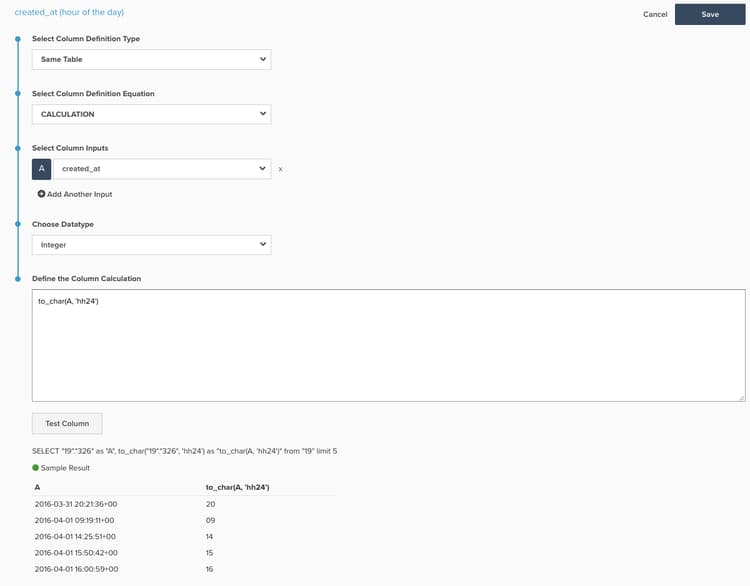
created_at (hour of the day) -
새 아키텍처: 이 계산을 만드는 방법에 대한 예제 사진과 함께 아래에 나열된 SQL
created_at (month-day)Calculation: to_char(A, ‘mm-dd’)created_at (month)Calculation: to_char(A, ‘mm-month’)created_at (day of the month)< Calculation: to_char(A, ‘dd’)created_at (day of the week)Calculation: to_char(A, ‘d-Day’)created_at (hour of the day)Calculation: to_char(A, ‘hh24’)**
지표
없음.
보고서
-
전년 대비 차트
-
Metric:
Number of orders -
Metric:
Number of orders -
Time options:
Time range (Custom):2 years ago to 1 year ago -
Show top/bottom:
created_at (month-day)별로 정렬된 상위 100%*
-
-
지표
A:This year -
지표
B:Last year -
Time period:
1 year ago to 0 years ago -
Interval:None -
Group by:
created_at (month-day) -
Chart Type:Line -
MoM 차트
-
Metric:
Number of orders -
Metric:
Number of orders -
시간 옵션:
Time range (Custom):2 months ago to 1 month ago -
위쪽/아래쪽 표시:
created_at (day of month)별로 정렬된 위쪽 100%*
-
-
지표
A: 이번 달* -
지표
B: 지난 달* -
Time period: 1개월 전부터 0개월 전까지입니다.
-
Interval: None -
Group by:
created_at (day of month) -
Chart Type: Line -
너비 차트
-
Metric:
Number of orders -
Metric:
Number of orders -
Time options:
Time range (Custom):2 weeks ago to 1 week ago -
Show top/bottom:
created_at (day of week)별로 정렬된 상위 100%
-
-
지표
A:This week -
지표
B:Last week -
Time period:
1 week ago to 0 weeks ago -
Interval:None -
Group by:
created_at (day of week) -
Chart Type:Line -
DoD 차트
-
Metric:
Number of orders -
Metric:
Number of orders -
Time options:
Time range (Custom):2 days ago to 1 day ago -
Show top/bottom:
created_at (hour of day)별로 정렬된 상위 100%
-
-
지표
A:Today -
지표 B:
Yesterday -
Time period:
1 day ago to 0 days ago -
Interval:None -
Group by:
created_at (hour of day) -
Chart Type:Line
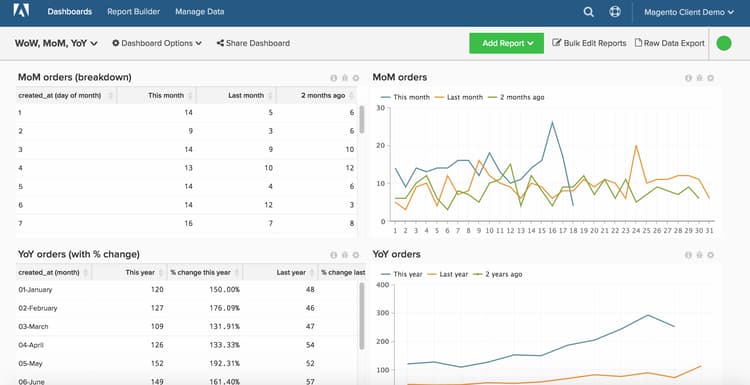
모든 보고서를 컴파일한 후 원하는 대로 대시보드에서 구성할 수 있습니다. 결과는 이 페이지 상단에 있는 이미지와 비슷할 수 있습니다.