スマートリスト
スマートリスト REST APIを使用して、スマートリストをクエリ、複製、削除します。

クエリ
ID🔗で、名前で、または閲覧でスマートリストをクエリします。
ID 別
IDによるクエリ は、1つのスマートリスト id パスパラメーターを受け取り、一致するレコードを返します。 オプションのincludeRules ブール値パラメーターを設定して、スマートリストルールを含めます。
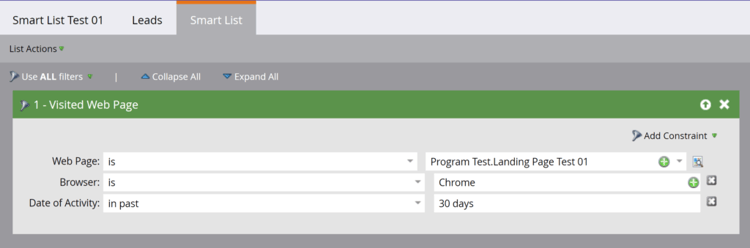
GET /rest/asset/v1/smartList/{id}.json?includeRules=true
{
    "success": true,
    "errors": [],
    "requestId": "6efc#16c8967a21f",
    "warnings": [],
    "result": [
        {
            "id": 4363,
            "name": "Smart List Test 01",
            "createdAt": "2019-06-03T23:01:13Z+0000",
            "updatedAt": "2019-06-04T17:37:45Z+0000",
            "url": "https://app-sjqe.marketo.com/#SL4363A1LA1",
            "folder": {
                "id": 1041,
                "type": "Program"
            },
            "workspace": "Default",
            "rules": {
                "filterMatchType": "all",
                "triggers": [],
                "filters": [
                    {
                        "id": 459,
                        "name": "Visited Web Page",
                        "ruleTypeId": 1,
                        "ruleType": "Activity",
                        "operator": "occurs",
                        "conditions": [
                            {
                                "activityAttributeId": 1,
                                "activityAttributeName": "Web Page",
                                "operator": "is",
                                "values": [
                                    "Program Test.Landing Page Test 01"
                                ],
                                "isPrimary": true
                            },
                            {
                                "activityAttributeId": 6,
                                "activityAttributeName": "Browser",
                                "operator": "is",
                                "values": [
                                    "Chrome"
                                ],
                                "isPrimary": false
                            },
                            {
                                "activityAttributeId": -101,
                                "activityAttributeName": "Date of Activity",
                                "operator": "in past",
                                "values": [
                                    "30 days"
                                ],
                                "isPrimary": false
                            }
                        ]
                    }
                ]
            }
        }
    ]
}
スマートキャンペーン ID 別
スマートキャンペーン IDによるクエリ は、1つのスマートキャンペーン id パスパラメーターを受け取り、そのスマートリストレコードを返します。 オプションのincludeRules ブール値パラメーターを設定して、スマートリストルールを含めます。
GET /rest/asset/v1/smartCampaign/{smartCampaignId}/smartList.json
{
    "success": true,
    "errors": [],
    "requestId": "6efc#16c8967a21f",
    "warnings": [],
    "result": [
        {
            "id": 4363,
            "name": "Smart List Test 01",
            "createdAt": "2019-06-03T23:01:13Z+0000",
            "updatedAt": "2019-06-04T17:37:45Z+0000",
            "url": "https://app-sjqe.marketo.com/#SL4363A1LA1",
            "folder": {
                "id": 1041,
                "type": "Program"
            },
            "workspace": "Default"
         }
    ]
}
プログラム ID 別
プログラム IDによるクエリは、1つの電子メールプログラム id パスパラメーターを受け取り、そのスマートリストレコードを返します。 オプションのincludeRules ブール値パラメーターを設定して、スマートリストルールを含めます。
GET /rest/asset/v1/program/{programId}/smartList.json
{
    "success": true,
    "errors": [],
    "requestId": "6efc#16c8967a21f",
    "warnings": [],
    "result": [
        {
            "id": 4363,
            "name": "Smart List Test 01",
            "createdAt": "2019-06-03T23:01:13Z+0000",
            "updatedAt": "2019-06-04T17:37:45Z+0000",
            "url": "https://app-sjqe.marketo.com/#SL4363A1LA1",
            "folder": {
                "id": 1041,
                "type": "Program"
            },
            "workspace": "Default"
         }
    ]
}
名前別
名前によるクエリ は、スマートリスト name パラメーターを使用します。 エンドポイントは、完全一致の名前を実行し、一致するレコードを返します。
GET /rest/asset/v1/smartList/byName.json?name=2018 Leads
{
    "success": true,
    "errors": [],
    "requestId": "115d7#16423bc13b4",
    "result": [
        {
            "id": 283988,
            "name": "2018 Leads",
            "createdAt": "2008-10-07T15:20:39Z+0000",
            "updatedAt": "2010-04-13T15:34:32Z+0000",
            "url": "https://app-abm.marketo.com/#SL283988A1",
            "folder": {
                "id": 31,
                "type": "Folder"
            },
            "workspace": "Default"
        }
    ]
}
参照
参照エンドポイントを使用して、一括でスマートリストを取得。 オプションのfolder パラメーターは、クエリを親フォルダーにスコープします。 idとtypeを含むJSON オブジェクトとして渡します。
ページネーションにoffsetとmaxReturnを使用します。 オプションのearliestUpdatedAtおよびlatestUpdatedAt パラメーターを使用して、updatedAt日付範囲でフィルタリングします。
GET /rest/asset/v1/smartLists.json?folder={"id":31,"type":"Folder"}
{
    "success": true,
    "errors": [],
    "requestId": "9aa4#16423c0e969",
    "result": [
        {
            "id": 283988,
            "name": "2018 Leads",
            "createdAt": "2008-10-07T15:20:39Z+0000",
            "updatedAt": "2010-04-13T15:34:32Z+0000",
            "url": "https://app-abm.marketo.com/#SL283988A1",
            "folder": {
                "id": 31,
                "type": "Folder"
            },
            "workspace": "Default"
        },
        {
            "id": 299697,
            "name": "Active Prospects",
            "createdAt": "2008-10-17T02:09:49Z+0000",
            "updatedAt": "2010-03-27T18:27:46Z+0000",
            "url": "https://app-abm.marketo.com/#SL299697A1",
            "folder": {
                "id": 31,
                "type": "Folder"
            },
            "workspace": "Default"
        },
        {
            "id": 400517,
            "name": "Leads by Score",
            "createdAt": "2009-01-07T18:52:52Z+0000",
            "updatedAt": "2010-04-13T15:36:09Z+0000",
            "url": "https://app-abm.marketo.com/#SL400517A1",
            "folder": {
                "id": 31,
                "type": "Folder"
            },
            "workspace": "Default"
        }
    ]
}
複製
application/x-www-form-urlencoded POST リクエストを スマートリストの複製に送信します。 id パス パラメーターは、ソース スマート リストを識別します。
folderをidとtypeを含むJSON オブジェクトとして渡します。 親はプログラムまたはスマートリストフォルダーである必要があります。 nameは一意である必要があります。 オプションのdescription パラメーターは、新しいリストを説明します。
POST /rest/asset/v1/smartList/{id}/clone.json
Content-Type: application/x-www-form-urlencoded
folder={"id":31,"type":"Folder"}&name=2018 Leads Qualified
{
    "success": true,
    "errors": [],
    "requestId": "a672#16423d755ed",
    "result": [
        {
            "id": 788645,
            "name": "2018 Leads Qualified",
            "createdAt": "2018-06-21T19:34:32Z+0000",
            "updatedAt": "2018-06-21T19:34:32Z+0000",
            "url": "https://app-abm.marketo.com/#SL788645A1",
            "folder": {
                "id": 31,
                "type": "Folder"
            },
            "workspace": "Default"
        }
    ]
}
削除
スマートリスト 🔗を削除するには、そのidをパスパラメーターとして渡します。
POST /rest/asset/v1/smartList/{id}/delete.json
{
    "success": true,
    "errors": [],
    "requestId": "8f5#16423dd0fbe",
    "result": [
        {
            "id": 788645
        }
    ]
}