このページ:ジャンプアクティビティを使用して、1 つのジャーニーから別のジャーニーに個人をプッシュする方法について説明します。これにより、複雑なデザインを簡素化し、再利用可能で一般的なジャーニーパターンを作成できます。
ジャンプアクションアクティビティを使って、個人をジャーニー間でプッシュできるようになりました。 この機能を使うと次のことができます。
- 非常に複雑なジャーニーを複数のジャーニーに分けて設計を簡素化する
- 一般的で再利用可能なジャーニーパターンに基づいてジャーニーを作成する
接触チャネルジャーニーで、ジャンプアクティビティを追加し、ターゲットジャーニーを選択します。 個人が ジャンプ ステップにエントリすると、内部イベントがターゲットジャーニーの最初のイベントに送られます。 ジャンプアクションが成功した場合、個人はジャーニー内で進行を続けます。 動作は他のアクションと同様です。
ターゲットジャーニーでは、ジャンプアクティビティによって内部で最初のイベントがトリガーされ、個人はジャーニーに沿って導かれます。
ライフサイクル jump-lifecycle
例えば、ジャーニー A の ジャンプ アクティビティをジャーニー B に追加したとします。ジャーニー A は 接触チャネルジャーニー で、ジャーニー B は ターゲットジャーニー です。
実行プロセスの様々なステップを次に示します。
ジャーニー A は外部イベントからトリガーされます。
- ジャーニー A が、個人に関連する外部イベントを受信する。
- 個人が ジャンプ ステップに到達する。
- 個人はジャーニー B にプッシュされ、ジャンプステップの後、ジャーニー A の次のステップに進みます。
ジャーニー B では、最初のイベントがジャーニー A の ジャンプ アクティビティを介して内部でトリガーされます。
- ジャーニー B がジャーニー A から内部イベントを受け取ります。
- 個人が、ジャーニー B でのフローを開始します。
ジャンプ中のプロファイル動作 jump-profile-behavior
プロファイルが ジャンプ ステップに到達すると、元のジャーニー(ジャーニー A)での処理を続行しながら、同時にターゲットジャーニー(ジャーニーB)にエントリします。 したがって、プロファイルは両方のジャーニーで同時にアクティブになります。
インタラクションがあります。
- プロファイルは、ジャンプアクティビティ以降のジャーニー A での残りのステップ(例:フォローアップの待機や終了アクション)を完了します。
- また、プロファイルは、ジャーニー A とは個別に、最初のイベントからジャーニー B を通じてフローを開始します。
- ジャンプの実行時に、プロファイルがジャーニー B で 既にアクティブ な場合、もう一度ジャーニー B にエントリしません。 ジャーニー A は正常に続行し、エラーは報告されません。
ベストプラクティスと制限 jump-limitations
これらのガイドラインを使用して、ジャンプアクティビティの動作を予測可能かつ安全な状態に保ってください。
オーサリング jump-limitations-authoring
-
名前空間要件: ジャンプ アクティビティは、名前空間を使用するジャーニーでのみ使用できます。 接触チャネルジャーニーと同じ名前空間を使用するジャーニーにのみジャンプできます。
-
ターゲットジャーニーの制約: オーディエンスの選定 イベントまたは オーディエンスの読み取り で始まるジャーニーにジャンプすることはできません。
-
オーディエンス選定のサポート(プログレッシブロールアウト): ジャーニーがオーディエンス選定で始まり、ジャンプがイベントベースの開始ジャーニーにリダイレクトされる場合、同じジャーニーにジャンプ アクティビティとオーディエンス選定 イベントを設定できます。 この機能は段階的に導入されています。 環境にこれが表示されない場合は、オーディエンスの選定でバッチオーディエンスを引き続き使用していることが原因である可能性があります。
-
オーディエンスの読み取り制限:同じジャーニーにジャンプ アクティビティとオーディエンスの読み取り イベントを設定することはできません。
-
複数のジャンプ: ジャーニーに必要な数のジャンプ アクティビティを含めることができます。 ジャンプの後に、必要なアクティビティを追加できます。 必要な数のジャンプ レベルを設定できます(例えば、ジャーニーAはジャーニーBにジャンプし、ジャーニーCにジャンプします)。 ターゲットジャーニーには、必要に応じて ジャンプ アクティビティをいくつでも含めることができます。
-
ループ防止: ループパターンはサポートされていません。 2つ以上のジャーニーをリンクして無限ループを作成する方法はありません。 ジャンプアクティビティ設定画面では、この操作はできません。
実行 jump-limitations-exec
- ジャンプアクティビティが実行されると、ターゲットジャーニーの最新バージョンがトリガーされます。
- 一意の個人は同じジャーニーに一度しか存在できません。 その結果、接触チャネルジャーニーからプッシュされた個人がターゲットジャーニー内に既に存在する場合、その個人はターゲットジャーニーにエントリすることはできません。 ジャンプアクティビティは通常の動作なので、エラーは報告されません。
デザイン戦略:バイトサイズのサブジャーニー jump-strategy
複雑なカスタマージャーニーは、特に追加のチャネルやタッチポイントが導入されるにつれて、作成や維持が急速に困難になる場合があります。 数個のマイルストーンしかないジャーニーでも、顧客が辿る可能性のある 20 以上の独自のパスが明らかになり、マイルストーンが追加されるごとにその複雑さは指数関数的に拡大します。
これを管理する実用的なアプローチは、大規模なジャーニーを、ビジネスのフェーズやマイルストーンごとに、より小さく特定の焦点を当てたサブジャーニーへと分割し、ジャンプアクティビティを使用して接続することです。 これにより、各ジャーニーは、読み取り可能、テスト可能、個別に保守可能な状態に維持されます。
手順 1 - エンドツーエンドのジャーニーを視覚化
完全なカスタマージャーニーをマッピングし、その高レベルのフェーズを特定します。 例えば、ロイヤリティオンボーディングジャーニーには、モバイルアプリのダウンロード、最初のトランザクションの実行、2 回目のトランザクションの実行という 3 つの異なるフェーズが含まれる可能性があります。
手順 2 - フェーズに注釈を付け、サブジャーニーを定義
各フェーズの境界をマークし、そのビジネス目標を定義します。 各フェーズは、明確なエントリ条件と目標を持つ候補のサブジャーニーになります。
手順 3 - サブジャーニーを作成および接続
Journey Optimizer で各フェーズを個別のジャーニーとして作成し、ジャンプアクティビティを使用して、1 つのサブジャーニーから次のサブジャーニーにプロファイルを渡します。 その結果、よりシンプルで再利用可能な一連のジャーニーが作成され、これらを組み合わせることで、完全なエンドツーエンドのエクスペリエンスを生成して、エラーが発生するリスクを低減できます。
ジャンプアクティビティの設定 jump-configure
-
接触チャネルジャーニーを設計します。
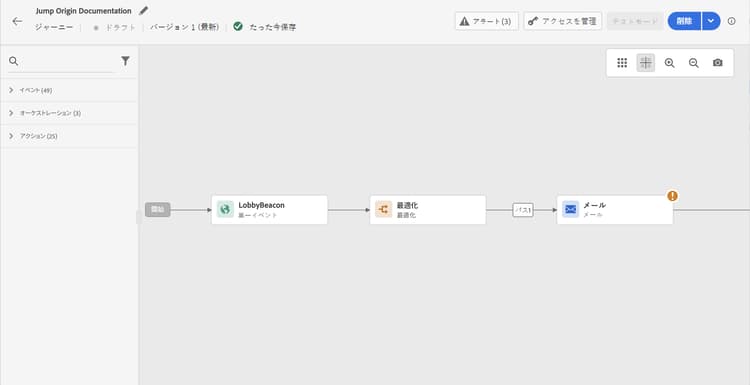
-
ジャーニーの任意のステップで、アクションカテゴリから ジャンプ アクティビティを追加します。 ラベルと説明を追加します。
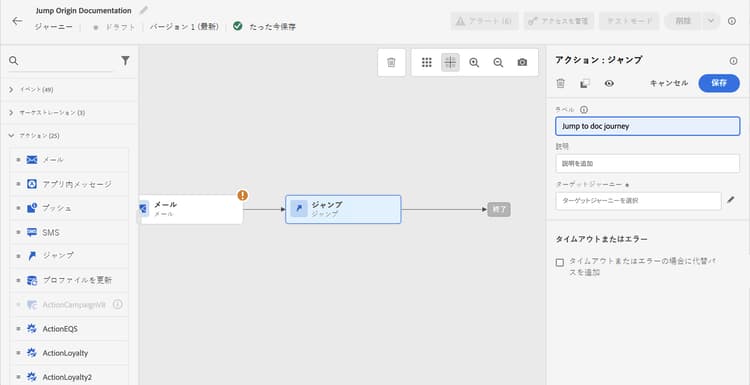
-
「ターゲットジャーニー」フィールド内をクリックします。
リストには、ドラフトモード、ライブモード、またはテストモードのすべてのジャーニーバージョンが表示されます。 別の名前空間を使用しているか、オーディエンスを読み取り ジャーニーで始まるイベントは使用できません。 Audience Qualification イベントで始まるジャーニーは、オリジンジャーニーがAudience Qualificationでも始まる場合にのみ使用できます(また、組織内の新しいAudience Qualification ノードではバッチオーディエンスが非推奨になっています)。 ループパターンを作成するターゲットジャーニーも除外されます。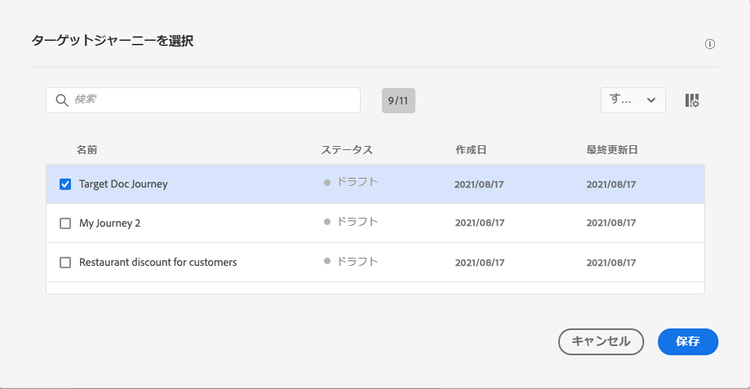
note NOTE 右側の「ターゲットジャーニーを開く」アイコンをクリックすると、新しいタブでターゲットジャーニーが開きます。 -
ジャンプ先のターゲットジャーニーを選択します。
「最初のイベント」フィールドには、ターゲットジャーニーの最初のイベントの名前が事前に入力されています。 ターゲットジャーニーに複数のイベントが含まれる場合、ジャンプは最初のイベントでのみ許可されます。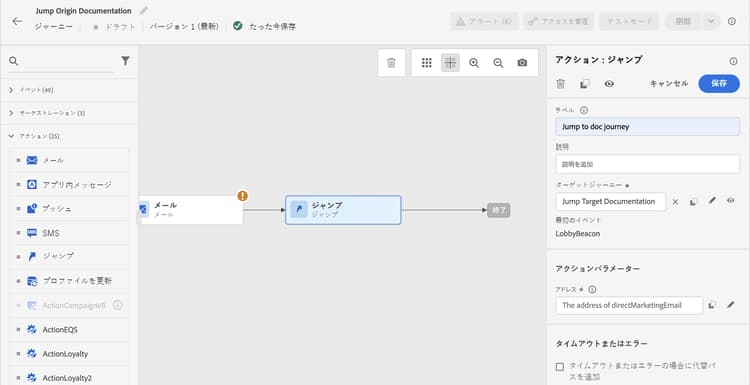
-
アクションパラメーターセクションには、ターゲットイベントのすべてのフィールドが表示されます。 他のタイプのアクションと同様に、各フィールドを接触チャネルイベントまたはデータソースのフィールドにマッピングします。 この情報は、実行時にターゲットジャーニーに渡されます。
-
次のアクティビティを追加し、接触チャネルジャーニーを終了します。
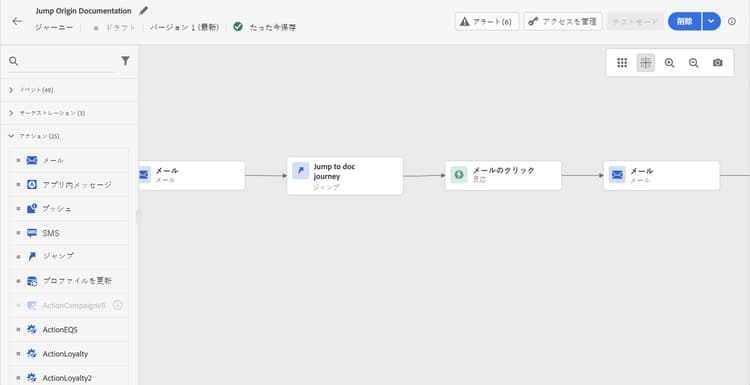
note NOTE 個人の ID は自動的にマッピングされます。 この情報は、インターフェイスには表示されません。
ジャンプアクティビティが構成されます。 ジャーニーがライブまたはテストモードになると、ジャンプステップに到達した個人は、ターゲットジャーニーにプッシュされます。
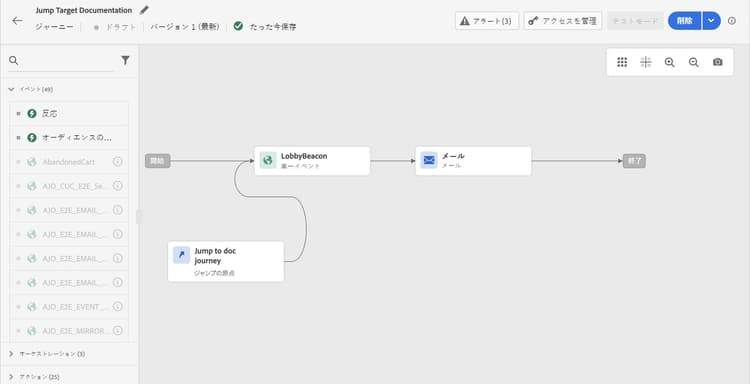
ジャーニー内に ジャンプ アクティビティを設定すると、ターゲットジャーニーの先頭に ジャンプ エントリアイコンが自動的に追加されます。 これによって、このジャーニーは外部からトリガーされることもあるけれど、ジャンプアクティビティで内部からトリガーされることもあるということを識別できます。
トラブルシューティング jump-troubleshoot
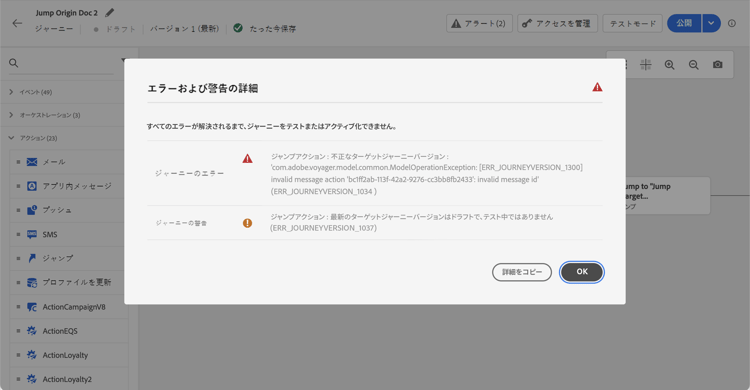
設定エラー
次の問題により、ジャンプが正しく機能せず、ジャーニーキャンバスにエラーとして表示されます。
- ターゲットジャーニーが存在しない。
- ターゲットジャーニーがドラフトである、クローズしている、または停止している。
- ターゲットジャーニーの最初のイベントが変更され、マッピングが壊れている.。
ランタイムエラー
次のケースでは、ジャーニー A でジャンプステップは 失敗したアクション として処理されます。
- 既存のターゲットジャーニーインスタンスが終了し、ターゲットジャーニーが再エントリされない。
- 再エントリ期間がターゲットジャーニーで設定される。 原則として再エントリが許可されている場合でも、その期間が経過するまでプロファイルは再エントリできない(「期間中は再エントリできない」というステータスでジャンプは失敗します)。
- ターゲットジャーニーバージョンが見つからないか、削除されているか、完了状態であるか、停止されている。
この節には、このトピックに関連する解釈、検索、質問への回答をサポートすることを目的とした構造化された知識が含まれています。
完全に理解するには、この情報をこのページのドキュメント組み合わせる必要があります。 どちらのソースも単独で使用することを意図していません。このページでは、機能について説明していますが、この節では、用語、意図、適用可能性、制約の曖昧さを解消するのに役立つ追加コンテキストを提供しています。
- TL;DR:このページでは、「ジャンプ」アクティビティについて説明します。このアクティビティでは、あるジャーニーから別のジャーニーにプロファイルをプッシュして、再利用可能なサブジャーニーパターンを通じて複雑なジャーニー設計を簡素化します。
インテント:
- 「ジャンプ」アクティビティを使用して、オリジンジャーニーからターゲットジャーニーにプロファイルを転送します
- 複雑なジャーニーを、ジャンプアクティビティによって接続された、管理しやすい小さなサブジャーニーに分解します
- ターゲットジャーニーを選択し、アクションパラメーターをマッピングして、ジャンプ アクティビティを設定します
- ジャンプ実行時のプロファイルの動作を把握する(両方のジャーニーで同時にアクティブなプロファイル)
- ジャンプ設定エラーとランタイムエラーのトラブルシューティング
- ジャンプアクティビティを使用して複数のジャーニーを連鎖させる場合は、ループパターンを避けます
用語集:
- ジャンプアクティビティ:ターゲットジャーニーの最初のイベントに内部イベントを送信し、そのジャーニーを通じてプロファイルのフローを開始するアクションアクティビティ。 (製品固有)
- オリジン ジャーニー: ジャンプ アクティビティを含み、プロファイルを別のジャーニーに転送するジャーニー。 (製品固有)
- ターゲットジャーニー: ジャンプアクティビティの内部イベントトリガーを介してプロファイルを受け取るジャーニー。 (製品固有)
- サイレントスキップ: ジャンプ時にターゲットジャーニーでプロファイルが既にアクティブになっている場合の動作。ジャンプはエラーなしでスキップされ、オリジンのジャーニーは正常に続行されます。 (製品固有)
ガードレール:
- ジャンプアクティビティは、名前空間を使用するジャーニーでのみ使用できます。オリジンジャーニーとターゲットジャーニーは同じ名前空間を共有する必要があります
- オーディエンス選定イベントまたはオーディエンス読み取りで始まるジャーニーにジャンプできない
- ジャンプ アクティビティとオーディエンス読み取りイベントを同じジャーニーで使用できない
- ジャーニーがAudience Qualificationで始まり、イベントベースのジャーニーにジャンプする場合にのみ、同じジャーニーでJump アクティビティとAudience Qualification イベントを使用できます(機能フラグのロールアウトが適用されます)
- ループパターン(循環ジャーニーチェーン)はサポートされておらず、設定UIで禁止されています
- 実行時に、ターゲットジャーニーの最新のライブバージョンがトリガーされます
- プロファイルは、同じジャーニーに一度に1回しか存在できません。ターゲットジャーニーですでにアクティブな場合、ジャンプはサイレントにスキップされます
- ターゲットジャーニーがドラフト、クローズ、停止、削除または最初のイベントマッピングが破損した場合、ジャンプは設定エラーになります
用語:
- 正式名称:Jump activity — Acronym: none — バリエーション:Jump action, journey jump
- 同義語:「オリジンジャーニー」 = 「ソースジャーニー」、「ターゲットジャーニー」 = 「宛先ジャーニー」
- 混同しないでください:「サイレントスキップ」≠「ランタイムエラー」 – プロファイルがターゲットジャーニー内に既に存在する場合(エラーが発生しない場合)、サイレントスキップが発生します。ターゲットジャーニーに到達できないか、または再エントリできない場合(失敗したアクションとして扱われる)、ランタイムエラーが発生します
よくある質問:
- Q: ジャンプ後のオリジン ジャーニーのプロファイルはどうなりますか? — プロファイルは、ジャンプのステップの後のオリジンジャーニーの残りのステップを進みながら、同時にターゲットジャーニーに入ります。両方のジャーニーで同時にアクティブです。
- Q: オーディエンスの読み取りジャーニーにジャンプできますか? – いいえ。オーディエンスを読み取りイベントで始まるジャーニーにジャンプすることはできません。 また、オーディエンス選定イベントで始まるジャーニーにジャンプすることはできません。 ただし、オリジンのジャーニーがオーディエンス選定イベントで始まる場合は、イベントベースのジャーニーにジャンプできます(この機能は段階的にロールアウトされており、まだ一部の組織では利用できない場合があります)。
- Q: ジャンプが実行されたときに、対象となるジャーニーにどのようなトリガーがありますか? – 内部イベントは、ジャンプ アクティビティによってターゲットジャーニーの最初のイベントに送信されます。その後、プロファイルはその最初のイベントからターゲットジャーニーを流れます。
- Q: ジャンプでジャーニーを連鎖させる際に、無限ループを防ぐにはどうすればよいですか? — ループ パターンは、循環チェーンを作成するターゲット ジャーニーをフィルタリングするジャンプ アクティビティ設定UIによってブロックされます。
- Q: ジャンプによってトリガーされるターゲットジャーニーのバージョンは何ですか? — ターゲットジャーニーの最新のライブ(またはテストモード)バージョンが実行時にトリガーされます。