このページで: ロイヤルティの課題レポート、機会、および傾向を使用して、メンバーのアクティビティ、課題のパフォーマンス、報酬の結果および収益を監視する方法を説明します。
ロイヤルティの課題レポートを使用して、課題のパフォーマンスを確認します。 一元的に管理することで、新規登録者、課題の完了者、プログラムの売上を確認できます。 Adobe Customer Journey Analyticsから。
レポートダッシュボードを開くには、Journey Optimizerの ロイヤルティチャレンジ に移動し、左側のナビゲーションで パフォーマンス を選択します。
➡️ チャレンジレポートでチャレンジパフォーマンスを測定する方法を見る
レポートインターフェイスには3つのタブがあります。
レポートビュー reports-view
「レポート」タブでは、選択した期間のプログラムの実行状況の概要を表示します。 ページ上部の日付選択ツールを使用し、フィルターを適用 ボタンを選択してレポート期間を変更し、更新された数値とグラフを確認します。
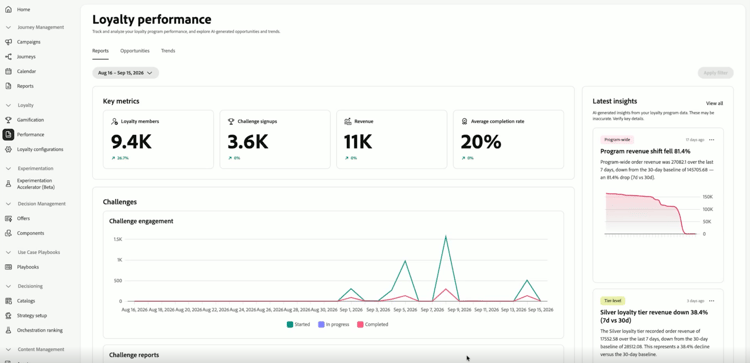
主要指標領域には、4つの数字が一目で表示されます。 各指標には、前期と比較した変化率も表示されます。
- ロイヤルティメンバー:期間中にアクティブだったロイヤルティメンバーの数。
- チャレンジサインアップ:メンバーがチャレンジに登録した回数。
- 収益:チャレンジ アクティビティに関連付けられた総収益。
- 平均完了率:少なくとも1つのチャレンジを完了した登録済みメンバーの割合。
右側の最新のインサイト パネルには、プログラムの最新のインサイトが表示されます。 「すべて表示」を選択して、商談 タブを開きます。
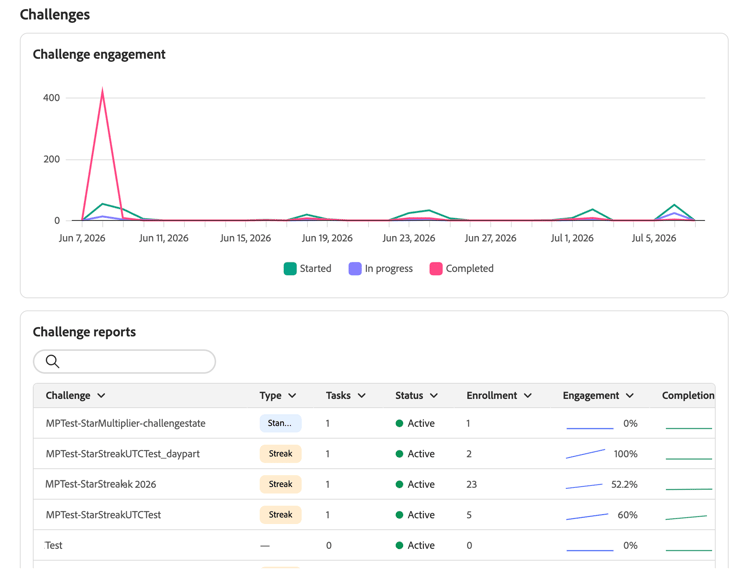
主要な指標の下にある「チャレンジ」セクションには、チャレンジのアクティビティに関する2つのビューが表示されます。
-
チャレンジのエンゲージメント:開始済みのメンバー数、進行中のメンバー数、期間中に完了したチャレンジ数を示すタイムライン。
-
チャレンジレポート:種類、ステータス、登録番号などの詳細を含むあらゆる課題のテーブル。 検索バーを使用して、特定の課題を見つけます。 レポート全体と、エンゲージメントの傾向とパフォーマンスの詳細を確認するには、課題を選択します。
accordion チャレンジレポートの例 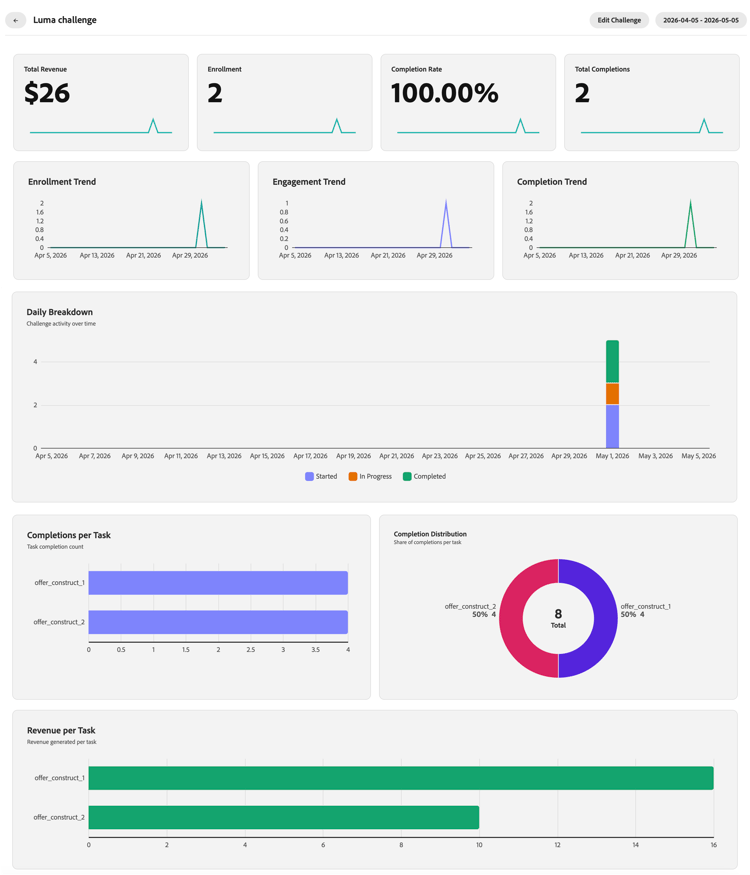
「機会」タブ opportunities-view
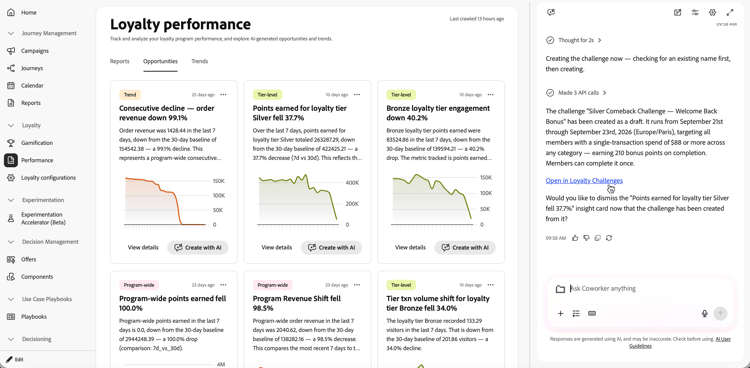
「商談」タブには、ロイヤルティプログラムのトレンドとパフォーマンスデータに基づく、特定のチャレンジの商談が表示されます。 :機会は、メンバーの支出額の増加、非アクティブなメンバーの獲得、パフォーマンスの低い課題の改善、製品やカテゴリーへの注力、ポイントの失効への対処などに注力できます
機会は、分析によって統計的に有意な傾向とそれに対処できる解決策が特定された場合にのみ表示されます。
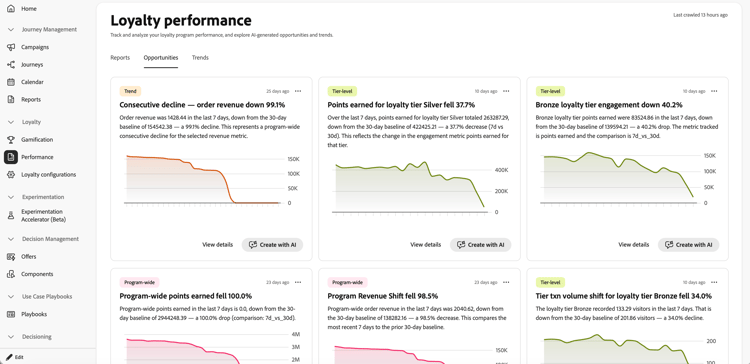
オポチュニティカードには、プログラムのどの部分にオポチュニティが関連しているかを特定するカテゴリタグが含まれています。
「商談」タブでは、各カードに対して次のアクションを実行できます。
-
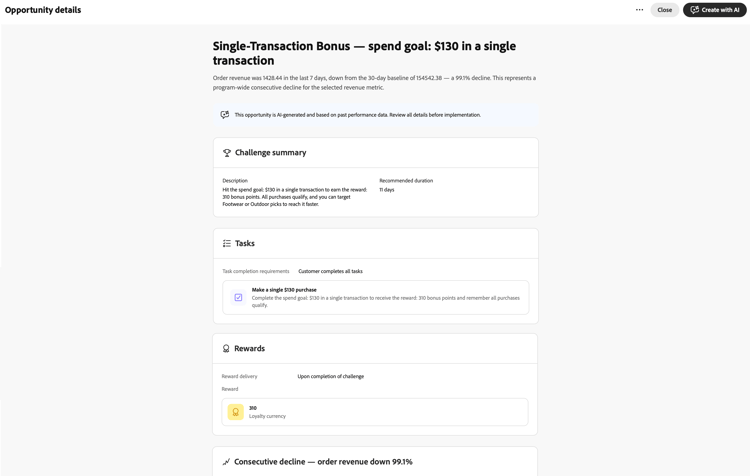
商談の詳細を確認 - 詳細を表示を選択して、AIがドラフトした課題の概要、タスク、報酬、商談の根拠などをプレビューするダイアログを開きます。
-
Coworkerでチャレンジを作成または編集 - AIで作成を選択して、右側のパネルでCoworkerを開きます。 同僚のロイヤルティチャレンジ管理スキル を使用して、選択した機会に基づいてチャレンジを作成または編集し、不足している詳細を提供し、レポートページを離れずに続行します。
チャレンジを作成したら、チャットの「ロイヤルティチャレンジで開く」リンクを選択して、チャレンジのドラフトを開き、チャレンジの日付、タスク、およびその他のフィールドを公開前に確認します。
「トレンド」タブ trends-view
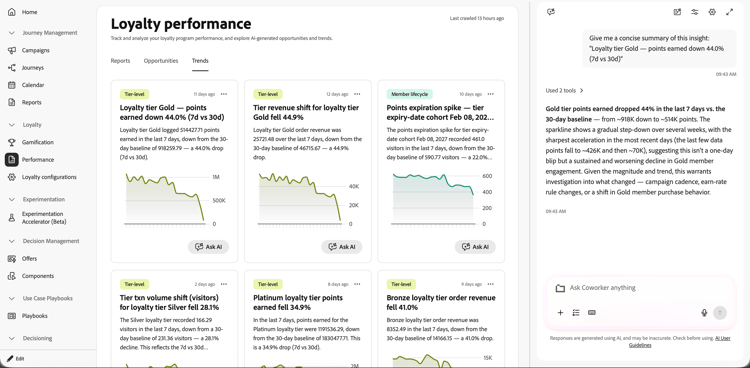
「トレンド」タブには、ロイヤルティインサイトとパフォーマンスパターンが表示され、「商談」タブの商談の基礎となります。
AIを使用してトレンドを調査するには、トレンドカードで AIに質問 を選択します。 これにより、右側のパネルにCoworkerが開き、事前入力されたリクエストが表示され、選択したinsightの概要が簡潔に表示されます。 その後、フォローアップで質問するか、その意味を調べることができます。
チュートリアルビデオ video
➡️ チャレンジレポートでチャレンジのパフォーマンスを測定する方法を見る
This section contains structured knowledge intended to support interpretation, retrieval, and question answering related to this topic.
For complete understanding, this information should be combined with the documentation on this page. Neither source is intended to stand alone; the page describes the feature, while this section provides additional context that helps disambiguate terminology, intent, applicability, and constraints.
- TL;DR: This page explains how to use Loyalty Challenges reporting to monitor challenge performance, review grounded challenge opportunities and trends, and create or edit a challenge from an opportunity with Coworker.
Intents
- Open Loyalty Challenges performance dashboards.
- Filter reports by date and apply the selected reporting period.
- Review key metrics, challenge engagement, and challenge reports.
- Review grounded opportunity cards based on loyalty program trends and performance data.
- Open opportunity details to review a proposed challenge and its rationale.
- Create or edit a challenge with Coworker from an opportunity and verify it in Loyalty Challenges before publishing.
Glossary
- Reports (product-specific): The reporting view with numbers, charts, key metrics, challenge engagement, and challenge reports.
- Opportunities (product-specific): A tab with grounded, specific challenge opportunities based on loyalty program trends and performance data.
- Trends (product-specific): A tab that displays loyalty insights and performance patterns.
- Loyalty Opportunities (product-specific): Grounded, specific challenge ideas based on loyalty program trends and performance data.
Guardrails
- Reporting data comes from Adobe Customer Journey Analytics.
- The Trends tab displays loyalty insights and performance patterns that ground the opportunities in the Opportunities tab.
- Opportunities are surfaced only when the analysis identifies a statistically significant trend and a solution that can address it.
- After a challenge is created with Coworker, verify the challenge dates, tasks, and other fields in Loyalty Challenges before publishing.
Terminology
- Do not confuse: Challenge engagement is a timeline showing how many members started, are in progress, and completed challenges; Challenge reports is a table of challenge details and enrollment numbers.
- Do not confuse the Trend category tag on opportunity cards (time-based patterns such as weekly cycles, seasonal spikes, or trend reversals) with the Trends tab (insight cards with an Ask AI button).
FAQ
- Where do I open Loyalty Challenges reporting? Go to Loyalty Challenges in Journey Optimizer and select Performance in the left navigation.
- What does the Reports tab show? It shows numbers and charts, including key metrics, challenge engagement, and challenge reports.
- What does the Opportunities tab show? It shows grounded, specific challenge opportunities based on loyalty program trends and performance data.
- When are opportunities surfaced? Opportunities are surfaced only when the analysis identifies a statistically significant trend and a solution that can address it.
- What does the Trends tab show? It displays loyalty insights and performance patterns. Select Ask AI on a trend card to open Coworker in the right rail with a prefilled request to provide a concise summary of the selected insight.
- What happens when I select Create with AI? Coworker opens in the right rail, where you can use the Loyalty Challenge Management skill to create or edit a challenge based on the selected opportunity, provide missing details, and continue without leaving the reporting page. After creation, select the Open in Loyalty Challenges link in the chat to open the draft challenge and verify its dates, tasks, and other fields before publishing.