このページ: Adobe Journey Optimizer のサンドボックスキーレジストリで管理者がキーを作成、ローテーション、取り消す方法など、個人を特定できる情報がプレーンテキストで公開されないように、機密性の高い URL クエリパラメーターを暗号化する方法について説明します。
URL パラメーターの暗号化を使用する理由 why-url-parameter-encryption
パーソナライズされたトラッキングリンクおよびランディングページの URL には、多くの場合、プロファイル属性、識別子、トークン、その他の値がクエリ文字列に含まれます。 通常、これらのパラメーターは、電子メールやモバイルメッセージではプレーンテキストとして表示され、誰かがリンクをコピー、共有、ブックマークした場合も読みやすくなります。 その値に保護する必要がある個人を特定できる情報(PII)またはその他の機密データが含まれている場合、セキュリティやプライバシーのリスクが発生することがあります。
Journey Optimizer は、パーソナライゼーションエディターで暗号化ヘルパーを提供します。これにより、レンダリング時に任意の式の値(例:複数のフィールドから作成したプロファイル属性、トークンまたは文字列)を暗号化できます。 暗号化には、常に組織のレジストリのキーが必要です。
管理者がサンドボックスレベルのレジストリで管理するキーを使用して、選択したクエリパラメーターのみを暗号化するので、リンクを共有または検査した際、機密値がクリアテキストで公開されたままになることはありません。
仕組み how-it-works
例
ランディングページの URL では、値が文字列トークンである token などのクエリパラメーター(例:オファーまたはプロファイル識別子を含む JSON ペイロード)を使用できます。 暗号化しないと、その文字列トークンはリンク内にプレーンテキストとして表示されます。 暗号化ヘルパーでその値を囲むと、URL 内の機密ペイロードが暗号テキストに置き換えられますが、リンクの残りの部分は変更されません。
キーの作成 create-keys
URL パラメーター暗号化ヘルパーを使用する前に、キーを作成する必要があります。 これを行うには、以下の手順に従います。
-
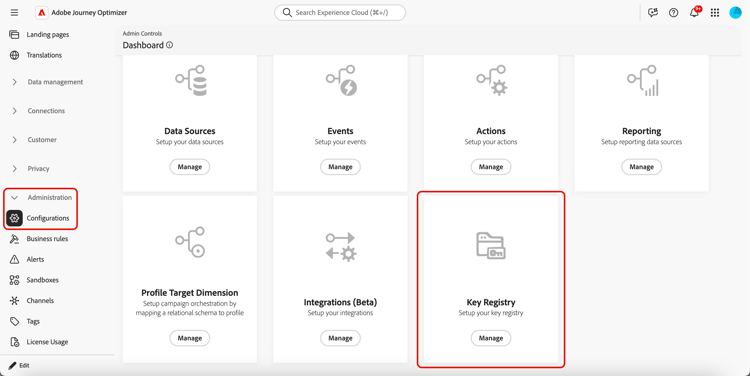
管理/設定に移動します。
-
「管理」ボタンをクリックして、キーレジストリを開きます。
-
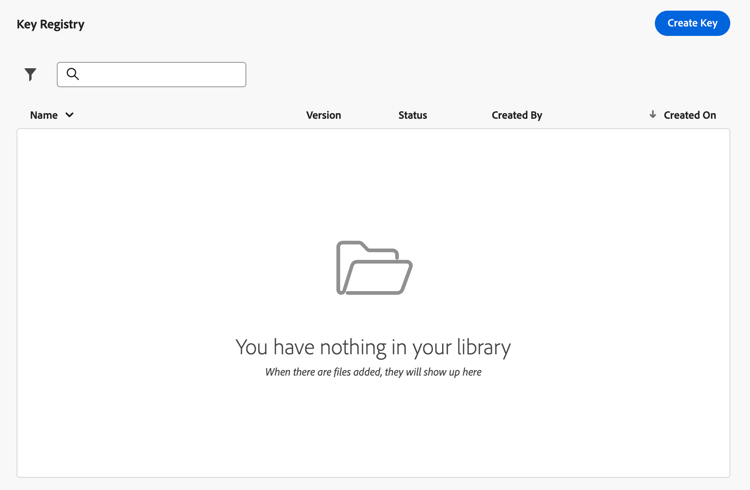
専用ボタンを使用して、組織の必要に応じてキーを作成します。
-
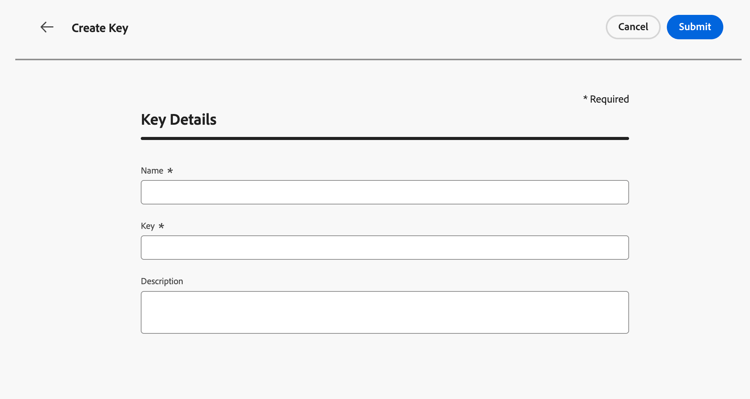
パーソナライゼーションエディターでチームが参照できる明確なラベルや識別子を割り当てます。
-
「 送信」をクリックして、変更を確定します。
キーを作成すると、マーケターはパーソナライゼーションエディターの URL パラメーター暗号化ヘルパーを使用して、URL クエリパラメーターに配置する特定の値を暗号化できます。
キーの管理 manage-keys
キーを管理するには、次の手順に従います。
-
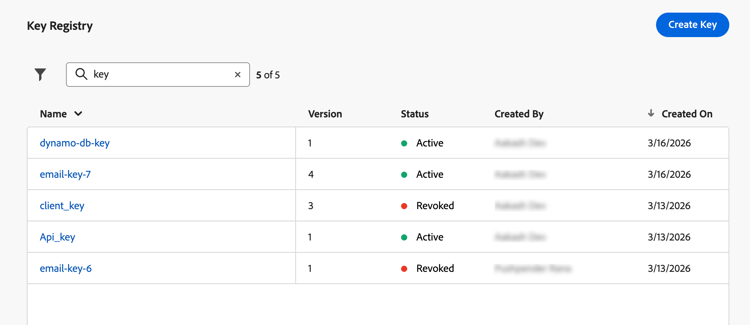
キーレジストリにアクセスします。 リスト表示では、現在のサンドボックス用に作成されたすべてのキーを確認できます。
-
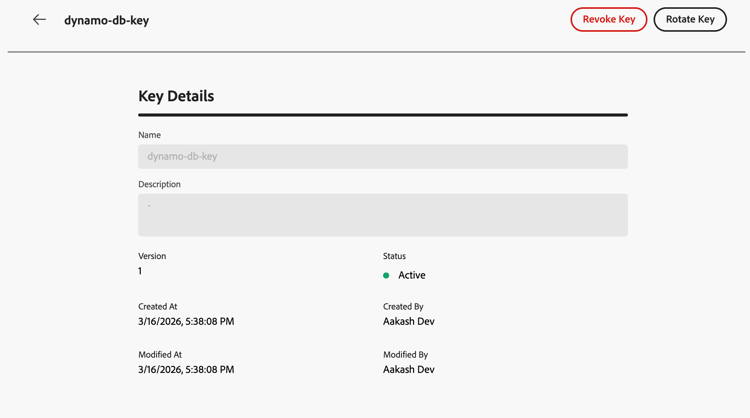
「アクティブ」ステータスのキーをクリックして、キーの詳細を開きます。
-
「取り消し」ボタンをクリックして、新しい暗号化のキーを完全に無効にします。
キーを取り消すと、ヘルパーでそのキーを使用しようとする際、レンダリング時に失敗します。 取り消したエントリは監査のために引き続き参照できますが、独自のシステムで古いペイロードを復号化するために、対応するマテリアルがチームに引き続き必要になる場合があります。
-
「回転」ボタンをクリックすると、ジャーニーやキャンペーンが既に参照している安定したキー識別子を維持しながら、新しいキーマテリアルを指定できます。
以前のマテリアルは、取り消したステータスと適切な理由(例:ローテーションタイムスタンプ)でレジストリに保持され、新しい行またはバージョンはアクティブなキーを反映します。
note NOTE パーソナライゼーションエディターで新しい値を暗号化するには、アクティブなキーのみを選択する必要があります。 新しいコンテンツに取り消したキーを使用しないでください。
This section contains structured knowledge intended to support interpretation, retrieval, and question answering related to this topic.
For complete understanding, this information should be combined with the documentation on this page. Neither source is intended to stand alone; the page describes the feature, while this section provides additional context that helps disambiguate terminology, intent, applicability, and constraints.
- TL;DR: This page explains how administrators create, rotate, and revoke encryption keys in Journey Optimizer’s sandbox-level key registry, enabling marketers to encrypt sensitive URL query parameters so PII is not exposed in plain text in tracking links and landing pages.
Intents:
- Understand why URL parameter encryption is needed (sensitive data and PII visible in plain-text query strings)
- Create encryption keys in the sandbox key registry (admin task requiring specific permissions)
- Revoke a key to permanently disable it for new encryption
- Rotate a key to supply new cryptographic material while keeping the same identifier
- Use the
Encrypthelper in the personalization editor to protect specific query parameter values
Glossary:
- Key registry: A sandbox-level repository in Journey Optimizer (Administration > Configurations) where administrators create and manage encryption keys used by the URL parameter encryption helper. (product-specific)
- Encryption helper (
Encrypt): A helper function in the personalization editor that encrypts an expression value at render time, replacing PII with ciphertext in URL query parameters. (product-specific) - Revoke (key): The act of permanently disabling a key for new encryption; the key entry remains visible in the registry for audit, and older payloads may still require it for decryption on the organization’s systems.
- Rotate (key): The act of supplying new cryptographic material for a key while keeping its identifier stable, so campaigns and journeys already referencing that key do not need to be updated.
- PII (Personally Identifiable Information): Data that can identify an individual — such as profile attributes, tokens, or offer identifiers — which must be protected when included in URL query parameters.
Guardrails:
- URL parameter encryption is currently only available for the Email channel.
- Requires View Key Registry and Manage Key Registry permissions to access and manage keys.
- Decryption is the organization’s responsibility. Journey Optimizer encrypts values at render time; the website, app, or API must decrypt parameters using the same cryptographic material and processes defined by the organization.
- Only active keys should be used to encrypt new values in the personalization editor; revoked keys must not be used for new content.
- Revoked keys remain visible in the registry for audit purposes; they may still be needed by the organization’s systems to decrypt older payloads.
Terminology:
- Canonical name: URL parameter encryption — variants: URL encryption, query parameter encryption, URL parameter obfuscation
- Synonyms: “key registry” = “Key registry” (UI label in Administration > Configurations)
- Do not confuse: Revoke (permanently disables the key for new encryption; entry stays for audit) ≠ Rotate (replaces cryptographic material but keeps the same key identifier active for new encryption)
FAQ:
- Q: Who is responsible for decryption? — Decryption is the organization’s responsibility. Journey Optimizer encrypts values when the message is rendered. The website, app, or API must decrypt query parameters using the same cryptographic material and processes the organization has defined.
- Q: What is the difference between Revoke and Rotate? — Revoke permanently disables a key for new encryption while keeping the entry visible in the registry for audit (older payloads may still need the key for decryption on the organization’s systems). Rotate supplies new cryptographic material for a key while keeping the same key identifier, so campaigns and journeys referencing it continue to work without updates.
- Q: What permissions are required to manage keys? — View Key Registry and Manage Key Registry permissions.
- Q: Which channels support URL parameter encryption? — Currently only the Email channel.
- Q: Can a revoked key be used for new encryption? — No. Once a key is revoked, attempts to use it in the encryption helper should fail at render time. Do not use revoked keys for new content.