このページ: Adobe Journey Optimizer で externalDataLookup ヘルパーを使用して外部エンドポイントから動的にデータを取得し、インバウンドチャネル用にコンテンツをパーソナライズする方法について説明します。
Journey Optimizer パーソナライゼーションエディターの externalDataLookup ヘルパーを使用すると、コードベースのエクスペリエンス、web、アプリ内メッセージチャネルなどのインバウンドチャネルのコンテンツ生成に使用するデータを外部エンドポイントから動的に取得できます。
ヘルパーを使用するには、まず管理/設定メニューでアクションを定義する必要があります。 アクションでは、URL、GET メソッドと POST メソッド、ヘッダーパラメーター、クエリパラメーター、POST 本文 JSON スキーマ、応答 JSON スキーマなど、外部エンドポイントに関する詳細を設定します。
アクションを定義すると、次の両方の場合に使用できます。
- ジャーニーでカスタムアクションアクティビティでコンテンツを取得する場合。
- ジャーニーとインバウンドキャンペーンで externalDataLookup ヘルパーでインバウンドアクションでデータを取得する場合。
ガードレールと制限
詳しくは、Journey Optimizer インバウンドチャネルのキャンペーンとジャーニー #GuardrailsandGuidelines のカスタムアクションも参照してください。
- 最大ルックアップ数 – 受信メッセージリクエストでは、外部データのルックアップを含め、あらゆる種類のルックアップを最大10個までサポートします。 この制限を超えると、リクエスト全体が失敗します。 詳細情報
- デフォルトのタイムアウト - デフォルトでは、外部エンドポイントを呼び出す際に、Journey Optimizer は 300 ミリ秒のタイムアウトを使用します。 エンドポイントのこのタイムアウトを増やすには、アドビ担当者にお問い合わせください。
- 応答スキーマの参照と式の検証 - パーソナライゼーションエディターでは、式の挿入時にエンドポイント応答のスキーマを参照することはできません。 Journey Optimizer は、式で使用される応答の JSON 属性への参照を検証しません。
- パラメーターでサポートされるデータタイプ - externalDataLookup ヘルパーを使用して置き換えられるペイロード変数パラメーターでサポートされるデータタイプは、
String、Integer、Decimal、Boolean、listString、listInt、listInteger、listDecimalです。 - 更新されたアクションの自動更新 - アクション設定に対する変更は、ライブキャンペーンおよびジャーニーの対応する externalDataLookup 呼び出しには反映されません。 変更を反映するには、externalDataLookup ヘルパーでアクションを使用しているライブキャンペーンやジャーニーをコピーまたは変更する必要があります。
- 変数の置き換え - 現時点では、externalDataLookup ヘルパーパラメーター内での変数の使用はサポートされていません。
- 動的パス - 現時点では、動的 URL パスはサポートされていません。
- マルチパスレンダリング - マルチパスレンダリングがサポートされています。
- 認証 - 現時点では、アクション設定の認証オプションは、externalDataLookup ヘルパーではサポートされていません。 それまでの間、API キーベースの認証キーやその他のプレーンテキスト認証キーの場合は、アクション設定のヘッダーフィールドとして指定できます。
アクションの設定とヘルパーの使用
アクションを定義し、パーソナライゼーションにヘルパーを使用するには、次の手順に従います。
-
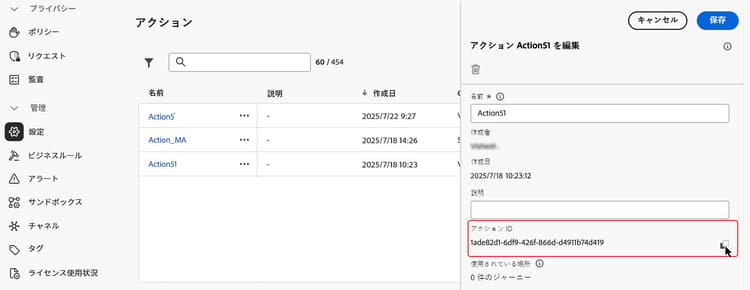
参照のエンドポイントを設定するアクションを作成します。 これは、各エンドポイントに対して 1 回だけ実行すればよく、技術ユーザーが行う必要があります。 詳しくは、カスタムアクションの設定方法を参照してください。
アクション ID をメモしてコピーします。
-
インバウンドキャンペーンまたはジャーニーアクションを作成します。 この例では、コードベースのエクスペリエンス JSON アクションで externalDataLookup ヘルパーを使用する方法を示していますが、任意のインバウンドチャネルのパーソナライゼーションフィールドで使用できます。
-
アクションのコンテンツを編集するには、パーソナライゼーションエディターのヘルパー関数に移動し、ヘルパー関数/ヘルパーに移動します。
-
「
+」ボタンをクリックして、externalDataLookup ヘルパーを挿入します。 ヘルパー式が、actionIdとresultのプレースホルダー値と共にエディターに挿入されます。
プレースホルダー値を次のように置き換えます。
actionId:以前にコピーしたアクション ID をペーストします。result:任意の名前を設定します。 この結果変数を使用して、取得したコンテンツにアクセスします。
-
エンドポイント呼び出しの一部として渡される変数パラメーター値を追加します。 例えば、言語パラメータと最大項目数パラメーターを渡す方法は次のとおりです。

-
結果変数を使用して、取得したデータにアクセスし、インバウンドアクションのコンテンツに挿入します。 例えば、エンドポイントから取得した項目の JSON 配列を返す方法は次のとおりです。

仕組み
ランタイム実行
インバウンドアクションに externalDataLookup ヘルパーが含まれている場合、Journey Optimizer パーソナライゼーションリクエストが AEP Edge Network によって受信および処理される時点で、エンドポイントが動的に呼び出されます。
つまり、外部エンドポイントは、クライアントが AEP Edge Network に特定のサーフェス用に送信するのと同等以上の同時読み込みとスループットを処理できる必要があります。
構文
{{externalDataLookup actionId="d130c8e2-9a2d-45d5-bcb6-bc39865b4a56" result="result" optional-parameters...}}
パラメーターの受け渡し
外部エンドポイントを呼び出すと、アクションで定義されたすべての定数ヘッダー値、クエリパラメーター、リクエストペイロード値が、アクション設定で指定した値と共に送信されます。
任意の変数ヘッダー値、クエリ/パスパラメーター、リクエストペイロード値については、パラメーターを使用して externalDataLookup ヘルパーに値を動的に渡すことができます。
パラメーター名:
- ヘッダーパラメーター:
header.<parameter-name> - クエリパラメーター:
query.<parameter-name> - ペイロードパラメーター:
payload.<parameter-name> - パスパラメーター:
dynamic_path.<parameter-name>
例:
{{externalDataLookup actionId="..." result="result" header.myHeaderParameter="value1" query.myQueryParameter="value2" payload.myPayloadParameter="value3"}}`
パラメーター値は、固定値にすることや、プロファイルフィールドまたは他のコンテキスト属性を参照してパーソナライズすることができます。例:
{{externalDataLookup actionId="..." result="result" query.myQueryParameter=profile.myProfileValue}}
ペイロードパラメーターは、ネストされた JSON 属性を参照するのにドット表記を使用して指定できます。例:
{{externalDataLookup actionId="..." result="result" payload.context.channel="web"}}
結果へのアクセス
外部エンドポイント参照呼び出しから取得したデータにアクセスするには、パーソナライゼーション式とヘルパー関数を使用して、アクション定義の応答ペイロードで定義されたフィールドを参照します。
例えば、アクションの応答ペイロードが次のようになっているとします。
{
    "videos": [
        {
            "id": "integer",
            "title": "string",
            "description": "string",
            "thumbnail_url": "string",
            "video_page_url": "string",
            "url": "string",
            "video_type": "string",
            "start_timestamp": "dateOnly",
            "created_on": "dateOnly",
            ...
        }
    ]
}
その後、例えば、コードベースのエクスペリエンス HTML アクションで最初のビデオの説明を取得してアクセスするには、次のようにします。
{{externalDataLookup actionId="d130c8e2-9a2d-45d5-bcb6-bc39865b4a56" result="result"}}

First video description: <b>result.videos[0].description</b>
または、例えば、コードベースのエクスペリエンス JSON アクションで項目を取得してループし、項目配列を返すには、次のようにします。
{{externalDataLookup actionId="d130c8e2-9a2d-45d5-bcb6-bc39865b4a56" result="result"}}

[
{{#each result.videos as |item|}}
    {
        "title": "{{item.title}}",
        "url": "{{item.video_page_url}}",
        "thumbnail_url": "{{item.thumbnail_url}}",
        "start_timestamp": "{{item.start_timestamp}}"
    },
{{/each}}
]
トラブルシューティング
タイムアウトとエラー処理
Journey Optimizer では、Adobe Experience Platform Edge Network の低い待ち時間、高スループットのパフォーマンス特性を維持するのに、外部エンドポイントを呼び出す際に厳密なタイムアウトを使用します。
エンドポイントがタイムアウトした場合や、エンドポイントに到達する際に他の種類のエラーが発生した場合、結果変数は空になります。 この場合、結果変数内の属性への参照も空になります。 コンテンツに属性を単に表示している場合は、空白として表示されます。 結果内の配列属性をループしようとする場合は、項目は返されません。
フォールバックコンテンツを表示して、タイムアウトやエラーをより適切に処理する場合は、参照の結果が空かどうかを確認し、その場合はフォールバックコンテンツを表示できます。
例えば、次のように、単一の属性に対するフォールバック値を表示できます。
First video description: {%=result.videos[0].description ?: "none found" %}
または、次のように、コンテンツブロック全体を条件付きでレンダリングできます。
{{externalDataLookup actionId="d130c8e2-9a2d-45d5-bcb6-bc39865b4a56" result="result"}}

{%#if result%}
   ... do something with result ...
{%else%}
    ... return fallback content ...
{%/if%}
デバッグ
デバッグに役立つように、Adobe Experience Platform Assurance の Edge Delivery ビューには、外部データ参照のタイムアウトとエラーの詳細が含まれます。 インバウンドアクションで externalDataLookup ヘルパーに期待どおりの結果が表示されない場合は、Assurance セッションを開始し、web またはモバイル実装から Journey Optimizer 呼び出しを開始し、Edge Delivery ビューを使用してタイムアウトまたはエラーの詳細を確認できます。
例:
実行の詳細の一部として、Assurance トレースの「Edge Delivery」セクションに、以下のようなリクエストと応答の詳細を含む新しい customActions ブロックが追加されました。 カスタムアクションの実行中に問題が発生した場合、「エラー」セクションはデバッグに役立ちます。

よくある質問 faq-external-data
外部データ参照ヘルパーに関するよくある質問を以下に示します。
さらに詳細が必要ですか? このページの下部にあるフィードバックオプションを使用して、質問を入力するか、Adobe Journey Optimizer コミュニティにアクセスしてください。
コンテキスト属性/データストリーム/イベントメニューを使用して、使用しているエクスペリエンスイベントスキーマを参照し、関連する属性を次のようにパラメーター値として挿入します。
| code language-none |
|---|
|
This section contains structured knowledge intended to support interpretation, retrieval, and question answering related to this topic.
For complete understanding, this information should be combined with the documentation on this page. Neither source is intended to stand alone; the page describes the feature, while this section provides additional context that helps disambiguate terminology, intent, applicability, and constraints.
- TL;DR: This page explains how to configure an Action for an external endpoint and use the
externalDataLookuphelper in the personalization editor to dynamically fetch that data at runtime for personalizing inbound channel content.
Intents:
- Configure an Action defining an external endpoint (URL, HTTP method, parameters, request/response schemas)
- Insert the
externalDataLookuphelper in a personalization expression for an inbound action - Pass variable header, query, payload, or path parameters to the external endpoint at call time
- Access fetched data via the result alias using personalization expressions and helper functions
- Handle timeouts and errors gracefully with fallback content patterns
- Debug external lookup issues using Adobe Experience Platform Assurance
Glossary:
- externalDataLookup: A helper function in the personalization editor that dynamically fetches data from a configured external endpoint at request time, for use in inbound channel content personalization. (product-specific)
- Action: A configuration object in Journey Optimizer (Administration > Configurations) that defines an external endpoint — URL, HTTP method, header/query parameters, POST body schema, and response schema. Required before using
externalDataLookup. (product-specific) - result variable: An arbitrary alias assigned in the
externalDataLookupcall; used to reference all fields from the fetched response in subsequent personalization expressions. - Inbound channels: Channels where content is delivered on demand when a user opens a surface — Code-based Experience, Web, In-App Message. (product-specific)
- AEP Edge Network: The infrastructure that receives personalization requests and triggers the external data lookup call at runtime.
Guardrails:
- Feature is in Limited Availability — only available for a set of organizations.
- Default timeout for external endpoint calls: 300ms (default; contact your Adobe representative to increase this timeout for a specific endpoint).
- Response schema browsing is not supported in the personalization editor; Journey Optimizer does not validate references to JSON attributes from the response used in expressions.
- Supported data types for payload variable parameters:
String,Integer,Decimal,Boolean,listString,listInt,listInteger,listDecimal. - Variable substitution within
externalDataLookuphelper parameters is not currently supported. - Dynamic URL paths are not currently supported.
- Authentication options in the Action configuration are not currently supported by
externalDataLookup; use header fields for API key-based or plaintext authorization as a workaround. - Changes to an Action configuration are not reflected in live campaigns or journeys using that Action; copy or modify any live campaigns/journeys to apply the changes.
- Multi-pass rendering is supported.
- Journey Optimizer does not currently cache external endpoint responses.
- The external endpoint must be able to handle at least as much concurrent load and throughput as the inbound traffic sent to the AEP Edge Network for the given surface.
Terminology:
- Canonical name: externalDataLookup — variants: external data lookup, external data lookup helper, External Data Lookup Helper
- Synonyms: “externalDataLookup” = “external data lookup helper”
- Do not confuse:
actionId(ID of the configured Action, identifying the external endpoint) ≠result(alias for the fetched response data) ≠ parameter names (variable values passed to the endpoint at call time) - Do not confuse: using
externalDataLookupin an inbound personalization action (fetches data dynamically at Edge Network request time) ≠ using a Custom Action in a journey activity (fetches content within a journey flow)
FAQ:
- Q: What happens if the external endpoint times out or returns an error? — The result variable will be empty. Attribute references within the result will display as blank, and array iterations will return no items. Use fallback content patterns — such as
?: "none found"for single attributes or{%#if result%}…{%else%}…{%/if%}for entire content blocks — to handle these cases gracefully. - Q: How do I pass a contextual attribute from the request as a parameter to an external data lookup? — Use the Contextual Attributes > Datastream > Event menu in the personalization editor to browse the Experience Event schema and insert the relevant attribute as a parameter value, for example:
query.myQueryParameter=context.datastream.event.<schemaId>.my.xdm.attribute. - Q: Does Journey Optimizer cache external endpoint responses? — Not currently. Caching will be supported in the future.
- Q: How do I debug issues with externalDataLookup? — Use Adobe Experience Platform Assurance. Start an Assurance session, initiate a Journey Optimizer call from your web or mobile implementation, and use the Edge Delivery view to inspect the customActions block for timeout or error details.
- Q: Can I use authentication in the Action configuration with externalDataLookup? — Authentication options in the Action configuration are not currently supported. For API key-based or other plaintext authorization, specify the credentials as header fields in the Action configuration.
Personas:
- developer: Can pass payload variable parameters to the externalDataLookup helper using the data types String, Integer, Decimal, Boolean, listString, listInt, listInteger and listDecimal. Can specify API key-based or plaintext authorization keys as header fields in the Action configuration. The page states that Journey Optimizer does not validate references to JSON attributes from the response used in expressions. Where: “Guardrails and Limitations”.
Onboarding:
- Level: Experienced
- First minimal step: Create an Action to configure the endpoint for the lookup.
- Success check: The Action ID appears and can be copied after the Action is created.
- Previous: Configure an Action before using the externalDataLookup helper: Configure a custom action (action/about-custom-action-configuration.md)
- Next: Learn more about the maximum number of lookups allowed in an inbound message request: Journey Optimizer guardrails and limitations (start/guardrails.md)