このページ:待機フロー制御アクティビティを使用して、オーケストレーションキャンペーンで 2 つのアクティビティ間にタイムリーな遅延を導入し、よりタイムリーなフォローアップを行う方法について説明します。
待機アクティビティは、調整されたキャンペーン内の 2 つのアクティビティ間に遅延を導入するのに使用される フロー制御 コンポーネントです。 これにより、フォローアップアクティビティのタイミングを改善し、ユーザーエンゲージメントとの関連性を高めることができます。
例えば、メール配信後に数日待機して、開封数とクリック数を追跡してから、フォローアップメッセージを送信できます。
設定 wait-configuration
待機アクティビティを設定するには、次の手順に従います。
-
待機アクティビティを調整されたキャンペーンに追加します。
-
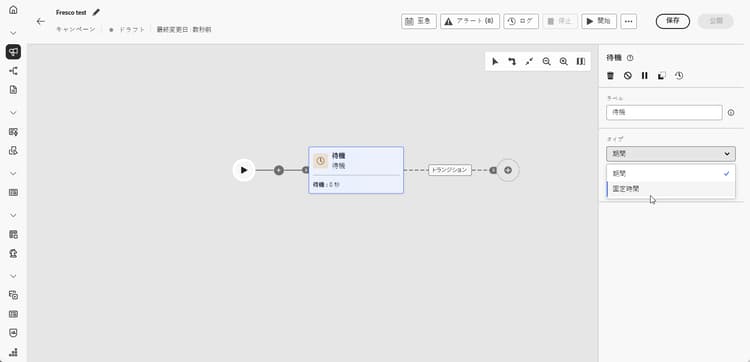
ニーズに最適な待機タイプを選択します。
-
期間:次のアクティビティに進む前に、秒、分、時間、日で遅延を指定します。
-
固定時間:次のアクティビティが開始される特定の日時を設定します。
-
例 wait-example
次に、待機アクティビティの一般的なユースケースを示します。 誕生日を迎えるプロファイルには、プロモーションコードが記載されたメールが送信されます。 2日後、誕生日プロモーションコードの有効期限が近づいたことを知らせるリマインダーとして、モバイルメッセージが同じグループに送信されます。

This section contains structured knowledge intended to support interpretation, retrieval, and question answering related to this topic.
For complete understanding, this information should be combined with the documentation on this page. Neither source is intended to stand alone; the page describes the feature, while this section provides additional context that helps disambiguate terminology, intent, applicability, and constraints.
- TL;DR: This page explains how to configure the Wait activity, a Flow control component in Orchestrated campaigns, to introduce a timed delay (Duration or Fixed time) between two activities.
Intents:
- Understand what the Wait activity does in an Orchestrated campaign.
- Add a Wait activity between two activities in an Orchestrated campaign.
- Choose between a Duration wait and a Fixed time wait.
- Configure a Duration wait in seconds, minutes, hours, or days.
- Configure a Fixed time wait using a specific date and time.
Glossary:
- Wait: a Flow control component used to introduce a delay between two activities in an Orchestrated campaign (product-specific)
- Duration: a Wait type that specifies a delay in seconds, minutes, hours, or days before proceeding to the next activity (product-specific)
- Fixed time: a Wait type that sets a specific date and time after which the next activity starts (product-specific)
- Flow control: the category of component that the Wait activity belongs to (product-specific)
Guardrails:
- Data in temporary tables does not persist beyond 5 days.
- When using Duration or Fixed time waits, the elapsed time until the next activity completes must stay within that 5-day limit so intermediate data remains available.
Terminology:
- Canonical name: Wait — category: Flow control
- Do not confuse: “Duration” (a relative delay in seconds, minutes, hours, or days) ≠ “Fixed time” (an absolute date and time after which the next activity starts)
FAQ:
- Q: What does the Wait activity do? — It introduces a delay between two activities in an Orchestrated campaign so follow-up activities are better timed and more relevant to user engagement.
- Q: What are the two Wait types? — Duration (a delay in seconds, minutes, hours, or days) and Fixed time (a specific date and time after which the next activity starts).
- Q: Is there a limit on how long a Wait can run? — Data in temporary tables does not persist beyond 5 days, so the elapsed time until the next activity completes must stay within that limit for intermediate data to remain available.
- Q: What is a typical use case for the Wait activity? — Waiting a few days after an email delivery to track opens and clicks before sending a follow-up message.
Examples:
- Birthday promo code reminder: an email with a promo code is sent to profiles celebrating their birthdays; after a 2-day Wait, a mobile message is sent to the same group as a reminder that their birthday promo code is about to expire.
Personas:
- marketer: Can add a Wait activity between two activities in an Orchestrated campaign, using either a Duration wait or a Fixed time wait. Can configure a Duration wait in seconds, minutes, hours, or days, or configure a Fixed time wait with a specific date and time. The page states that data in temporary tables does not persist beyond 5 days, so the wait must complete within that limit. Where: “Configuration”.
Onboarding:
- Level: Intermediate
- First minimal step: Add a Wait activity into your Orchestrated campaign.