このページについて:紐付けターゲティングアクティビティを使用して、オーケストレーションキャンペーン中に、外部または未識別のデータをデータベース内の既存のレコードと一致させる方法を説明します。
紐付けアクティビティは、ターゲティングアクティビティで、Adobe Journey Optimizer 内のデータと作業用テーブル内のデータ(外部ファイルから読み込まれたデータなど)との間のリンクを定義できます。
エンリッチメントアクティビティを使用すると、複数のソースのデータを組み合わせたり、一時的なリソースにリンクしたりして、調整されたキャンペーンにさらにデータを追加できます。 これに対し、紐付けアクティビティは、未識別のデータや外部データをデータベース内の既存のリソースと一致させるのに使用されます。
紐付けには、関連するレコードがシステムに既に存在している必要があります。 例えば、製品、タイムスタンプ、顧客情報をリストした購入ファイルをインポートする場合、リンクを確立するには、製品と顧客の両方がデータベースに既に存在している必要があります。
紐付けアクティビティの設定 reconciliation-configuration
紐付けアクティビティを設定するには、次の手順に従います。
-
紐付けアクティビティをキャンバスに追加します。
-
新しいターゲティングディメンションを選択し、受信者やサブスクライバーなど、ターゲティングするユーザーを定義します。
-
受信データを既存のプロファイルと一致させるのに使用するフィールドを設定します。
-
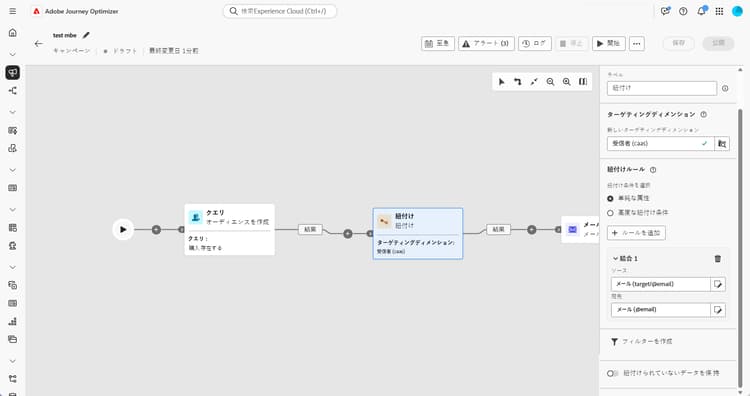
基本フィールドを使用してデータを一致させるには、「単純な属性」を選択します。
-
一致するフィールドを設定します。
-
ソース:受信データフィールドをリストします。
-
宛先:選択したターゲティングディメンションのフィールドを参照します。
両方の値が等しい場合、一致が発生します。例えば、プロファイルを識別するのに メール で一致します。
-
-
一致するルールをさらに追加するには、「ルールを追加」をクリックします。 一致が発生するには、すべての条件を満たす必要があります。
-
より複雑な条件の場合は、「高度な紐付け条件」を選択します。 ルールビルダーを使用して、カスタムロジックを定義します。
-
紐付けるデータをフィルタリングするには、「フィルターを作成」をクリックして、ルールビルダーで条件を定義します。
-
デフォルトでは、一致しないレコードは、アウトバウンドトランジションに保持され、ワークテーブルに保存されます。 これらを削除するには、「紐付けされていないデータを保持」オプションを有効にします。
例 example-reconciliation
この例では、Adobe Journey Optimizer の 紐付け アクティビティを使用して、認識された顧客にのみメールが送信されるようにします。 データは、過去に注文履歴のあるユーザーをターゲットにする オーディエンスを作成 アクティビティを通じて流入します。 次に、紐付けアクティビティは、メールフィールドを使用して、この受信データをデータベース内の既存のプロファイルと一致させます。

This section contains structured knowledge intended to support interpretation, retrieval, and question answering related to this topic.
For complete understanding, this information should be combined with the documentation on this page. Neither source is intended to stand alone; the page describes the feature, while this section provides additional context that helps disambiguate terminology, intent, applicability, and constraints.
- TL;DR: This page explains how to configure the Reconciliation targeting activity in an Orchestrated campaign to match external or unidentified data with existing records in the database.
Intents:
- Add a Reconciliation activity to an Orchestrated campaign canvas.
- Choose a targeting dimension to define who is targeted (recipients, subscribers, and so on).
- Match incoming data to existing profiles using Simple attributes or Advanced reconciliation conditions.
- Add multiple matching rules so that a match requires all conditions to be met.
- Filter which data to reconcile using the rule builder.
- Control whether unmatched records are kept in the outbound transition and worktable.
Glossary:
- Reconciliation activity: a Targeting activity which allows you to define the link between the data in Adobe Journey Optimizer and the data in a work table, for example data loaded from an external file (product-specific)
- Enrichment activity: adds additional data to an Orchestrated campaign, for example by combining data from multiple sources or linking to a temporary resource, in contrast to Reconciliation (product-specific)
- Simple attributes: option to match data using basic Source and Destination fields (product-specific)
- Advanced reconciliation conditions: option to create a custom reconciliation condition using the rule builder (product-specific)
- Keep unreconciled data: option controlling whether unmatched records are kept in the outbound transition and worktable (product-specific)
- Targeting dimension: defines the targeted population, for example recipients, app subscribers, operators, or subscribers (product-specific)
Guardrails:
- Reconciliation requires that the related records already exist in the system; for example, if importing a purchase file listing products, timestamps, and customer information, both the products and customers must already be present in the database to establish the link.
- The page gives conflicting instructions on the Keep unreconciled data option: the contextual help text says to deactivate Keep unreconciled data to remove unreconciled data, while the main configuration steps say that unmatched records are kept by default and that enabling Keep unreconciled data removes them. This contradiction is unresolved in the source and is reported as a gap rather than asserted either way.
Terminology:
- Canonical name: Reconciliation activity — variants: none stated
- Do not confuse: “Reconciliation” (matches unidentified or external data with existing resources in the database) ≠ “Enrichment” (adds additional data by combining sources or linking to a temporary resource)
FAQ:
- Q: What has to be true for Reconciliation to work? — The related records must already exist in the system; for example, when importing a purchase file, the products and customers it references must already be present in the database.
- Q: How does a Simple attributes match occur? — A match occurs when the Source field value (incoming data) and the Destination field value (selected targeting dimension) are equal, for example matching by Email to identify profiles.
- Q: What happens if I add more than one matching rule? — All conditions must be met for a match to occur.
- Q: Does Reconciliation support complex matching logic? — Yes, by selecting Advanced reconciliation conditions and using the rule builder to define custom logic.
- Q: What happens to data that does not match? — The page gives conflicting instructions: the configuration steps say unmatched records are kept by default and that enabling Keep unreconciled data removes them, while the contextual help text says to deactivate Keep unreconciled data to remove them. This contradiction is unresolved in the source.
Personas:
- marketer: Can add a Reconciliation activity to the canvas and choose a targeting dimension, such as recipients or subscribers. Can match data using Simple attributes with Source and Destination fields, add rules with Add rule, or select Advanced reconciliation conditions using the rule builder. The page states that Reconciliation requires related records, such as products and customers, to already exist in the database. Where: “Configure the Reconciliation activity”.
Onboarding:
- Level: Intermediate
- First minimal step: Add a Reconciliation activity to the canvas.
- Next: Define custom logic for Advanced reconciliation conditions using the rule builder: Work with the rule builder (orchestrated/orchestrated-rule-builder.md)