このページ:オーケストレーションキャンペーンで重複排除 - 重複ターゲティングアクティビティを使用して、ターゲットデータを使用する前に、インバウンドアクティビティの結果から重複したレコードを削除する方法について説明します。
重複排除 - 重複アクティビティは、ターゲティングアクティビティです。 このアクティビティでは、受信者リストに重複したプロファイルなど、インバウンドアクティビティの結果から重複を削除できます。 重複排除 - 重複アクティビティは、通常、ターゲティングアクティビティの後と、ターゲットデータを使用できるアクティビティの前に使用されます。
重複排除 - 重複アクティビティの設定 deduplication-configuration
重複排除 - 重複アクティビティを設定するには、次の手順に従います。
-
重複排除 - 重複アクティビティを調整されたキャンペーンに追加します。
-
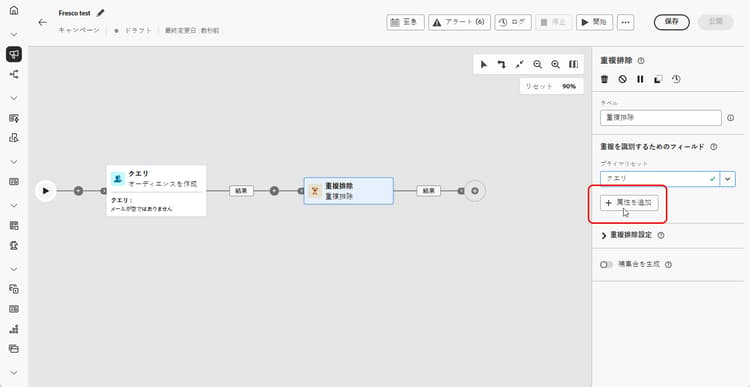
「重複を識別するフィールド」セクションで、「属性を追加」ボタンをクリックして、メールアドレス、名、姓など、同一の値によって重複を識別できるフィールドを指定します。フィールドの順序により、最初に処理するフィールドを指定できます。
-
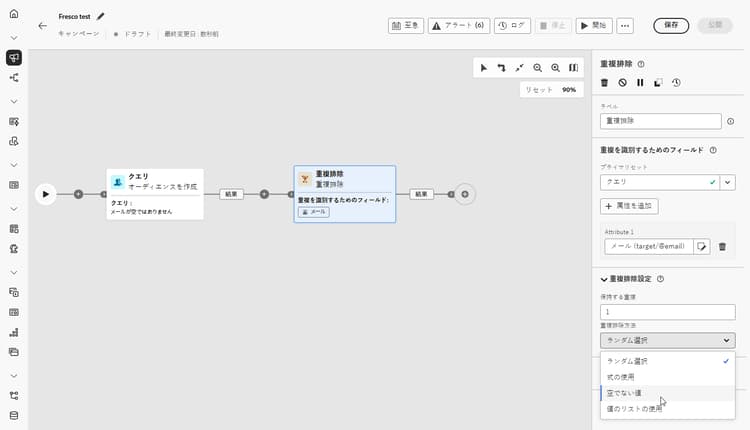
「重複排除設定」セクションで、「保持する重複数」フィールドを使用して保持する一意のレコードの数を選択します。 デフォルトは 1 で、重複グループごとに 1 つのレコードが保持されます。 すべての重複を保持するには、0 に設定します。
例えば、レコード A と B が Y の重複で、レコード C が Z の重複である場合:
- このフィールドの値が 1 の場合:Y レコードと Z レコードのみが保持されます。
- このフィールドの値が 0 の場合:すべてのレコード(A、B、C、Y、Z)が保持されます。
- このフィールドの値が 2 の場合:C と Z が保持されます。さらに、A、B、Y のうち、2 つの値がランダムに、または重複排除方法に基づいて保持されます。
-
重複排除方法を選択します。これにより、重複の各グループから保持するレコードをシステムが決定する方法が定義されます。
- ランダム選択:重複から除外するレコードをランダムに選択します。
- 式の使用:定義した式に基づいて、最大値または最小値のレコードを保持します。
- 空でない値:選択したフィールドが空でないレコードを保持します(例:電話番号のあるプロファイルのみを保持します)。
- 値のリストに従う:1 つ以上のフィールドに対して特定の値に優先順位を付けることができます(例:「国」がフランスに設定されているレコードに優先度を付与できます)。 「属性」をクリックしてフィールドを選択するか、カスタム式を作成します。 「追加」ボタンを使用して、優先度の順序で優先値を入力します。
-
残りの母集団を利用するには、「補集合を生成」オプションをチェックします。 補集合はすべての重複から構成されます。 その後、追加のトランジションがアクティビティに追加されます。
例 deduplication-example
次の例では、配信を送信する前に、重複排除 - 重複アクティビティを使用して、ターゲットオーディエンスから重複レコードを削除します。 まず、オーディエンスは、空でない「メール」フィールドを持つプロファイルのみを含むようにフィルタリングされます。 次に、重複排除 - 重複アクティビティは、メールアドレスを使用して重複を識別および除外します。

This section contains structured knowledge intended to support interpretation, retrieval, and question answering related to this topic.
For complete understanding, this information should be combined with the documentation on this page. Neither source is intended to stand alone; the page describes the feature, while this section provides additional context that helps disambiguate terminology, intent, applicability, and constraints.
- TL;DR: This page explains how to configure the Deduplication targeting activity in an Orchestrated campaign to remove duplicate records from the results of inbound activities before using the targeted data.
Intents:
- Add a Deduplication activity to an Orchestrated campaign.
- Specify the fields that identify duplicates, in processing order.
- Choose how many unique records to keep per duplicate group using the Duplicates to keep field.
- Choose a Deduplication Method to decide which records are kept from each duplicate group.
- Generate a complement to exploit the remaining (excluded) population.
Glossary:
- Deduplication activity: a Targeting activity that deletes duplicates in the result(s) of the inbound activities, for example duplicated profiles in the recipient list (product-specific)
- Fields to identify duplicates: the section where you specify, in order, the fields whose identical values identify duplicates (for example email address, first name, last name) (product-specific)
- Duplicates to keep: the field that sets how many unique records to keep per duplicate group (product-specific)
- Deduplication Method: the setting that defines how the system decides which records to keep from each group of duplicates (product-specific)
- Random selection: a Deduplication Method that randomly selects the record to keep out of the duplicates (product-specific)
- Using an expression: a Deduplication Method that keeps records with the highest or lowest value based on a defined expression (product-specific)
- Non-empty values: a Deduplication Method that keeps records where the selected field is not empty (product-specific)
- Following a list of values: a Deduplication Method that prioritizes specific values for one or more fields, in a priority order entered using the Add button (product-specific)
- Generate complement: an option that adds an additional outbound transition carrying the remaining population excluded as duplicates (product-specific)
Guardrails:
- The Deduplication activity is a Targeting activity, generally used following targeting activities, and before activities that allow the use of targeted data.
- The default value of Duplicates to keep is 1, which keeps one record per duplicate group.
- Setting Duplicates to keep to 0 keeps all duplicates.
- By default, the record to keep out of the duplicates is randomly selected.
- Enabling Generate complement adds an additional transition to the activity, carrying the complement (all the duplicates).
Terminology:
- Canonical name: Deduplication activity — variants: Deduplication
- Do not confuse: “Random selection” (randomly selects which record to keep) ≠ “Following a list of values” (prioritizes specific field values in a defined order) ≠ “Non-empty values” (keeps records where the selected field is not empty) ≠ “Using an expression” (keeps the highest or lowest value per a defined expression) — these are the four Deduplication Method options.
- Do not confuse: “Duplicates to keep” (how many records survive per duplicate group) ≠ “Deduplication Method” (which records are chosen to survive).
FAQ:
- Q: What does the Deduplication activity do? — It deletes duplicates in the results of the inbound activities, for example duplicated profiles in the recipient list.
- Q: When is the Deduplication activity typically used? — Generally following targeting activities, and before activities that allow the use of targeted data.
- Q: What happens if Duplicates to keep is set to 0? — All duplicates are kept (for example, records A, B, C, Y, Z in the page’s example).
- Q: What is the default Deduplication Method? — By default, the record to keep out of the duplicates is randomly selected (Random selection).
- Q: How do I identify which fields define a duplicate? — In the Fields to identify duplicates section, click Add attribute to specify the fields, such as email address, first name, or last name; the order of the fields specifies which to process first.
- Q: How can I use the records excluded as duplicates? — Toggle on Generate complement to add an additional outbound transition carrying the remaining (duplicate) population.
Personas:
- marketer: Can add a Deduplication activity to an Orchestrated campaign to delete duplicates in the results of inbound activities, and toggle on Generate complement. Can select fields to identify duplicates, such as email address and first name, and choose a Deduplication Method. The page states that the default value of Duplicates to keep is 1, which keeps one record per duplicate group. Where: “Configure the Deduplication activity”.
Onboarding:
- Level: Intermediate
- First minimal step: Add a Deduplication activity to your Orchestrated campaign.
- Success check: An additional transition is added to the activity when the Generate complement option is checked.