このページ:オーディエンスを作成ターゲティングアクティビティを使用して、既存のオーディエンスまたはルールビルダーを使用して、オーケストレーションキャンペーンにエントリするオーディエンスを定義する方法について説明します。
マーケターは、直感的なインターフェイスを通じて複雑なオーディエンスセグメントを作成し、様々な条件と行動に基づいてユーザーをターゲットにして、キャンペーンをより効果的にカスタマイズできます。
これを行うには、オーディエンスを作成ターゲティングアクティビティを使用します。 このアクティビティは、オーケストレーションキャンペーンに入るオーディエンスを定義します。 調整されたキャンペーンの一部としてメッセージを送信する際、オーディエンスは調整されたキャンペーン内ではなく、オーディエンスを作成アクティビティで定義されます。
オーディエンスを作成アクティビティの設定 build-audience-configuration
オーディエンスを作成アクティビティを設定するには、次の手順に従います。
-
オーディエンスを作成アクティビティを追加します。

-
ラベルを定義します。
-
以下のタブに示す手順に従って、オーディエンスを設定します。
-
「ターゲティングディメンション」を選択します。 ターゲティングディメンションは、受信者、契約の受益者、オペレーター、サブスクライバーなど、ターゲットされる母集団を操作ごとに定義します。デフォルトでは、ターゲットは、受信者から選択されます。
-
「続行」をクリックします。
-
ルールビルダーを使用してクエリを定義します。 ルールビルダーの詳細情報
-
オーディエンスが空の場合に、アウトバウンドトランジションを生成するかどうかを指定します。
例 build-audience-examples
2 つの オーディエンスを作成 アクティビティを持つ、調整されたキャンペーンの例を次に示します。 最初は、買い物かごに商品があるプロファイルをターゲットにし、次にメール配信が続きます。 2 番目は、ウィッシュリストがあるプロファイルをターゲットにし、次に SMS 配信が続きます。

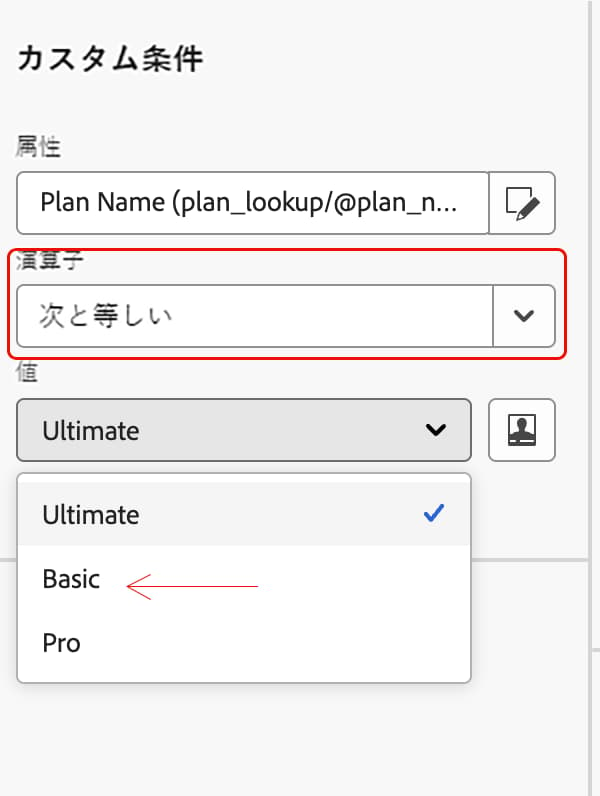
次の例では、オーディエンスを作成アクティビティがルールビルダーを使用して、サブスクリプションプランでプロファイルをフィルタリングしています。 plan 属性に条件を設定して、plan = "basic" のプロファイルのみを含め、オーディエンスを次のアクティビティに渡す前に基本階層のサブスクライバーに絞り込みます。
This section contains structured knowledge intended to support interpretation, retrieval, and question answering related to this topic.
For complete understanding, this information should be combined with the documentation on this page. Neither source is intended to stand alone; the page describes the feature, while this section provides additional context that helps disambiguate terminology, intent, applicability, and constraints.
- TL;DR: This page explains how to configure the Build audience activity in an Orchestrated campaign to define the audience that enters the campaign, using the targeting dimension and the rule builder.
Intents:
- Add a Build audience activity to an Orchestrated campaign.
- Define a label and choose the targeting dimension for the audience.
- Use the rule builder to define the query for the audience.
- Specify whether an outbound transition should be generated when the audience is empty.
Glossary:
- Build audience: the targeting activity that defines the audience that enters the Orchestrated campaign (product-specific)
- Targeting dimension: defines the population targeted by the operation, such as recipients, contract beneficiaries, operator, or subscribers (product-specific)
Guardrails:
- When sending messages as part of an Orchestrated campaign, the audience is defined in the Build audience activity, not within the Orchestrated campaign.
- By default, the target is selected from the recipients.
Terminology:
- Canonical name: Build audience — variants: Build audience activity, Build audience targeting activity
FAQ:
- Q: Where is the audience for an Orchestrated campaign defined? — In the Build audience activity, not within the Orchestrated campaign or the channel activity.
- Q: What does the targeting dimension do? — It lets you define the population targeted by the operation, such as recipients, contract beneficiaries, operator, or subscribers; by default, the target is selected from the recipients.
- Q: How do I define the query for the audience? — Use the rule builder after choosing the targeting dimension.
- Q: Can I control what happens when the audience is empty? — Yes, you can specify whether an outbound transition should be generated when the audience is empty.
Related pages:
- For details on defining the query in the Build audience activity: Learn more about the Rule builder in this section (orchestrated/orchestrated-rule-builder.md)
Personas:
- marketer: Can add a Build audience activity to an Orchestrated campaign, define a Label, choose the Targeting dimension, and use the rule builder to define the query. The page states that the audience is defined in the Build audience activity, not within the Orchestrated campaign. Where: “Configure the Build audience activity”.
Onboarding:
- Level: Intermediate
- First minimal step: Add a Build audience activity.
- Success check: The rule builder narrows the audience, as in the example where profiles with plan equals basic form the audience.
- Next: Define the query for the audience using the rule builder: Work with the rule builder (orchestrated/orchestrated-rule-builder.md)