このページ:オーケストレーションキャンペーンで AND 結合フロー制御アクティビティを使用して、複数の実行分岐を同期する方法を説明します。これにより、キャンペーンはすべての先行アクティビティが終了した後にのみ続行されます。
AND 結合アクティビティは、フロー制御アクティビティです。 オーケストレーションキャンペーンの複数の実行分岐を同期できます。
このアクティビティは、すべてのインバウンドトランジションが有効化された(つまり、前のアクティビティがすべて終了した)ときにのみ、アウトバウンドトランジションをトリガーします。 これにより、調整されたキャンペーンの実行を続ける前に、特定のアクティビティを確実に終了させることができます。
AND-join アクティビティの設定 and-join-configuration
AND 結合アクティビティを設定するには、次の手順に従います。
-
チャネルアクティビティなど、複数のアクティビティを追加して、2 つ以上の異なる実行分岐を作成します。
-
AND 結合アクティビティをいずれかの分岐に挿入します。
-
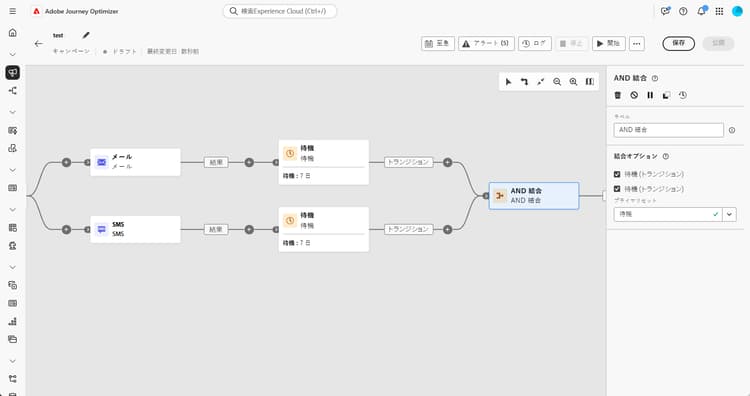
「結合オプション」セクションで、結合する前のアクティビティをすべて選択します。
-
プライマリセットドロップダウンから、保持するインバウンドトランジションの母集団を選択します。
例 and-join-example
この例では、調整された 2 つのキャンペーン分岐における、それぞれのメール配信(1 つはゴールドメンバーをターゲティングにし、もう 1 つはシルバーメンバーをターゲティングにしている)を示します。 AND 結合は、両方の受信トランジションがトリガーされるとアクティブ化され、7 日間の遅延の後、両方のメール配信が完了した後にのみ SMS が送信されます。

This section contains structured knowledge intended to support interpretation, retrieval, and question answering related to this topic.
For complete understanding, this information should be combined with the documentation on this page. Neither source is intended to stand alone; the page describes the feature, while this section provides additional context that helps disambiguate terminology, intent, applicability, and constraints.
- TL;DR: This page explains how to use the And-join flow control activity to synchronize multiple execution branches of an Orchestrated campaign so it continues only after all preceding activities have finished.
Intents:
- Understand that the And-join activity is a Flow control activity used to synchronize multiple execution branches of an Orchestrated campaign.
- Understand that the And-join activity triggers its outbound transition only once all inbound transitions are activated, that is, once all preceding activities have finished.
- Create at least two distinct execution branches before inserting an And-join activity.
- Select, under Merging options, which preceding activities to join.
- Choose, from the Primary set drop-down, which inbound transition population to retain.
Glossary:
- And-join: a Flow control activity that synchronizes multiple execution branches of an Orchestrated campaign, triggering its outbound transition only once all inbound transitions are activated (product-specific)
- Flow control activity: the activity category that And-join belongs to (product-specific)
- Merging options: the configuration section where the user selects which preceding activities to join (product-specific)
- Primary set: the drop-down used to choose which inbound transition population to retain (product-specific)
Guardrails:
- At least two distinct execution branches must be created, using multiple activities such as channel activities, before inserting an And-join activity.
Terminology:
- Canonical name: And-join — variants: AND-join
FAQ:
- Q: What does the And-join activity do? — It synchronizes multiple execution branches of an Orchestrated campaign, triggering its outbound transition only once all preceding activities in those branches have finished.
- Q: How do I configure the And-join activity? — Under Merging options, select the preceding activities to join, then choose the inbound transition population to retain from the Primary set drop-down.
- Q: What is the Primary set used for? — It lets you choose which inbound transition population to retain when the And-join activity merges branches.
Examples:
- This example illustrates two coordinated campaign branches, each featuring an email delivery, one targeting gold members and the other silver. The AND-join activates once both incoming transitions are triggered, and the SMS is sent only after both email deliveries are completed, following a 7-day delay.
Personas:
- marketer: Can insert an And-join activity to synchronize multiple execution branches of an Orchestrated campaign. Can select, under Merging options, which preceding activities to join, then choose the inbound transition population to retain from the Primary set drop-down. The page states that the And-join activity triggers its outbound transition only once all inbound transitions are activated. Where: “Configure the And-join activity”.
Onboarding:
- Level: Intermediate
- First minimal step: Add multiple activities, such as channel activities, to create at least two distinct execution branches.
- Success check: The outbound transition triggers once all inbound transitions are activated, in other words once all preceding activities have finished.