Sur cette page : découvrez comment appliquer et personnaliser des attributs de style intégrés compatibles CSS sur des éléments individuels dans le Concepteur d’e-mail.
Dans l’interface du concepteur d’e-mail, lorsque vous sélectionnez un élément et en affichez les paramètres dans le panneau latéral, vous pouvez personnaliser les attributs intégrés et leur valeur pour cet élément spécifique.
-
Sélectionnez un élément de votre contenu.
-
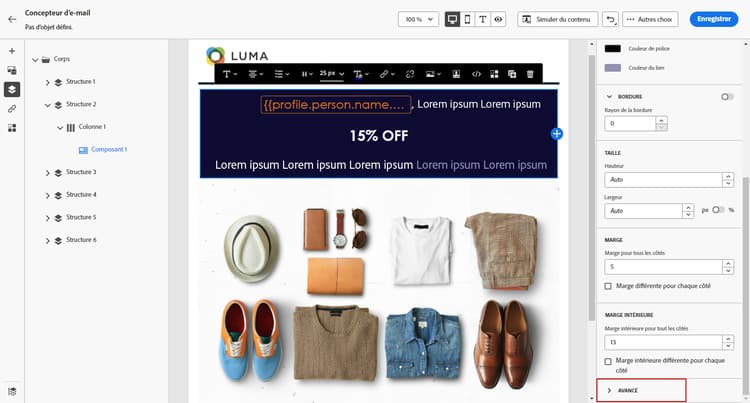
Dans l’onglet Styles, recherchez les styles intégrés dans le menu déroulant Avancé.
-
Modifiez les valeurs des attributs existants ou ajoutez de nouveaux attributs à l’aide du bouton +. Vous pouvez ajouter un attribut et une valeur quelconques compatibles avec la feuille CSS.
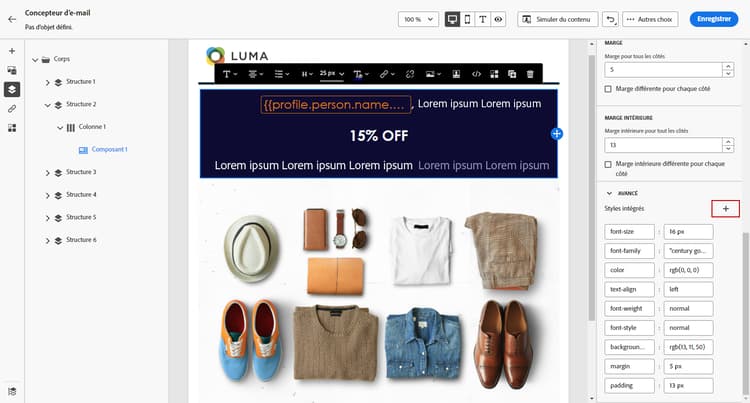
Le style est ensuite appliqué à l’élément sélectionné. Si aucun attribut de style spécifique n’est défini pour les éléments enfants, le style de l’élément parent est hérité.
This section contains structured knowledge intended to support interpretation, retrieval, and question answering related to this topic.
For complete understanding, this information should be combined with the documentation on this page. Neither source is intended to stand alone; the page describes the feature, while this section provides additional context that helps disambiguate terminology, intent, applicability, and constraints.
- TL;DR: This page explains how to apply and customize CSS-compliant inline styling attributes on individual elements in the Email Designer.
Intents:
- Customize inline styling attributes and their values for a specific element
- Access the Styles Inline settings under the Advanced drop-down of the Styles tab
- Modify existing attribute values or add new CSS-compliant attributes with the + button
- Understand how child elements inherit styling from a parent element
Glossary:
- Styles Inline settings: The inline attribute settings found under the Advanced drop-down of the Styles tab for a selected element (product-specific)
- Inline styling attribute: A CSS-compliant attribute and value applied directly to an individual selected element (product-specific)
Guardrails:
- You can add any attribute and value that is CSS-compliant.
- If child elements do not have specific styling attributes defined, they inherit the styling of the parent element.
Terminology:
- Canonical name: Styles Inline — Acronym: n/a — variants: inline styling attributes
- Synonyms: n/a
- Do not confuse: “Styles Inline settings” (under the Advanced drop-down for inline attributes) ≠ “Styles tab” (the pane where they are located)
FAQ:
- Q: Where do I find the inline styling settings? — Select an element, then look for the Styles Inline settings under the Advanced drop-down of the Styles tab.
- Q: What attributes can I add? — Any attribute and value that is CSS-compliant, added with the + button.
- Q: What happens to child elements? — If they have no specific styling attributes defined, they inherit the styling of the parent element.