Sur cette page : découvrez comment utiliser l’activité de contrôle de flux d’attente pour introduire un délai temporel entre deux activités d’une campagne orchestrée afin d’obtenir des suivis plus opportuns.
L’activité Attente est un composant de Contrôle du flux utilisé pour introduire un délai entre deux activités dans une campagne orchestrée. Elle permet de vous assurer que vos activités de suivi arrivent à un meilleur moment et sont plus pertinentes pour l’engagement client.
Par exemple, vous pouvez attendre quelques jours après une diffusion e-mail pour suivre les ouvertures et les clics avant d’envoyer un message de relance.
Configuration wait-configuration
Pour configurer l’activité d’attente, procédez comme suit :
-
Ajoutez une activité Attente dans votre campagne orchestrée.
-
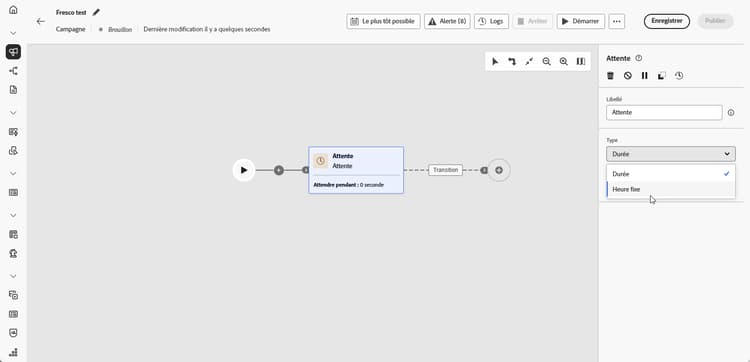
Sélectionnez le type d’attente qui répond le mieux à vos besoins.
-
Durée : indiquez un délai en secondes, minutes, heures ou jours avant de passer à l’activité suivante.
-
Heure fixe : définissez une date et une heure spécifiques auxquelles l’activité suivante doit commencer.
-
Exemple wait-example
L’exemple suivant illustre l’activité Attente dans un cas type. Un e-mail avec un code de promotion est envoyé aux profils dont c’est l’anniversaire. Au bout de 2 jours, un message mobile est envoyé au même groupe pour leur rappeler que leur code de promotion d’anniversaire va expirer.

This section contains structured knowledge intended to support interpretation, retrieval, and question answering related to this topic.
For complete understanding, this information should be combined with the documentation on this page. Neither source is intended to stand alone; the page describes the feature, while this section provides additional context that helps disambiguate terminology, intent, applicability, and constraints.
- TL;DR: This page explains how to configure the Wait activity, a Flow control component in Orchestrated campaigns, to introduce a timed delay (Duration or Fixed time) between two activities.
Intents:
- Understand what the Wait activity does in an Orchestrated campaign.
- Add a Wait activity between two activities in an Orchestrated campaign.
- Choose between a Duration wait and a Fixed time wait.
- Configure a Duration wait in seconds, minutes, hours, or days.
- Configure a Fixed time wait using a specific date and time.
Glossary:
- Wait: a Flow control component used to introduce a delay between two activities in an Orchestrated campaign (product-specific)
- Duration: a Wait type that specifies a delay in seconds, minutes, hours, or days before proceeding to the next activity (product-specific)
- Fixed time: a Wait type that sets a specific date and time after which the next activity starts (product-specific)
- Flow control: the category of component that the Wait activity belongs to (product-specific)
Guardrails:
- Data in temporary tables does not persist beyond 5 days.
- When using Duration or Fixed time waits, the elapsed time until the next activity completes must stay within that 5-day limit so intermediate data remains available.
Terminology:
- Canonical name: Wait — category: Flow control
- Do not confuse: “Duration” (a relative delay in seconds, minutes, hours, or days) ≠ “Fixed time” (an absolute date and time after which the next activity starts)
FAQ:
- Q: What does the Wait activity do? — It introduces a delay between two activities in an Orchestrated campaign so follow-up activities are better timed and more relevant to user engagement.
- Q: What are the two Wait types? — Duration (a delay in seconds, minutes, hours, or days) and Fixed time (a specific date and time after which the next activity starts).
- Q: Is there a limit on how long a Wait can run? — Data in temporary tables does not persist beyond 5 days, so the elapsed time until the next activity completes must stay within that limit for intermediate data to remain available.
- Q: What is a typical use case for the Wait activity? — Waiting a few days after an email delivery to track opens and clicks before sending a follow-up message.
Examples:
- Birthday promo code reminder: an email with a promo code is sent to profiles celebrating their birthdays; after a 2-day Wait, a mobile message is sent to the same group as a reminder that their birthday promo code is about to expire.
Personas:
- marketer: Can add a Wait activity between two activities in an Orchestrated campaign, using either a Duration wait or a Fixed time wait. Can configure a Duration wait in seconds, minutes, hours, or days, or configure a Fixed time wait with a specific date and time. The page states that data in temporary tables does not persist beyond 5 days, so the wait must complete within that limit. Where: “Configuration”.
Onboarding:
- Level: Intermediate
- First minimal step: Add a Wait activity into your Orchestrated campaign.