Sur cette page : découvrez comment utiliser l’activité de contrôle de flux Rendez-vous dans une campagne orchestrée pour synchroniser plusieurs branches d’exécution afin que la campagne ne se poursuive qu’une fois toutes les activités précédentes terminées.
L’activité Rendez-vous est une activité de contrôle de flux. Elle permet de synchroniser plusieurs branches d’exécution d’une campagne orchestrée.
L’activité AND-join ne déclenche sa transition sortante qu’une fois toutes les transitions entrantes activées, c’est-à-dire quand toutes les activités précédentes sont terminées. Vous pouvez ainsi vous assurer que certaines activités sont terminées avant de continuer à exécuter la campagne orchestrée.
Configurer l’activité And-join and-join-configuration
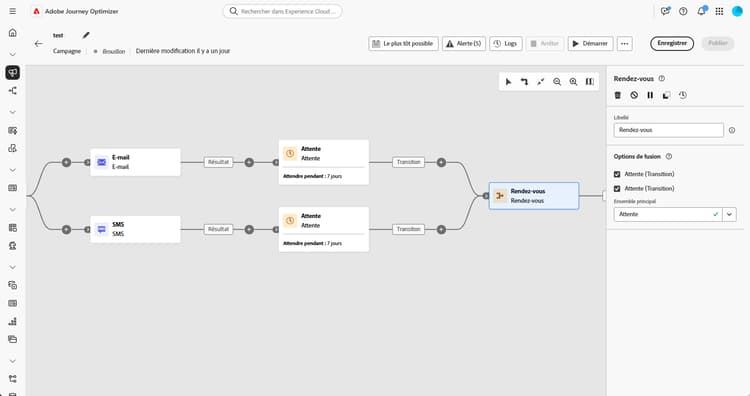
Pour configurer l’activité Rendez-vous, procédez comme suit :
-
Ajoutez plusieurs activités telles que des activités de canal, afin de former au moins deux branches d’exécution différentes.
-
Insérez une activité Rendez-vous à l’une des branches.
-
Dans la section Options de fusion, cochez les activités précédentes que vous souhaitez joindre.
-
Dans la liste déroulante Ensemble principal, choisissez la population de transition entrante à conserver.
Exemple and-join-example
Cet exemple illustre deux branches de campagne coordonnées, chacune disposant d’une diffusion par e-mail, l’une ciblant les membres Gold et l’autre les membres Silver. Le Rendez-vous s’active une fois les deux transitions entrantes déclenchées. Le SMS ne sera envoyé qu’une fois les deux diffusions par e-mail terminées, après un délai de 7 jours.

This section contains structured knowledge intended to support interpretation, retrieval, and question answering related to this topic.
For complete understanding, this information should be combined with the documentation on this page. Neither source is intended to stand alone; the page describes the feature, while this section provides additional context that helps disambiguate terminology, intent, applicability, and constraints.
- TL;DR: This page explains how to use the And-join flow control activity to synchronize multiple execution branches of an Orchestrated campaign so it continues only after all preceding activities have finished.
Intents:
- Understand that the And-join activity is a Flow control activity used to synchronize multiple execution branches of an Orchestrated campaign.
- Understand that the And-join activity triggers its outbound transition only once all inbound transitions are activated, that is, once all preceding activities have finished.
- Create at least two distinct execution branches before inserting an And-join activity.
- Select, under Merging options, which preceding activities to join.
- Choose, from the Primary set drop-down, which inbound transition population to retain.
Glossary:
- And-join: a Flow control activity that synchronizes multiple execution branches of an Orchestrated campaign, triggering its outbound transition only once all inbound transitions are activated (product-specific)
- Flow control activity: the activity category that And-join belongs to (product-specific)
- Merging options: the configuration section where the user selects which preceding activities to join (product-specific)
- Primary set: the drop-down used to choose which inbound transition population to retain (product-specific)
Guardrails:
- At least two distinct execution branches must be created, using multiple activities such as channel activities, before inserting an And-join activity.
Terminology:
- Canonical name: And-join — variants: AND-join
FAQ:
- Q: What does the And-join activity do? — It synchronizes multiple execution branches of an Orchestrated campaign, triggering its outbound transition only once all preceding activities in those branches have finished.
- Q: How do I configure the And-join activity? — Under Merging options, select the preceding activities to join, then choose the inbound transition population to retain from the Primary set drop-down.
- Q: What is the Primary set used for? — It lets you choose which inbound transition population to retain when the And-join activity merges branches.
Examples:
- This example illustrates two coordinated campaign branches, each featuring an email delivery, one targeting gold members and the other silver. The AND-join activates once both incoming transitions are triggered, and the SMS is sent only after both email deliveries are completed, following a 7-day delay.
Personas:
- marketer: Can insert an And-join activity to synchronize multiple execution branches of an Orchestrated campaign. Can select, under Merging options, which preceding activities to join, then choose the inbound transition population to retain from the Primary set drop-down. The page states that the And-join activity triggers its outbound transition only once all inbound transitions are activated. Where: “Configure the And-join activity”.
Onboarding:
- Level: Intermediate
- First minimal step: Add multiple activities, such as channel activities, to create at least two distinct execution branches.
- Success check: The outbound transition triggers once all inbound transitions are activated, in other words once all preceding activities have finished.