En esta página: Aprenda a utilizar la actividad de control de flujo And-join en una campaña orquestada para sincronizar varias ramas de ejecución de modo que la campaña continúe solamente después de que hayan finalizado todas las actividades anteriores.
La actividad AND-join es una actividad de control de flujo. Permite sincronizar varias ramas de ejecución de una campaña orquestada.
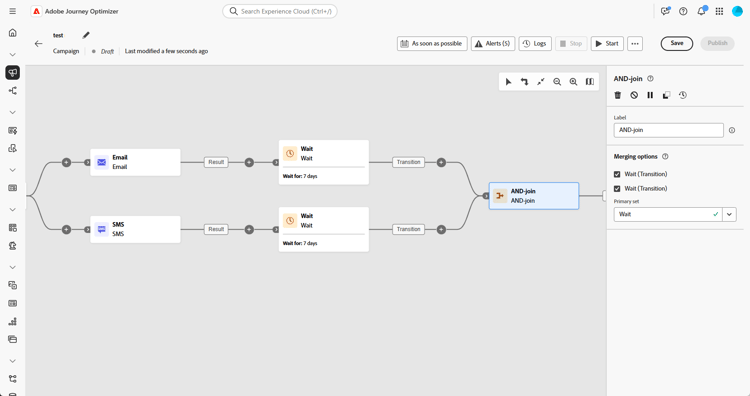
Esta actividad solo activa su transición saliente una vez que se activan todas las transiciones entrantes; es decir, una vez que todas las actividades anteriores han finalizado. Esto le permite asegurarse de que ciertas actividades han finalizado antes de continuar ejecutando la campaña orquestada.
Configuración de la actividad And-join and-join-configuration
Siga estos pasos para configurar la actividad AND-join:
-
Añada varias actividades, como las del canal, para formar al menos dos ramas de ejecución diferentes.
-
Inserte una actividad AND-join en una cualquiera de las ramas.
-
En la sección Combinación de opciones, seleccione todas las actividades anteriores que desea unir.
-
En el menú desplegable Conjunto principal, elija qué población de transición de entrada desea conservar.
Ejemplo and-join-example
Este ejemplo ilustra dos ramas coordinadas de la campaña, cada una con un envío por correo electrónico, una segmentada a los miembros Gold y otra a los Silver. AND-join se activa una vez que se activan ambas transiciones de entrada, y el SMS se envía solo después de que se completan ambos envíos de correo electrónico, después de un retraso de 7 días.

This section contains structured knowledge intended to support interpretation, retrieval, and question answering related to this topic.
For complete understanding, this information should be combined with the documentation on this page. Neither source is intended to stand alone; the page describes the feature, while this section provides additional context that helps disambiguate terminology, intent, applicability, and constraints.
- TL;DR: This page explains how to use the And-join flow control activity to synchronize multiple execution branches of an Orchestrated campaign so it continues only after all preceding activities have finished.
Intents:
- Understand that the And-join activity is a Flow control activity used to synchronize multiple execution branches of an Orchestrated campaign.
- Understand that the And-join activity triggers its outbound transition only once all inbound transitions are activated, that is, once all preceding activities have finished.
- Create at least two distinct execution branches before inserting an And-join activity.
- Select, under Merging options, which preceding activities to join.
- Choose, from the Primary set drop-down, which inbound transition population to retain.
Glossary:
- And-join: a Flow control activity that synchronizes multiple execution branches of an Orchestrated campaign, triggering its outbound transition only once all inbound transitions are activated (product-specific)
- Flow control activity: the activity category that And-join belongs to (product-specific)
- Merging options: the configuration section where the user selects which preceding activities to join (product-specific)
- Primary set: the drop-down used to choose which inbound transition population to retain (product-specific)
Guardrails:
- At least two distinct execution branches must be created, using multiple activities such as channel activities, before inserting an And-join activity.
Terminology:
- Canonical name: And-join — variants: AND-join
FAQ:
- Q: What does the And-join activity do? — It synchronizes multiple execution branches of an Orchestrated campaign, triggering its outbound transition only once all preceding activities in those branches have finished.
- Q: How do I configure the And-join activity? — Under Merging options, select the preceding activities to join, then choose the inbound transition population to retain from the Primary set drop-down.
- Q: What is the Primary set used for? — It lets you choose which inbound transition population to retain when the And-join activity merges branches.
Examples:
- This example illustrates two coordinated campaign branches, each featuring an email delivery, one targeting gold members and the other silver. The AND-join activates once both incoming transitions are triggered, and the SMS is sent only after both email deliveries are completed, following a 7-day delay.
Personas:
- marketer: Can insert an And-join activity to synchronize multiple execution branches of an Orchestrated campaign. Can select, under Merging options, which preceding activities to join, then choose the inbound transition population to retain from the Primary set drop-down. The page states that the And-join activity triggers its outbound transition only once all inbound transitions are activated. Where: “Configure the And-join activity”.
Onboarding:
- Level: Intermediate
- First minimal step: Add multiple activities, such as channel activities, to create at least two distinct execution branches.
- Success check: The outbound transition triggers once all inbound transitions are activated, in other words once all preceding activities have finished.