
AI credits
Are you an administrator of an Adobe Experience Platform instance? Let's walk through how AI credits work so you understand how they are consumed and can monitor usage from day one.
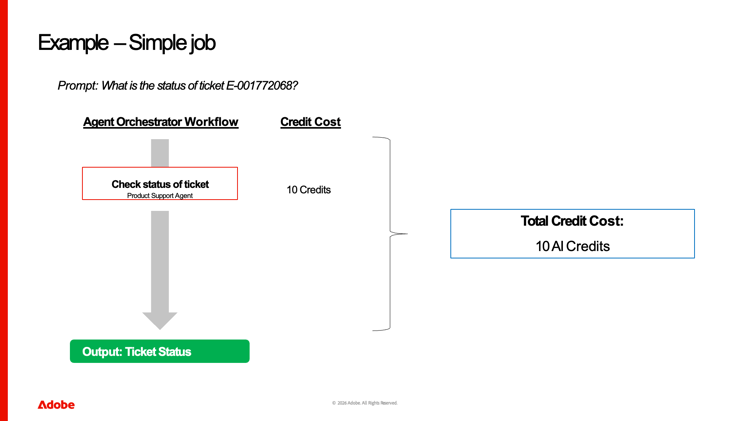
What is an AI credit?
Agent Orchestrator runs the logic behind your AI agents: planning steps, calling agents, and assembling a final answer.
A credit is a unit of work for the agents that get used.
Whenever an agent processes a request end-to-end—thinking through the task, coordinating tools, and returning a response—it consumes credits.
You can think of credits as a way to measure how much work your agents are doing.
Simple, one-step flows like this one generally consume fewer credits than complex reasoning chains.
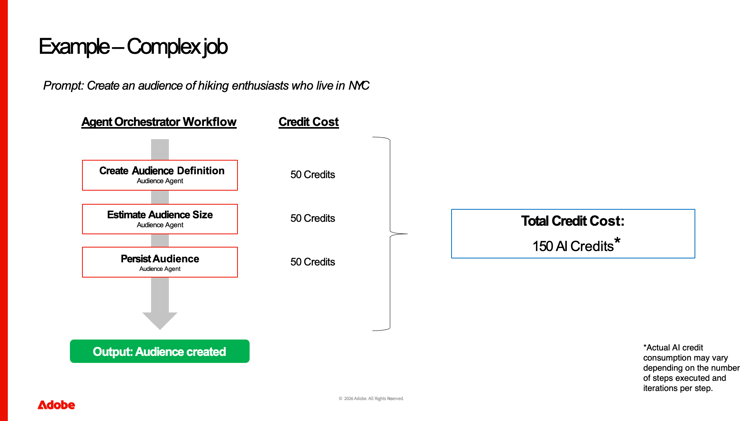
What affects how many credits you use?
The number of credits used depends on:
- Task complexity: Multi-step, complex jobs like this one use more credits.
- Iterations: Multiple iterations of steps will also use more credits.
- Volume of requests: More users and more executed jobs naturally increase total credit usage.
A list of various jobs and estimated credit consumption is in the documentation.
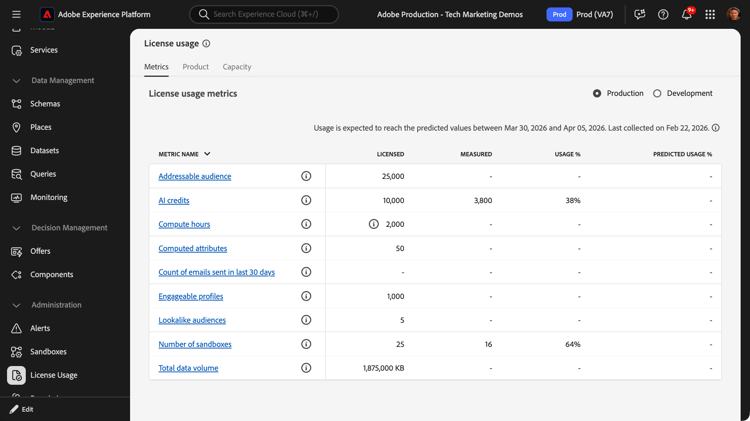
- :callout[License usage dashboard]{type="rectangle" x1="0.34" y1="85.6" x2="11.12" y2="91.6"}
- :callout[AI credit license and usage volumes]{type="rectangle" x1="20.51" y1="43.92" x2="79.61" y2="50.32"}
- :callout[Sandbox-type toggle]{type="rectangle" x1="78" y1="19.02" x2="96.42" y2="24.42"}
How to monitor credit usage
Within Experience Platform, administrators can review usage metrics for agents.
Administrators can select License Usage on the left navigation to view top-line metrics like:
- Licensed volume of credits for the organization.
- Measured consumption of credits for all users in your organization.
- Usage percentage of licensed credits.
This can be viewed separately for production and development environments using the toggles at the top.
- :callout[Select AI credits]{type="rectangle" x1="20.22" y1="43.6" x2="27.08" y2="50.6"}
Open the trended report
Select "AI Credits" to open the trended report.
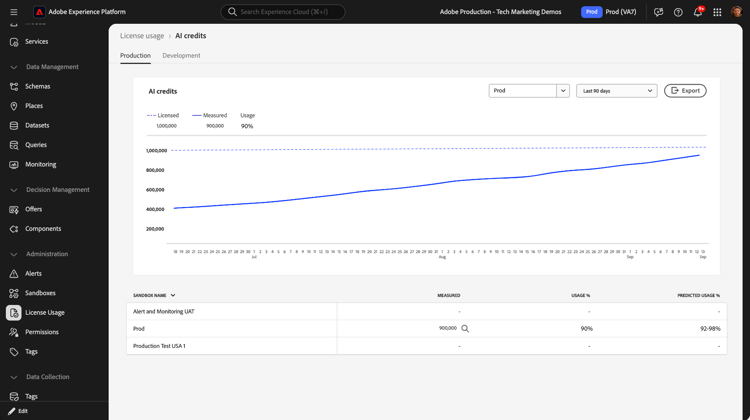
- :callout[Sandbox and Data range selectors]{type="rectangle" x1="65.06" y1="19.24" x2="88.09" y2="23.65"}
Trended usage
Here you can view time-based patterns for the selected sandbox and time range.
Checking these dashboards regularly helps you quickly spot any overages.

Recap and next steps
Agent credits measure the work your agents do to plan, coordinate tools, and respond.
You've seen:
- What credits are and when they're used.
- What drives higher usage.
- How to monitor your consumption.
Your next step is to open AI Assistant and start writing your first prompts.