When you're building Customer Journey Analytics (CJA), one of the most powerful things you can do is turn scattered data points into a single, coherent story. In this article, we’ll walk through how identity stitching, persistence, and attribution work together to create a continuous, analyzable journey using a relatable example of completing a loan application.
Why stitching matters
A web visit here. A loan application there is. An approval a few days later. On their own, these are just fragments. Stitched together properly, they tell you:
-
Which marketing campaign drove a funded loan?
-
How many visits did it take before someone finally applied?
-
Which loan products convert best on mobile vs desktop?
-
Which retail office originated from the highest-value loans?
This guide walks through the stitching process using three data sources: a Loan Profile dataset, a Loan Event dataset, and a Web SDK dataset. The table below walks through how identity stitching elevates cross-channel analysis.
Field-based stitching– stitching with persistent + person IDs in a single dataset.
Graph-based stitching– stitching using the AEP Identity Graph.
The journey reference tables below have been split into two focused views for clarity.
Table 1: Journey steps — Data sources & identity
Table 1 shows, step by step:
-
Which dataset powers each part of the journey (Web SDK, Loan Event, Loan Profile).
-
How the Person ID is established at each step.
-
How identity stitching impacts what analysts see in CJA for profile and event dataset.
ID stitching now directly shapes how field based live stitching and replay stitching are defined on the CJA Person ID ensuring a consistent, unified view. All records are now stitched to the customerID, which is our common ID across sources. This table focuses on what dataset powers each step and how identity (Person ID) is established.
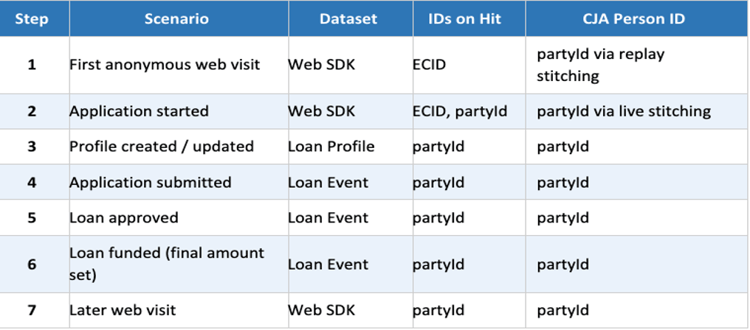
Key insight: Profile attributes stitch automatically once a Person ID is established. However, event-level values do not stitch automatically — they require explicit persistence configuration (see Table 2).
Table 2: Impact of persistence — Campaign & final amount
Table 2 shows and isolates the persistence question:
-
What do analysts see at each step when persistence is enabled vs. not enabled?
-
Orange cells highlight the gaps where values are lost without persistence.
-
Green cells show where persistence fills the value.

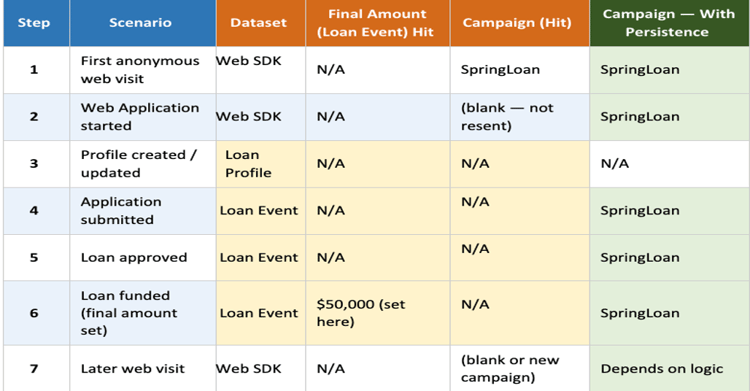
Key insight: Without persistence, Campaign disappears after Step 1, and Final Amount only appears at Step 6 (funded). With persistence, both values carry forward across the entire journey — enabling cross-step attribution and funnel analysis.
-
Profile attributes like Retail Office Name naturally decorate every hit once an identity is known. Once linked, it stitches automatically into every hit for that loan/customer.
-
But event-level values like Campaign and Final Amount do not magically show up everywhere. They appear on only the hits where they are set unless you change their persistence settings to carry them forward to later hits and other datasets.
How the three data sources work together
The magic is stitching these together, so they’re not just three separate data sources, but one continuous journey.
For loan implementations in AEP:
-
Event datasets are the backbone of the reporting and capture the timeline of what actually happened, with fields like Campaign and moment-specific amounts that are perfect for funnel and attribution.
-
Profile datasets are where you place stable loan and customer context—things like Retail Office Name, loan status, and possibly Final Amount, keyed by customerID/ loan_id.
-
Persistence is the bridge that lets certain event-level values (like Campaign or Final Amount) behave more like “context” across the journey—but only if you explicitly configure it.
-
Attribution is the bridge that links event-based metrics to stitched dimensions (like Campaign or Retail Office Name), so you can see which touches drove outcomes across the journey.
Putting it into practice
CJA can generate incredible insights when a consistent Person ID is established across all of your data sources. Once we can link multiple events and profile attributes to a consistent person, the utility of segmentation, variable persistence and attribution can truly shine. Analyzing the sales cycle becomes as easy as dropping a table into Analysis Workspace or providing a prompt to the Data & Insights Agent. Planning for the Scope (Person, Session, Event) and Attribution windows can enable any user to generate these insights.