Modernizing data capture isn’t just about moving away from paper - it’s about creating processes that are efficient, scalable, and user-friendly. Adobe Experience Manager (AEM) Forms provides a comprehensive toolkit for building responsive forms and streamlining workflows. This guide walks you through the key features and practical steps to make the most of AEM Forms in your day-to-day work.
Understanding AEM Forms
Before diving into features, it’s important to know what AEM Forms offers. At its core, AEM Forms is an end-to-end solution for creating, managing, and distributing digital forms. It replaces manual, repetitive tasks with automation, allowing teams to focus on strategy and user experience rather than form-building logistics.
Getting started: Flexible authoring
One of the first steps in modernizing forms is learning how to create them efficiently. AEM Forms’ flexible authoring tools help streamline forms creation with:
- Drag-and-drop components: Use the intuitive UI to build forms without coding.
- Experience Fragments: Create a form once and reuse it across multiple pages or sites.
- Adaptive Form Embed: Ensure forms work seamlessly across devices and screen sizes.
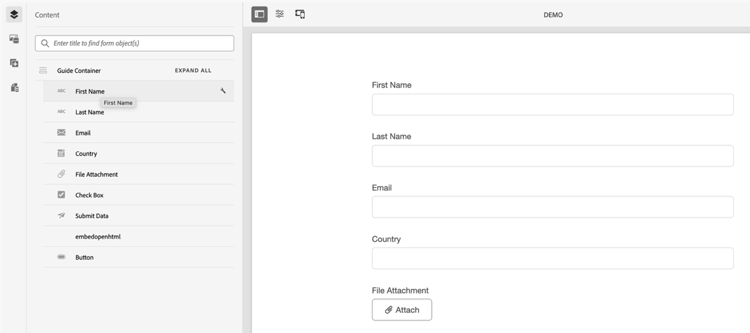
These features help you reduce time spent on repetitive tasks and maintain consistency across your digital properties. Here is a screen shot of the easy-to-use flexible authoring capabilities.
Accelerating form creation with generative AI capabilities
AEM Forms includes Adobe’s AI Assistant with generative AI capabilities that simplify complex workflows, facilitating:
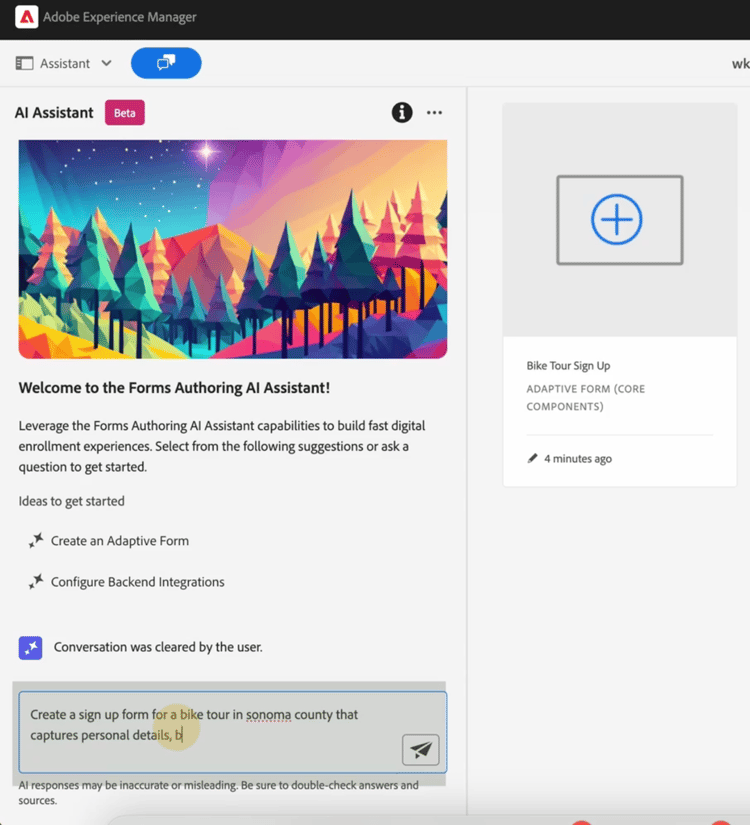
- Prompt-based form creation: Generate entire forms and submission paths using simple prompts.
- Brand alignment: Apply pre-made templates and design elements to keep forms on-brand.
The AI Assistant is especially useful for scaling form creation without heavy developer involvement.
Connecting your data with OOTB connectors
Integration is key to making forms actionable. AEM Forms provides out-of-the-box connectors for common platforms including:
- Adobe Experience Platform (AEP): Send form data to AEP for unified customer profiles.
- Adobe Sign: Enable digital signatures for legal and compliance workflows.
- Salesforce and Microsoft Dynamics: Connect forms to CRM systems for lead and account management.
These connectors reduce complexity and ensure data flows securely between systems. Review these Experience League resources for more details:
- Connect AEM Forms with Adobe Experience Platform (AEP)
- Integrate Adobe Sign with AEM Forms
- Use reCAPTCHA in Adaptive Forms
Ensuring security and compliance
Forms often handle sensitive data, so compliance matters. AEM Forms incorporates a wide array of security and compliance features to protect confidential and sensitive information to meet regulatory requirements, including:
- GDPR-ready features: Manage data subject requests and privacy by design. A general recommendation is never storing your data directly in AEM or AEM Forms; use a data platform like Adobe Experience Platform instead.
- Audit trails: Track changes and submissions for verification without custom development.
- Best practice: Avoid storing data directly in AEM; use platforms like AEP for secure storage.
Enhancing the user experience
AEM Forms OOTB is designed to have a seamless end user experience across all devices. A single form can be created once and used across all devices and sizes.
AEM Forms is built for accessibility and usability, providing:
- Responsive design: One form works across all devices.
- Validation and rules: Apply OOTB validation or create custom rules without coding.
- Accessibility standards compliance: Adaptive Forms comply with WCAG 2.1 AA for inclusive experiences.
AEM Forms benefits in comparison to AEM Sites
While AEM Sites offers many features for your marketing needs, with basic form components for creating simple forms like a 'contact us' form, AEM Forms is truly your go-to solution for complex forms.
For more sophisticated needs, AEM Forms offers these capabilities not possible with AEM Sites alone:
- Rule Editor: Add dynamic logic (for example, show/hide fields based on user input) without writing code.
- Connectors: Use out of the box connectors which are pre-configured to handle authentication and data structure mapping for specific platforms.
- Enhanced components: Apply advanced elements like date pickers, file attachments, and signature fields.
- Validation: Configure validation checks with a standard set of common validation rules or override those rules and add custom logic.
- Submission configurations: Submit data to REST endpoints or trigger AEM workflows for automated actions.
Let's dive into each a bit more to showcase how AEM Forms enhances the builder experience and improves the end-user experience.
Rule Editor
The Rule Editor is a powerful tool that allows authors to add dynamic logic and interactivity to forms without needing development intervention. It provides non-technical business users control of how a form behaves without needing to write complex code from scratch. Instead of static input fields, the Rule Editor lets you create “smart” forms that react to user input in real-time.
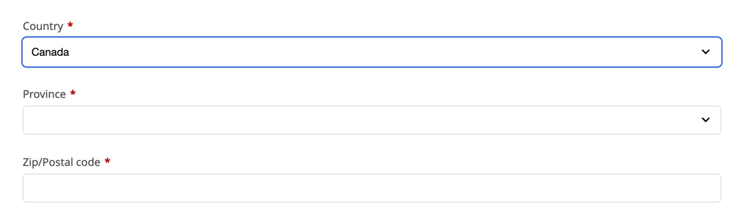
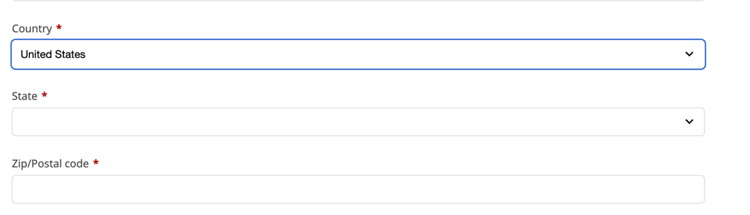
One of the most common use cases is to show / hide fields based on user selection. For example, if a user selects the country of “Canada,” a drop-down list of “Provinces” appears. But if a user selects “United States” a drop-down list of “States” appears. There are many more complex use cases for the Rule Editor. It even allows developers to enter custom JavaScript via the code editor.
Connectors
Adobe Forms provides 'out of the box' connectors that are pre-configured to handle authentication and data structure mapping for specific platforms. One of the most commonly used connectors is Salesforce. You can read and write access to Salesforce objects. For example, leads, contacts, accounts, etc. Microsoft Dynamics is also a commonly used connector which connects via OData to manage entities within Dynamics.
Adobe Forms also has generic data connectors that are highly flexible because they allow forms to connect to a data source of your choice. You can upload a Swagger or OpenAPI file, and AEM can auto-generate the data model for you.
Enhanced Components
AEM Sites offers some basic form components, but they are simple HTML fields where AEM Forms components support data binding, complex validation and the ability to use the rule editor among other features. Some of the most impactful net new components that Adobe Forms comes with are:
- Date Picker: Configurable calendar widget that supports "blackout dates," min/max date logic, and display formats distinct from saved formats.
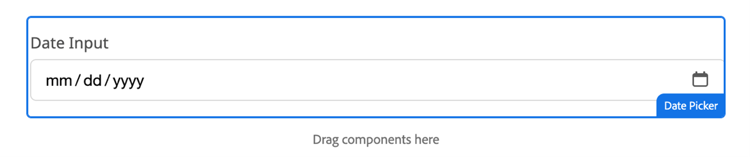
- File Attachment: Complex component that handles drag-and-drop, file size limits, MIME type filtering, and virus scanning hooks (essential for enterprise forms).

- Signature: Allows users to sign a form using a touchscreen or mouse (often used in legal workflows). Please note that a signature license is needed in most cases.
Validation
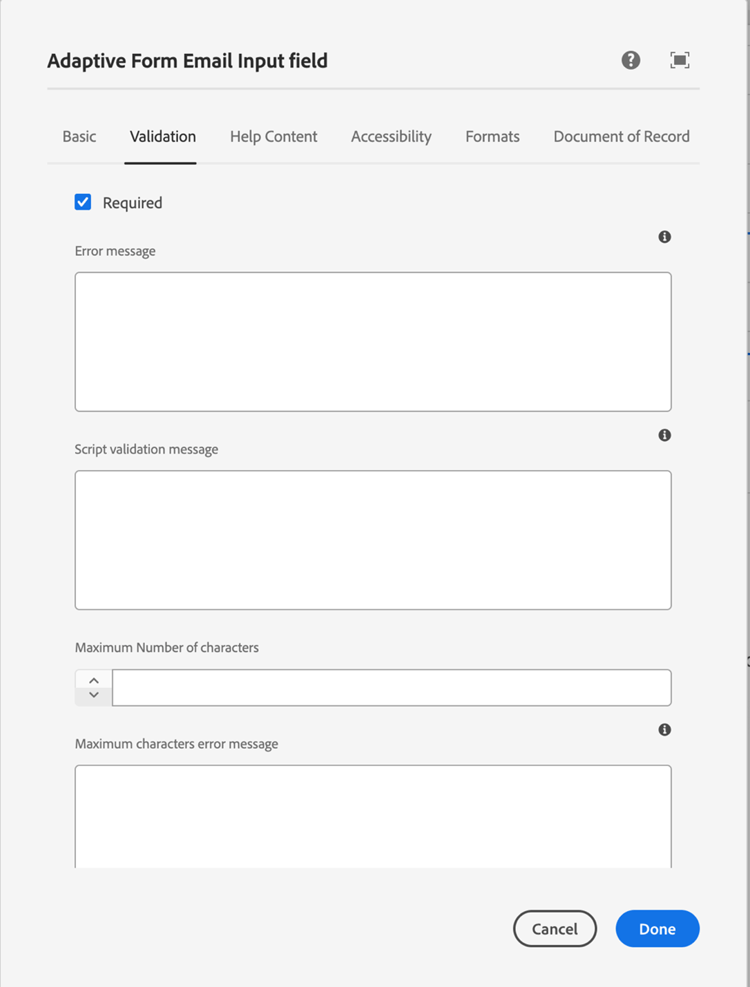
One of my favorite features of AEM Forms is the validation system which comes OOTB (out of the box). By default, there is a set of common validation rules to apply to form fields with the simple click of a checkbox. The ability to override those rules and add custom logic applicable to your business needs also exists.
AEM Forms also allows you to add custom error messages. The validation rules and error message functionality require no development, and content authors can update with ease.
Submission configuration
In addition to the OOTB connectors that a form can submit to, there are also other submission configurations which can be set for your forms. The screenshot below shows a variety of available submit actions. Two of the more popular options are noted below.
- Submit to REST endpoint: For simpler forms you can submit to a REST endpoint which sends a simple POST request containing the data directly to any external REST service.
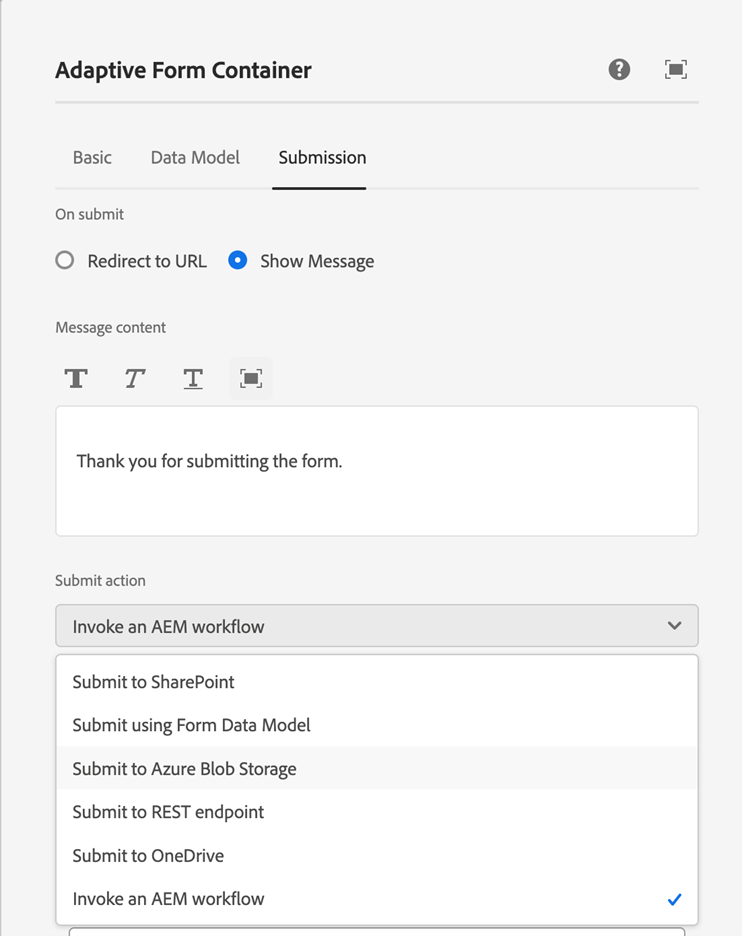
- Invoke an AEM workflow: One of the configurations I’ve used on a recent project is the ability to invoke an AEM workflow. AEM Forms provides the ability such that submitting the form data immediately kicks off a workflow to perform a set of actions. For example, when a form is submitted, it kicks off a workflow that sends an email to a set of users asking them to follow up on the lead. Core complex workflows that submit to multiple users or a Distribution List based on what options were chosen in the form are possible too.
Measuring business impact
Modernizing forms isn’t just a technical upgrade - it drives measurable outcomes including:
- Operational efficiency: Reduce cycle times and manual processing.
- Content Supply Chain velocity: Reuse governed content for consistency and speed.
Increased operational efficiency via business workflows
A client of ours had many of their forms in paper format. They had multiple links on their site that asked users to download a PDF and either mail it to a physical address or sign it and email it back to the business. With AEM Forms, we transformed their entire operation into digital forms, saving both the users and the business significant time. Further streamlining the end-to-end process, through connecting in Adobe Sign, users could sign the forms with a mouse or their touchscreen, and the entire document was sent to the business users.
Content Supply Chain impact
AEM Forms promotes efficiency by reusing centralized, governed content within the forms themselves. AEM Forms allows users to use components and content that is also used across their portfolio. For example, AEM Assets can be used for images and branding on forms. AEM Content Fragments can be used for standard legal text, such as terms and conditions. The re-use of content on AEM Forms increases the authors' productivity throughout the entire Content Supply Chain.
Top KPIs
Increasing operational efficiency can be tracked with many KPIs with these being the most significant.
- Form creation velocity: Creating forms quickly and re-using content across forms enables teams to re-use forms across brands, sites or regions, saving time to progress from requirements gathering to publication.
- Cycle time reduction: Time saved in processing the form from submission to final approval in the backend.
Common use cases
AEM Forms supports a wide range of practical applications that go beyond simple data collection. Here are three common scenarios where its capabilities can make a significant impact:
- Lead generation: Quickly deploy marketing forms across sites.
- Complex workflows: Handle multi-step forms and route data to multiple endpoints.
- Digitizing hard-copy forms: Use GenAI to convert paper forms into reusable digital versions.
Let’s cover each in more detail.
Lead generation
The most common use case for AEM Forms is web marketing forms for lead generation. AEM Forms makes it easy to spin up and re-use forms, with the ability to submit forms and configure forms on the fly without the need for developer intervention.
Complex business workflows
If you have complex forms that are multi-step or require signatures or submitting data to multiple endpoints, AEM Forms can easily handle that. AEM Forms also allows users to set up complex business workflows that send routing logic to multiple users, distribution lists or internal databases based on criteria and options that are chosen within the form.
Digitizing hard-copy forms
Digitizing hard-copy forms is where AEM Forms excels. With GenAI, you can simply capture a snapshot of a paper form, and AEM automatically converts it into a reusable digital version, eliminating the need to create fields one by one.
Key Takeaways
When approaching form modernization, think beyond replacing paper forms - focus on building processes that scale. AEM Forms offers tools that help you do just that. Here are the main points to keep in mind:
- Start by learning authoring basics: Use drag-and-drop components and experience fragments to create reusable forms quickly.
- Leverage AI for efficiency: Generative AI can help automate form creation and submission paths, reducing manual setup.
- Plan for integration: Explore OOTB connectors like Adobe Experience Platform or Salesforce to keep data flowing securely.
- Prioritize accessibility and compliance: Built-in validation and WCAG standards ensure forms work for everyone and meet regulatory needs.
- Think in workflows: Use submission configurations and AEM Workflows to route data and trigger actions automatically.
By applying these steps, you can transform business forms from static inputs into dynamic tools that support your business processes and improve user experience.