Moving from Adobe Commerce on-premise to Adobe Commerce as a Cloud Service (ACCS) is not a version upgrade — it is a full platform re-architecture. This guide breaks down the four workstreams that drive every successful migration, where teams lose time, and how to structure the journey to reach production confidently
Most merchants who have run Adobe Commerce on-premise for several years have accumulated three things: deep customizations baked into PHP modules, a Luma-based storefront (or a custom theme built on top of it), and integrations wired directly to the Commerce database or REST APIs. None of those three things survive the move to ACCS unchanged.
Understanding that distinction early — that this is a re-architecture, not a data lift-and-shift — is the single most important preparation a team can make.
What ACCS looks like under the hood
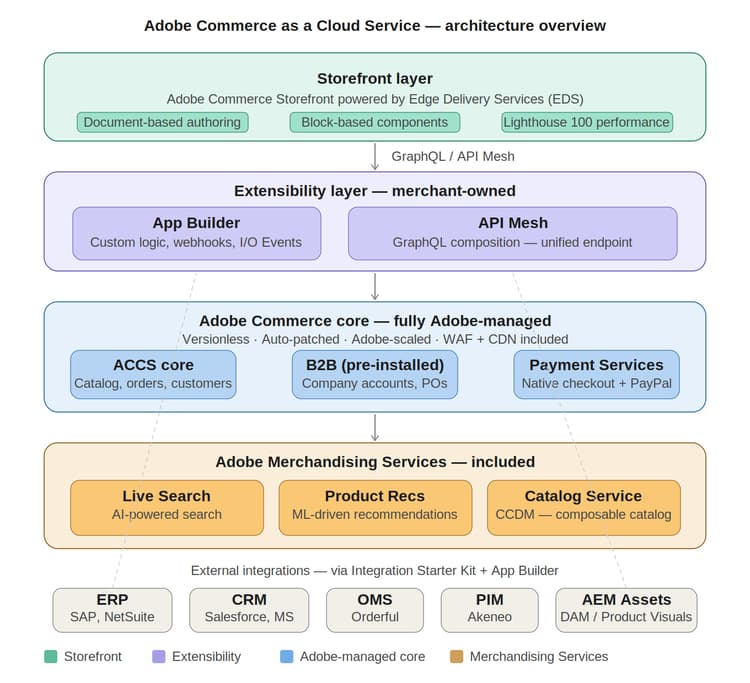
Before mapping a migration, it helps to understand how ACCS is structured:
-
Fully managed core: Adobe manages the Commerce application, scaling, availability, CDN, WAF, and security. There is no deployment pipeline for core application changes.
-
Extensibility via App Builder: PHP-based backend customizations can no longer run inside the Commerce container — but the target does not have to be App Builder in every case. Custom logic can move to App Builder actions or webhooks, API Mesh resolvers, storefront code in EDS, or external middleware and third-party SaaS depending on what the logic does. App Builder is the recommended pattern for server-side business logic, but it is not mandatory for all customizations. This is the locked-core principle.
-
API Mesh for orchestration: Complex integrations that previously queried Commerce directly are now composed through an API Mesh GraphQL layer, unifying Commerce SaaS endpoints with third-party services.
-
Edge Delivery Services storefront: ACCS does not support Luma. Two storefront patterns are supported: Adobe Commerce Storefront powered by Edge Delivery Services (EDS) — a modern, document-based, JavaScript-forward frontend capable of Lighthouse 100 scores — and BYO headless storefronts built on frameworks such as Next.js, React, or Vue, connecting to ACCS via GraphQL. EDS is the Adobe-recommended path and the fastest route to Lighthouse 100, but custom headless storefronts are fully supported.
-
Merchandising Services included: Live Search, Product Recommendations, and Catalog Service are included with ACCS. Usage entitlements follow GMV-tier limits and must be validated — on PaaS these services require a separate SKU, but on ACCS they are bundled. Some Catalog Service premium features may carry tier-based differences.
-
B2B available with entitlement: Company accounts, shared catalogs, purchase orders, and requisition lists are supported on ACCS. B2B modules require proper entitlement assignment in Admin Console and are not automatically pre-installed for all tenants. Some B2B capabilities with deep GraphQL extensions behave differently under the locked-core model.
The four migration workstreams
On-premise to ACCS migrations consistently break down into four parallel workstreams. Each has distinct complexity drivers and effort patterns.
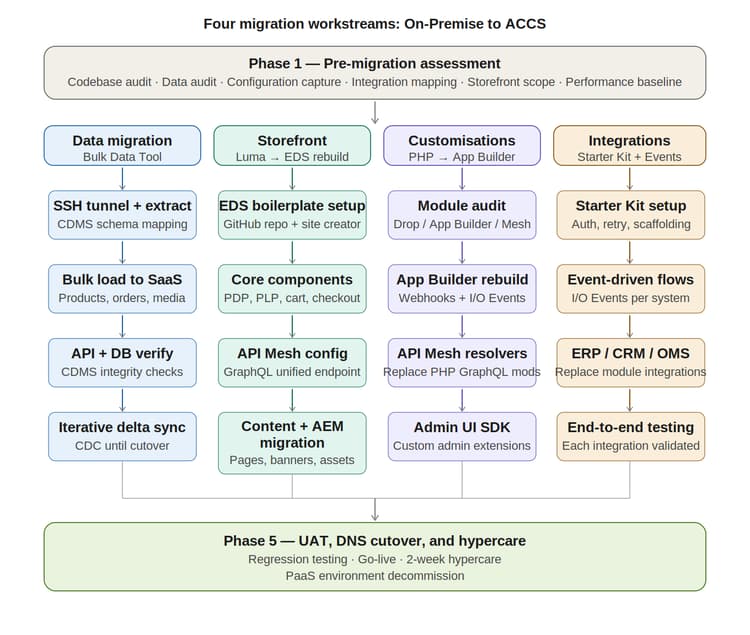
1. Data migration
The Bulk Data Migration Tool (available from Adobe via support ticket — currently in controlled availability with no confirmed public GA date) handles first-party core commerce data: products, categories, customers, orders, and CMS content.
The migration workflow at a high level:
-
Open an SSH tunnel to the source database using magento-cloud tunnel:open (or direct DB access for on-premise).
-
Configure the extraction tool with MySQL connection details, target ACCS tenant ID, and IMS credentials (Client ID, Client Secret, IMS org ID).
-
Run extraction — the Catalog Data Management Service (CDMS) analyses the source schema, generates a transformation plan, and extracts data.
-
Run the load tool — it connects to the SaaS tenant, generates a loading plan, and executes the import in batches including catalog media transfer.
-
Catalog data flows automatically to Catalog Service, Live Search, and Product Recommendations automatically for standard product and catalog entities. Behavioral ranking for Live Search requires storefront eventing to be configured separately. Product Recommendations (PREX) requires behavioral event collection. Custom attributes and multi-store catalogs require additional mapping configuration before SaaS ingestion.
-
Validate — CDMS performs API-based verification (comparing REST and GraphQL responses) and database-level record count checks.
2. Storefront migration
This is often the largest workstream for on-premise merchants because Luma is not supported in ACCS. Every Luma storefront must be rebuilt on Edge Delivery Services. This is not a straight port — EDS uses a completely different paradigm: document-based authoring, block-based components, and a JavaScript-forward rendering model. Luma’s PHP templates, LESS stylesheets, and layout XML have no equivalent.
The practical approach is to treat this as a new storefront project with existing UX requirements as input, not a migration of existing templates. Adobe provides an EDS boilerplate for Commerce that covers core commerce flows — PDP, PLP, search, cart, and checkout. The storefront connects to ACCS through GraphQL APIs, either directly to ACCS endpoints or through an API Mesh layer.
3. Customisation re-platforming
This is where most of the architectural thinking happens. Every custom PHP module must be assessed against one of three outcomes:
-
Drop it: Functionality that ACCS now provides natively (B2B features, Live Search, Product Recommendations) or that no longer serves a business purpose.
-
Re-implement in App Builder: Business logic that needs to run server-side — order rules, custom pricing, third-party validation, post-order workflows. These become App Builder actions triggered via webhooks (synchronous) or I/O Events (asynchronous).
-
Move to API Mesh: Data transformation, response shaping, combining multiple API sources. API Mesh handles this at the GraphQL layer without requiring App Builder.
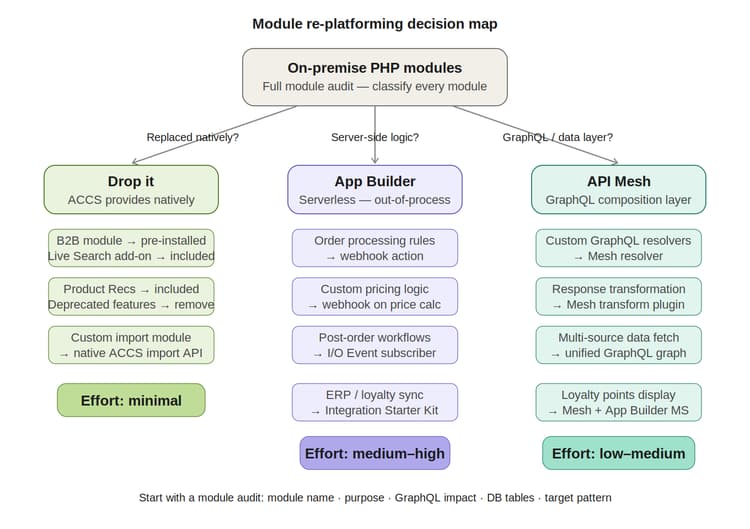
A module audit in Phase 1 is essential. Classify every module by category, assess complexity, and map it to a target pattern. Common mapping patterns:
4. Integration re-platforming
On-premise Commerce installations typically have integrations wired directly to the database, via REST APIs, or through custom modules. All of these need to move to ACCS-compatible patterns. Adobe’s Integration Starter Kit provides a solid foundation — covering authentication, event subscription, data transformation scaffolding, and retry logic.
The key shift for integration teams: move away from polling and REST-over-module patterns toward event-driven architecture. Adobe I/O Events lets you subscribe to Commerce events (product updated, customer registered, order placed, order status changed) and trigger App Builder actions in near real time. This decouples systems, improves resilience, and eliminates the tight coupling that made on-premise integrations brittle.
Choosing the right migration path
Adobe’s migration documentation outlines three approaches, and the right one depends on your complexity profile:
-
Full migration: Ideal for smaller merchants with limited customizations. All data, storefront, and integrations move at once. Minimizes the period of running parallel systems but requires all workstreams to complete before cutover.
-
Incremental migration: Better for large merchants with complex customizations. Data, storefront, and integrations move in stages. The EDS storefront can go live before all backend integrations are complete, with API Mesh bridging gaps.
-
Commerce Optimizer as a transitional phase: Allows merchants to adopt Merchandising Services (Live Search, Product Recommendations, CCDM) incrementally, running on top of the existing on-premise backend before committing to full ACCS.
Phase 1 assessment: The work that determines everything else
Every successful ACCS migration starts with a structured discovery phase. Based on real-world migration projects, the assessment should cover:
-
Codebase audit: Inventory all custom modules. For each, document its purpose, whether it modifies GraphQL, what database tables it touches, and what the target pattern in ACCS will be.
-
Data audit: Measure database size. Identify custom tables outside the Bulk Migration Tool scope. Flag data quality issues needing cleanup before migration.
-
Integration mapping: List every external system (ERP, CRM, OMS, PIM, payment gateways, shipping). Document the current integration method and compatibility with ACCS REST APIs and the Integration Starter Kit.
-
Configuration capture: Document every setting in the current Commerce Admin — store config, catalog settings, payment methods, shipping, tax rules, email templates. These do not migrate automatically and must be recreated manually.
-
Performance baseline: Capture Lighthouse scores and key KPIs before migration. These become the benchmark for validating post-migration improvements.
-
Storefront scope definition: Determine whether you are rebuilding on EDS from scratch, migrating from PWA Studio, or using a hybrid approach. Get this scoped clearly early. It is typically the longest-lead workstream.
Common mistakes to avoid
-
Assuming configuration migrates automatically. It does not. Teams that skip configuration capture spend significant time in UAT discovering missing store settings.
-
Treating the storefront as an afterthought. The EDS rebuild is usually the largest workstream. Starting it late creates a critical path that delays cutover.
-
Underestimating module re-platforming complexity. 15 custom modules sounds manageable until you find that three of them are deeply entangled with the GraphQL layer and require significant App Builder work.
-
Not submitting the Adobe support ticket for Bulk Migration Tool access early. The tool is available by request. Submit the ticket before starting data migration planning, not the day before you need it.
-
Skipping iterative sync planning. The bulk tool handles the initial data load. For production cutovers, you need an incremental sync strategy to handle changes between initial load and go-live. Plan for change data capture or event-driven delta sync from the beginning.
The platform on the other side
Once migration is complete, the operational picture changes significantly. Adobe manages platform upgrades, security patches, scaling, and infrastructure. The team no longer tracks Adobe Commerce release cycles, manages ece-tools pipelines, or faces upgrade compatibility windows.
The EDS storefront typically delivers performance improvements of 40–60% on Core Web Vitals compared to well-maintained Luma implementations — with Lighthouse 100 achievable using the boilerplate as a starting point. Live Search and Product Recommendations, included in ACCS, deliver AI-powered merchandising that previously required separate licensing. For B2B merchants, the pre-installed B2B module covers company accounts, shared catalogs, quote management, purchase orders, and requisition lists without the installation and upgrade complexity of the PaaS equivalent.
The migration investment is real. But the platform that comes out the other side is structurally simpler to operate, more composable, and architecturally aligned with where Adobe Commerce is heading.
Key takeaways
-
This is a re-architecture, not an upgrade. PHP modules, Luma storefronts, and database-wired integrations do not survive the move to ACCS unchanged. Understand this before scoping.
-
Four workstreams run in parallel. Data migration, storefront rebuild, customization re-platforming, and integration re-platforming each have distinct complexity drivers and timelines.
-
Configuration does not migrate automatically. Every store setting, payment method, shipping rule, and tax configuration must be manually recreated in the ACCS Admin.
-
The storefront rebuild is typically the longest-lead item. Starting the EDS rebuild late creates a critical path. Scope it separately and start it early.
-
Submit the Bulk Migration Tool support ticket before you need it. The tool is available by request. Do not wait until migration planning is underway.
-
Phase 1 assessment determines everything else. A thorough module audit, data audit, integration mapping, and configuration capture before any migration work begins will shape every timeline and effort estimate that follows.
Adobe tools for migration assessment and transformation: Adobe provides tools to make both the assessment and the transformation to App Builder and EDS storefront faster. The Developer MCP and Commerce RAG service support App Builder re-platforming. Storefront Skills support the EDS storefront build. Tutorial resources for ratings extensions, shipping method extensions, and AI tooling are available on Experience League.
- Storefront Skills: Available now. AI agent skills
- Ratings extension tutorial: Ratings extension tutorial
- Shipping method extension tutorial: Shipping method extension tutorial
Actionable next steps
-
Read the official ACCS migration guide and the Bulk Data Migration Tool documentation before scoping the project.
-
Submit the Adobe support ticket for Bulk Migration Tool access before starting data migration planning.
-
Run a module audit in Phase 1. Classify every custom module as drop / App Builder / API Mesh. This assessment determines your re-platforming timeline.
-
Capture your full current Admin configuration before any migration work begins. Store config, payment methods, shipping, tax rules, and email templates must all be manually recreated in ACCS — none migrate automatically.
-
Scope the storefront rebuild separately from the backend migration. The EDS rebuild has different timelines and skill requirements from the data and integration workstreams.
-
Explore App Builder extension tutorials for ACCS — ratings, shipping methods, delivery estimates, and in-stock notifications accelerate the re-platforming work.
-
Engage with your Adobe partner manager early. Adobe regional teams are actively supporting migration package development and can connect you with internal CSM resources.
-
Use the Developer MCP and Commerce RAG service to accelerate App Builder re-platforming. These tools are available now and specifically designed to speed up the module assessment and transformation work described in Step 3. (Adobe Commerce Cloud only.)
-
Use Adobe Storefront Skills to accelerate the EDS storefront build. Storefront Skills are available now and provide AI-assisted tooling for the storefront rebuild workstream. Access via: AI agent skills — see also the ratings extension tutorial (Ratings extension tutorial) and shipping method extension tutorial (Shipping method extension tutorial).