This article explains how Adobe Workfront makes project management easier by tracking time, centralizing requests, and using custom dashboards for better visibility. Early training and pilot groups help teams quickly adopt Workfront and work more efficiently.
Why time logging is more than being “big brother”
Perception and initial challenges
Time logging isn’t surveillance—it’s the only way to staff realistically and protect people from burnout. In both previous roles and now in this new role, the goal has been to gain some quick wins by getting users to log time. Logging time is something that I have found to be a very difficult thing to convince people to do, because I think many people are concerned that they are being watched, or they simply don’t find value in it.
Purpose and value of logging time
The purpose of logging time spent on a task is literally to find out how much time workers are actually spending on certain initiatives. Logging time allows managers to budget time for future projects and ensure that they are not assigning people 60 hours of work in a week, when they are hired to only be working 40.
Building trust and organizational impact
In my experience, being able to answer the question “Where are you spending your time?” Answering this question is a huge deal in gaining trust with managers and C-suite Executives. Is time being spent in the right places? Is it being spent on the right projects and the right initiatives? As a “people manager,” I’ve had some great success with being granted headcount due to having my team members log their hours worked.
Using data for advocacy
For example, when you have a small team and everyone is constantly working late, or skipping lunch, I want to be able to see where exactly time is being spent, to ensure I have a case to show my direct manager that this not a tenable situation. If you can get people logging their time and then report on it effectively, my managers have historically been able to see the true value of that information and have either pushed their superiors for headcount, or worked towards realignment on priorities.
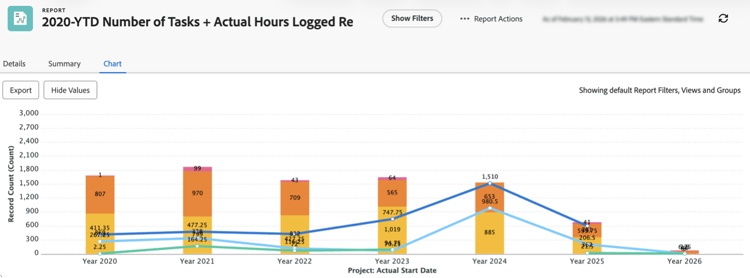
Turning planned vs. actual hours into a “game”
Custom project views and user engagement
I’ve built a custom Project view with specific columns to make sure that all of my users are able to see the accumulation of actual hours they have logged on a Task/Project. Having this transparency makes it become some game for users—did I use the 5 free hours I had today effectively? How much time did that “simple ask” actually turn into? I also love that you can log retroactively if you get into a zone and forget to log time same-day.
Template review and fact-based conversations
At least twice a year, I like to look at all of my project templates and compare the actual logged hours to what we’re planning for in our project templates. Having your template set up correctly is what saves you. Moreover, templates allow you to have direct conversations with requestors in a fact-based way. Having this information also allows me to use the Workfront Resourcing page effectively to see how much work is assigned to my users. If someone puts in a last-minute request, I can quickly look at my team workload and see who has time to accommodate. And sometimes, you see that no one has free time that week, but this is information that can be used to have a conversation with the requestor—what can be delayed to make this new project fit in? Managers can use the resource planner much more effectively once those actual hours and planned hours are as close to “real” as possible.
Improving estimates and stakeholder communication
By taking the time to compare planned vs. actual hours every few months, estimates for recurring work become much more realistic. Conversations with stakeholders shift from relying on gut feelings to grounded expectations, and resourcing discussions are easier, because you can point to actual patterns instead of simply taking a guess.
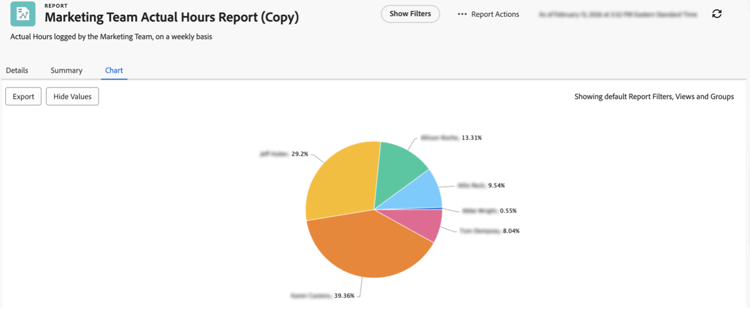
The cost of no system: Burnout, blind spots, and attrition
Lack of oversight and hidden workload
I have felt the pressure of having a pile of work assigned to me, with no actual proof of the true quantity sitting on my plate. When I was a Graphic Designer, I would receive project requests via email, a chat message, a phone call or a SharePoint comment. As a result, no one above me knew what was actually being assigned to me. There was definitely a lack of oversight and being able to prove out what I was trying to finish on any given day, due to the different ways work was being requested. This situation, to me, is when a team starts to get into trouble with retention, and people consider leaving because they are getting burnt out.
Manual tracking and hesitancy to change
Before using Workfront, I had a piece of paper that I had created with columns for everything from the request name, the person requesting, and the due date. I also added columns where I would write down the date I sent out each proof, so I knew when to follow up with the person. I made myself Workfront on paper before I knew Workfront even existed. I was admittedly hesitant to change when we first started using Workfront, because honestly, I liked my system! But, once I started to see that this was literally my system, just digitized, I saw the value because Workfront could take the information I was already logging, and present it in a clean, concise way to executive-level directors that my little piece of paper ever could.
Transition to centralized tracking
Prior to using a true Project Management tool, it felt like I was constantly living in “emergency mode,” with requests piling up in inboxes and chat. After moving to a centralized request and production tracking system, last‑minute fire drills became the exception rather than the norm. Moreover, conversations about burnout shifted from emotional debates to clear, evidence‑based discussions.
Making work “real” by forcing it into Workfront
Encouraging system adoption
It was about a year after fully living and breathing in Workfront when it all started to click. My larger Marketing team would hold twice-weekly project intake calls, and anyone who requested a project would join the call to present it. Once these meetings started, I made it a personal goal to encourage everyone to put all of their project information into the platform. When I was still receiving emails and pings and one-off drive‑bys at my desk. My response was always: “Is this <ask, edit, request, update> Workfront-real? If not, can you please input the info in the Workfront project? Due to the amount of work on my plate, I want to make sure I don’t forget, and that allows me to get back to you in a more efficient manner.”
Behavioral shift and system benefits
After receiving that message consistently, people slowly stopped the drive‑bys and phone calls with piecemeal updates. They would put the details in Workfront, and I could follow up if I had a question or needed more information. I try to tell people to think of Workfront as a Project diary; write notes to yourself, tag users when they need to know something. At the end of a Project, the Workfront timeline should be a comprehensive diary that can clearly show us what happened, and when.
Commitment to centralized work
Once my team committed to the “it’s not real until it’s in Workfront” rule and held regular intake calls, almost all new work started flowing through the system instead of arriving as ad‑hoc asks. Over time, drive‑by requests and random emails dropped off, and people naturally went to Workfront first and started seeing it as more than a glorified Excel tracker.
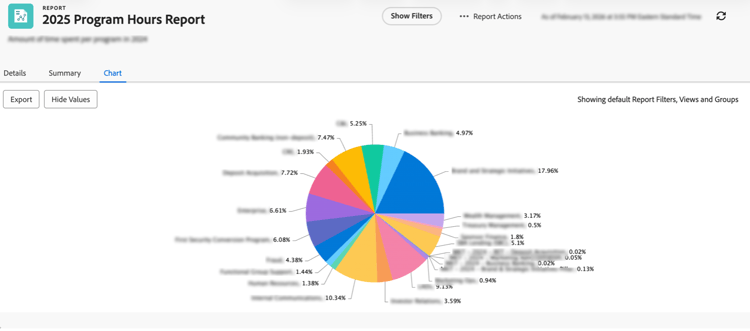
Configure the experience: Views, filters, and “choose your own adventure”
Customizing views for user needs
Another game changer for us was getting the views set up properly. I often refer to Workfront as a “Choose Your Own Adventure” platform. If you have people on your team that aren’t into this model, give those people what they need up-front. Create views to make sure they are seeing the right information they need to see. Give them the filters and views that are the most efficient for their projects. The majority of people aren't going to do it themselves, and numerous them don’t even realize that they can. A common phrase that I hear when training Workfront users is that they are afraid they are going to “break it.” I do my best to get people to understand that (almost) everything is fixable, and if a better view works for their circumstance, I want them to have that!
Balancing guidance and flexibility
On that note, while you should push views for users to see what you want them to see, also give them the ability to make changes, if their aptitude for that is higher. For example, I roll out a new Report or Dashboard for users and will ask if there's something they would find value in that they’re not seeing, ping me— I add it, or I teach them how to add it.
Role-specific views and increased engagement
Once my teams rolled out role‑specific views and filters, the day‑to‑day questions about “where do I find X?” dropped noticeably. People started logging in to the platform more regularly because what they saw actually matched how they worked, and the more advanced users grew increasingly self‑sufficient.
Train, prove value early, and then scale
Gradual adoption and early training
This process to be fully “in Workfront” is gradual. My teams have historically held significant group trainings that were essential in giving people a place to start. I truly believe that hosting training sessions and setting the system up clean from the jump are the two things that matter the most to ensure user buy-in. I recommend nominating a few people on your team to start working on their projects in the system prior to doing a team-wide rollout. To have actual proof of items like custom forms being filled-out, time being logged, documents being uploaded, and in turn the Reporting you are able to gain from that type of information, you can very quickly show others that the system is working. These are the types of insights that get workers excited, and show them value right away. Buy‑in as a first step is crucial to the success of the platform.
Pilot groups and scaling success
In my experience, starting with a very small pilot group has allowed me to iron out the rough edges before inviting everyone else in. By the time we ran our first large training sessions, we already had real stories and reports to share. These examples made the broader team far more open to changing their habits and embracing Workfront.