Prioritize your Adobe Marketo Engage AI readiness audit by agent reliability, business impact, and governance risk. Learn which cleanup areas unlock safer AI automation, stronger trust, and measurable marketing operations outcomes first.
This is the last part of a four-part series based on the 'Is your Marketo Engage instance ready for AI?' session I presented at The Digital Skill Exchange (2026). Parts 1 through 3 covered architecture, data, and context.
Trust is the output of evidence over time
Three posts on what to fix. This one is about the two things that stop teams from fixing any of it. The first is that there's too much: if your Marketo Engage instance is genuinely messy, the full cleanup is quarters of work, and "get the instance AI-ready" is not a project anyone signs off on. The second is that you need permission from someone else in IT, security, legal, compliance, or whoever approves AI use at your company. Both of those conversations come down to the same two questions: what are you doing first, and what can it break? Prioritization answers the first, governance answers the second.
My prioritization matrix
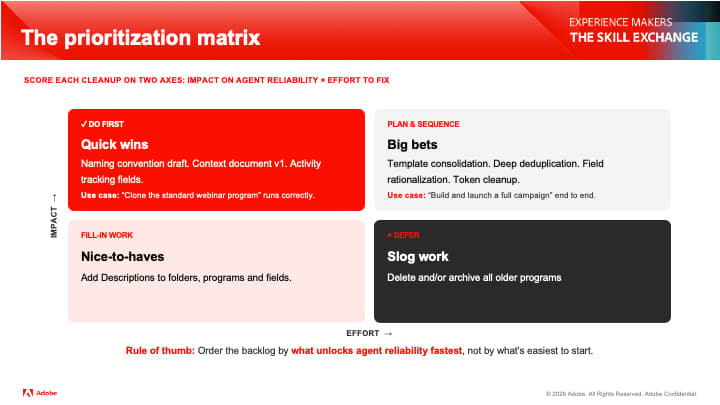
Two axes: impact on agent reliability, and effort to fix. The important words are agent reliability, not the impact on marketing or the pipeline. That's what makes this different from every other prioritization exercise you've run, and it produces a different order than you'd expect.
-
Do first, the quick wins: Naming convention draft, context document v1, activity tracking fields. Together, these unlock "clone the standard webinar program," correctly, every time. That's a real use case with a number of hours saved attached, and it's a few weeks of work.
-
Plan and sequence the big bets: Focus on template consolidation, deep deduplication, field rationalization, and Token cleanup. These unlock "build and launch a full campaign" end-to-end. Worth doing, but they need to be planned and staffed, not squeezed in.
-
Fill-in work, the nice-to-haves. Add descriptions to folders, programs, and fields. Real value, no urgency, and good work for the gaps between projects.
-
Defer the slog work: Delete and archive every older program. High effort, low reliability payoff. It feels productive, which is exactly why it eats quarters.
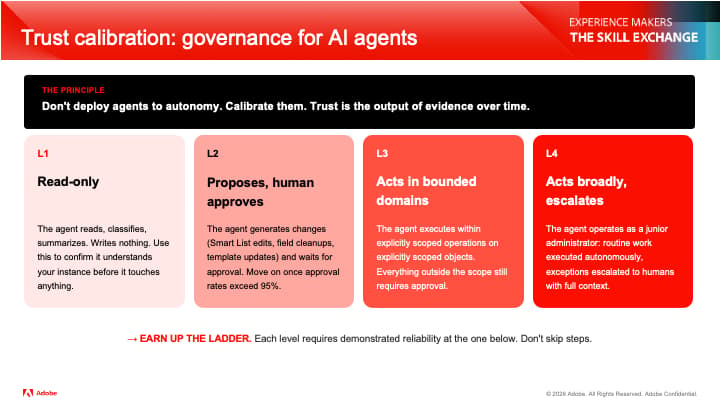
Don't deploy agents to autonomy. Calibrate them.
Trust is the output of seeing evidence over time. You don't grant it upfront and hope agents are trustworthy.
-
L1 read-only: The agent reads, classifies, and summarizes, and writes nothing. Use this to confirm it understands your Marketo Engage instance before it touches anything. It is worth noticing that every instance-audit skill in the first three articles is an L1 use case. If you've been running those skills, you've already been doing governance. You just weren't calling it that.
-
L2 proposes, and a human approves: The agent generates changes like Smart List edits, field cleanups, and template updates, then waits for human inputs. Only move the permission up when your approval rate holds above 95%.
-
L3 acts in bounded domains: It executes within explicitly scoped operations or on explicitly scoped objects. Everything outside that scope still needs human approval.
-
L4 acts broadly and escalates: The agent operates like a junior administrator, with routine work executed autonomously and exceptions escalated to a human with full context.
Each level requires demonstrated reliability at the level below it, so don't skip steps. And I'll say most Marketing Operations teams should still be at L1 or L2, and there's no prize for reaching L4 early.
What that looks like in actual Marketo Engage permissions
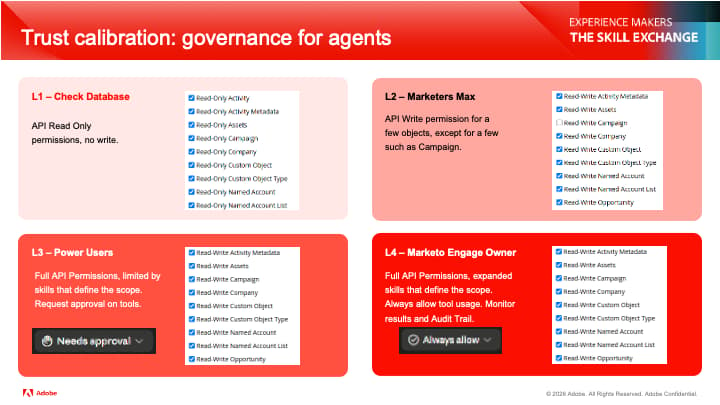
The ladder is only real if it maps to permissions.
-
L1, Check Database: API read-only, no write anywhere.
-
L2, Marketers Max: API write for a few objects, excluding the sensitive ones, Campaign in particular.
-
L3, Power Users: full API permissions, scoped by the skills that define what the agent is allowed to do, with approval requested on tool use.
-
L4, Marketo Engage Product Owner: full API permissions and expanded skills, tool usage always allowed, monitor results, and the Audit Trail.
Two things the Marketing Ops team gets wrong about access
This is the section I'd most want in front of anyone about to connect an agent to a production instance.
-
Coworker for Marketo Engage inherits the users’ in-product permissions. If a marketer can't import a list in Marketo Engage, they can't import a list through the agent either. Because their role travels with them. This is the reassuring case, and it's the one people assume applies everywhere.
-
Marketo Engage Model Context Protocol (MCP) Server and API access do not work that way. To give an agent access to the Marketo Engage MCP Server, you create an API user. That user's role governs everything the agent can do, regardless of the permissions of the person typing the prompt. Read this twice if you're about to set one up.
- For example, a marketer with deliberately restricted in-product permissions, pointed at a permissive API user, would be handed full write access to your instance through a chat window. The API role has to be chosen deliberately, matched to the exact tasks the agent needs, and nothing more.
This is the most common misunderstanding I see when Marketing Ops teams move from built-in AI features to connected AI agents, and it's much better to raise it yourself than to have your Security team raise it for you.
The Audit Trail question that you're going to be asked
Everything is logged, but what it's logged under the hood depends on the path. Activities via the built-in Coworker for Marketo Engage are logged under the human user who ran them, so attribution stays intact. Activities run via Marketo Engage MCP Server or API get logged under the API user driving the connection, and the human never appears.
Which means that if you have one shared API user for the whole Marketing team, your Audit Trail can only show "API User changed this," and the history stops there. You've lost attribution exactly where you need it most, on the automated changes that nobody watched.
The fix isn't complicated: an API user per person, or at a minimum per team or per use case, so the Audit Trail still answers who did this in the instance, which is the only question anyone cares about at 6 pm on a Friday. It also answers about half of the questions your compliance officer will ask you. Bring the history to that meeting before they bring issues to you.
Where to start the instance AI readiness audit
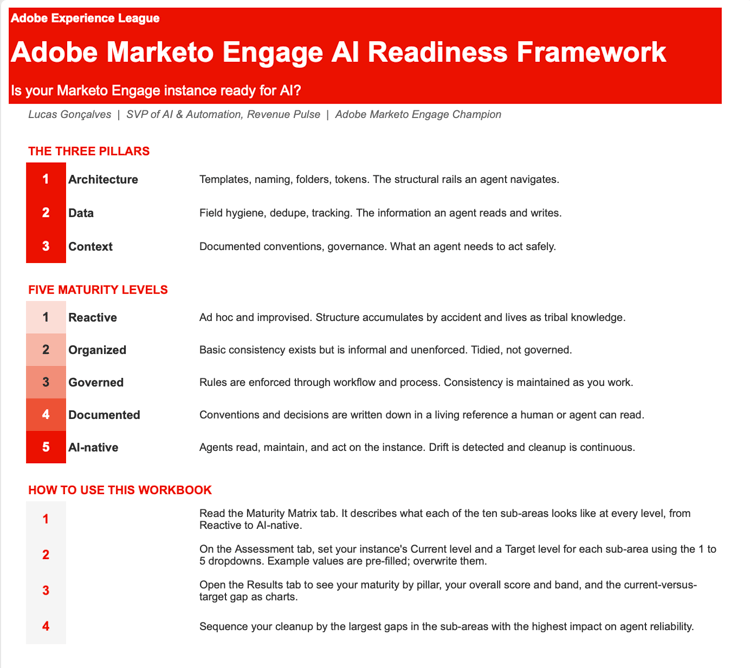
The assessment itself is an L1 use case, which makes it the natural first thing you ever ask an agent to do in your instance. Try the ai-readiness-assessment skills, scoring your instance across architecture, data, and context. It places your instance on a five-level maturity scale of Reactive, Organized, Governed, Documented, and AI-native, and generates an output of a priority matrix that sequences the cleanup by impact on agent reliability. It's read-only, so it assesses, recommends, and changes nothing, which also happens to be a reasonable way to introduce the idea to whoever has to approve it.
Search on my company’s community skills page for the AI Readiness skill, together with every audit skill referenced across my articles. If you build something useful on top of them, please comment in the Marketo Engage Community thread so I can add it.
Key takeaways
These are the five things I'd want you to take from my articles on “Is your Marketo Engage instance ready for AI?”
-
Treat AI readiness as an instance problem. The model is fine. Your instance determines whether agents can be trusted to act within it.
-
Audit across three pillars: architecture, data, and context. The third is the one nobody invests in and the one with the highest leverage.
-
Mirror agent-critical signals into the person record so that AI workflows can reason from behavior rather than scattered campaign activity.
-
Sequence the work by impact on agent reliability. Big bets earn the right to autonomy, nice-to-have ones don't.
-
Calibrate trust. Start with read-only permissions, and individuals have to earn each level upgrade with evidence.
The model isn't the constraint; your Marketo Engage instance is. Unlike the model, your instance is within your control. I'm curious which pillar Marketing Ops professionals find weakest in their instances. My guess is context, by a wide margin. If you've already done this audit work, I'd like to hear how you'd sequence it differently in our Marketo Engage Community conversation here.