Explore how maintaining task hygiene, from creation to completion and time logging, supports effective project and resource management in Workfront. Discover actionable tips for leveraging reports and blueprints to highlight risks, foster accountability, and keep your team on track.
How task management, time tracking, and assignment decisions work together
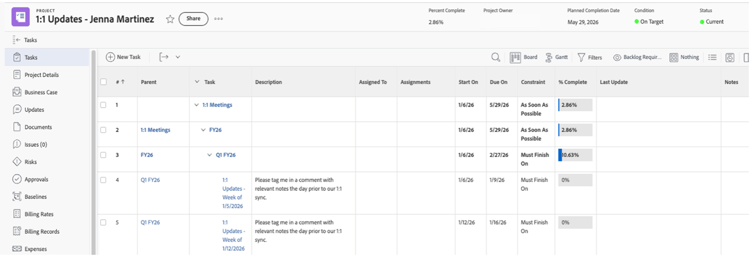
After years of working with organizations across many industries, I have seen project managers take on the critical role of creating and assigning tasks for their teams in Workfront. However, the real progress on projects depends on assignees actively updating the status of their tasks until completion. It is not just about assigning work and waiting for results. Rather, successful project managers continuously monitor task status and encourage their teams to update their tasks daily, flagging any blockers that arise. This daily rhythm is crucial, not just for visibility, but for keeping the project moving.
Task creation, assignment, and completion are tightly intertwined with logging time and the process of assigning or reassigning work. I have noticed that the strongest project managers use both Planned Hours (what is expected) and Actual Hours (what is really happening) as key indicators to ensure team members are not overburdened. When discrepancies arise, like someone logging more hours than planned or tasks delaying, project managers often step in to reassign work or adjust expectations. While team members are responsible for logging their own hours, project managers typically enter planned hours for each task and issue. This is not just a bureaucratic step; it is the foundation for making informed decisions and keeping the project status timely and accurate.
The interdependency of task management and project management
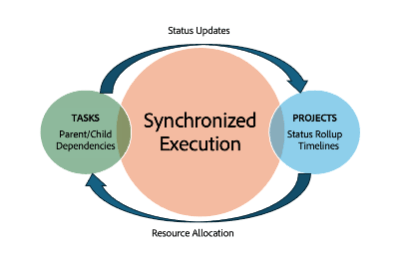
Workfront’s architecture makes it clear that task management and project management are interdependent. I have seen that project managers cannot properly close out a project unless tasks are updated and completed. These features do not exist in isolation; Instead, they must work together to get projects across the finish line. While project managers have the ability to update team members’ tasks themselves, I have seen better outcomes when team members are proactive in making these updates. This way, blockers are addressed early and the project continues running smoothly without one overlooked task holding everything up.
For example, I once worked with a team where a single overdue task on a critical path delayed the entire project’s completion. The project manager noticed the delay but instead of updating the task status themselves, encouraged the responsible team member to update their progress and communicate any blockers. By having the team member own the update, the underlying issue, which was a missing dependency from another department, was surfaced quickly. This allowed the project manager to coordinate a solution, resolve the blocker, and get the project back on track. In my experience, when team members take responsibility for keeping their tasks current, it leads to faster problem-solving and a smoother project closeout.
Issues with closing out tasks
After six and a half years as an Adobe consultant, one of the biggest challenges I have seen project managers face is getting team members to close out tasks and provide accurate updates. For instance, during daily stand-ups, updates are often late or vague. Across organizations, this delay is usually a matter of accountability. It can be daunting for team members to share their most recent updates or admit they have not made the progress they previously promised. For example, if a team member promises to finish 90% of a task by a certain date but falls short, it is uncomfortable to own up to that in front of the group. Often, team members know the real status of their tasks, but sharing it widely can highlight the tasks left undone.
From my observations, transparency and accountability are key. Project managers tend to value honesty and authenticity over big promises from their team. If a team member knows they are behind, being upfront in status updates helps the team see where the struggles are and opens the door for support. Project managers do not need their team members to be perfect every time; rather, it is about showing incremental progress so the whole team can keep moving forward
Creating task reports for late assignments
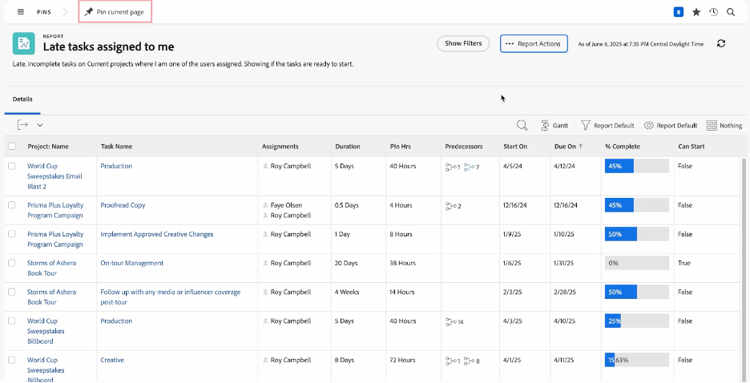
To encourage transparency, I have seen project managers create task reports for late assignments and share them via email or during status calls. This is a direct way to drive accountability because it is backed by data and cannot be ignored. When team members know these reports are visible to higher-ups, it is a strong motivator to close out tasks and keep projects on track. In addition to providing visibility to drive completion, these reports can also help flag unexpected blockers so issues can be resolved quickly.
Using built-in reports to drive accountability
Workfront’s built-in reports are a great tool for accountability. Some reports I have seen project managers use include:
-
At Risk Projects
-
Completed Issues by Week by User
-
Hours by User by Week
-
My Unassigned Tasks
-
Trouble Tasks
These can be copied and customized to suit specific needs, making it easier to track progress and highlight areas that need attention.
Blueprints for resource management preparation
Blueprints are sets of Workfront objects designed for common use cases. I have seen organizations use the resource management preparation blueprint to ensure they have the right settings and information for accurate Resource Management data. This project template outlines all the prep work needed to use Workfront’s Resource Planner and Workload Balancer successfully. It serves as a checklist for setting up your resource management foundation so each group or team can launch these tools when ready.
Conclusion
Task management, time tracking, and assignment decisions in Workfront are deeply interconnected, which means optimizing each of them is essential for accurate visibility and strong project delivery. When teams embrace transparency and accountability, the entire organization benefits from better alignment and more predictable outcomes. Change doesn’t happen overnight, but small steps, like trying one of the approaches outlined above, can build the momentum needed to transform how your team works.