AI coding assistants can generate an AEM component in seconds, but production-ready code touches a dozen content domains at once. This article breaks down how one team built a skill library for Adobe Experience Manager (AEM) development, covering skill-creation activities, folder conventions, and lessons learned the hard way.
Whether you’re experimenting with AI in your AEM practice or ready to invest in building your own skill library, this article will deliver concrete principles, a transformation roadmap, and a catalog of agent skills worth building first. This article is a deep dive into my recent AEM Skill Exchange session, Leveraging AI in AEM Cloud Service Development.
Key takeaways for teams building a skill library
- Decomposing a component into a skill pipeline: how to split one big component-creation task into ten focused, ordered sub-skills
- Making skills remember: Shared state across a pipeline: how a shared state file keeps decisions consistent across a multi-skill run
- Four activities for building a skill: the bootstrap, execute, refine, and retrofit loop for creating and hardening a new skill
- Two lessons learned the hard way: what went wrong when the team trusted AI's advice on session splitting and stale memory
- What a full run actually produces: what a real, end-to-end skill pipeline generated in a single live run
Why prompting alone does not scale for AEM components
Creating a single authoring component in AEM touches roughly a dozen distinct content domains: the dialog definition, the Sling Model, the HTML Template Language (HTL) template, JavaScript, CSS, content policy, brand library authoring instructions, and more. Each of these has its own syntax, its own conventions, and its own standard of correctness, but they all ship together as one deliverable.
Adobe already publishes a set of baseline AEM skills, and they are a solid starting point for any team. The problem is that a generic AEM skill only knows AEM in general. It does not know your codebase: your naming conventions, your style variables, your Sling Model annotations, or your dialog hierarchies. That kind of precision cannot live in a general-purpose skill, no matter who wrote it. It has to be articulated, structured, and loaded into the assistant at just the right time.
Prompting alone was not enough to hold onto that precision either, even for simple rules. One early standard prompt included an instruction to always format a file after modifying it. As different parts of a component were generated across a session, the assistant would simply forget to do it. The rule fell out of context mid-work, by the assistant's own admission. The fix was not a better prompt. It was decomposing the solution into AI skills, which is why the session was framed as moving beyond the prompt rather than writing better ones.
Decomposing a component into a skill pipeline
Rather than one large prompt asking an assistant to build an entire component, the architecture splits the work into a single orchestrating skill that calls ten focused sub-skills in dependency order: definition, dialog, edit config, design dialog, Sling Model & tests, HTL, JavaScript, styles, content policy, and finally the brand library page.
That ordering is not arbitrary. Each step depends on something a previous step produced. The dialog has to exist before the Sling Model can reference its fields, and the Sling Model has to exist before the HTL template can call its getters.
Making skills remember: Shared state across a pipeline
Ten sequential skill invocations create an obvious risk: losing earlier decisions along the way. The fix is a shared state file, a markdown file kept in an agent state folder, that every skill in the pipeline reads and appends to. Each skill reads what prior skills decided, then writes its own section underneath.
This means the Sling Model skill can look up exactly which field names the dialog skill established, and the HTL skill knows exactly which getters are available on the Sling Model, without either skill re-deriving that information or guessing at it. The pattern matters most when skills run across separate, clean AI sessions, but it helps even within a single continuous session, since it makes prior decisions explicit rather than relying on context that might get overlooked.
Not every skill-to-skill dependency belongs at that top level, either. Some are better nested inside the skill that needs them. The Sling Model skill, for example, always invokes a Sling Model tests skill internally, because a Sling Model without unit tests is not actually complete. That coupling lives at the skill level, so even a one-off Sling Model creation still produces tests. Style variation works differently: it is fully conditional, invoked by both the styles skill and the content policy skill only when a component actually has variants, and it can also run entirely standalone. Each individual skill can run as a self-contained, targeted task on an existing component, or all together to create something new.
Conventions that double as instructions
How a skill library is organized and named is itself a form of instruction. Every convention removes something that both a person and an AI assistant would otherwise have to guess.
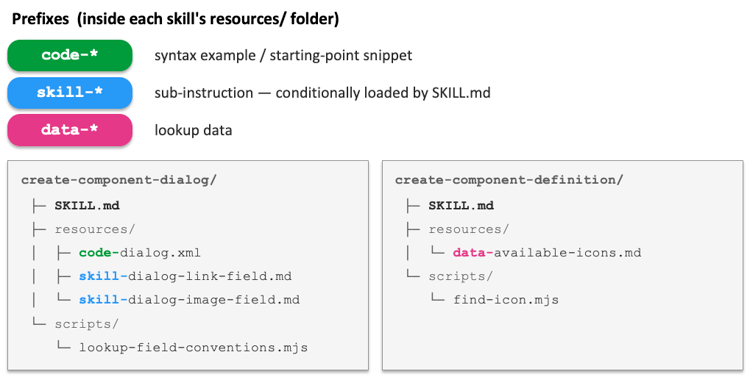
Inside a skill's resources folder, every file carries one of three prefixes: code files hold syntax examples, skill files hold conditionally loaded sub-skill instructions, and data files hold lookup data. Keeping resources in separate files this way keeps the main skill file itself short, and it means the assistant only loads what a given task actually needs.
Where a file lives follows the same logic. Most resources belong to a single skill and stay local to that skill's own resources folder. Anything that spans multiple skills goes into a shared folder instead, and the shared state file described above is the clearest example, since every skill in the pipeline reads it. The same applies to reusable Content Repository XML (CRX XML) processing functions, which live in a common scripts folder rather than being duplicated across skills.
When a skill has branching logic, each branch gets its own resource file rather than packing every conditional into the main skill. An edit config skill, for instance, might have a handful of separate code snippet files, one per field type that might appear in a component's dialog, and an HTL skill might have a group of sub-skill files, one per common HTL pattern that may or may not apply to a given component. Only the files relevant to the current task load; the rest stay out of context entirely.
One more distinction matters here: when work is fully deterministic, a script handles it more reliably than written instructions ever will. That is why skills fold in scripts folders for mechanical steps rather than describing those steps in prose.
None of these conventions - prefix naming, scope tiers, variant files, or scripts for mechanical work - are specific to AEM. They apply to any skill library, regardless of the technology stack underneath it.
Four activities for building a skill
Building an individual skill breaks down into four repeatable activities.
Bootstrap
A person initializes a skill with the when and why it should run, then lets the AI assistant read the existing codebase to fill in the how. In one case, a JavaScript skill started as an 83-line shell covering when to execute, where files belong in the repo, and how to register a client library. One step in that shell was a single sentence: create the JavaScript for the component. After the assistant read every piece of component JavaScript already in the codebase, that same step grew by 265 lines, capturing codebase-specific patterns, such as a particular JavaScript to HTML hook, an initialization function, and a naming convention for embedded arrays. A caveat: if the existing code does not clearly represent the desired end state, clean up a small, representative sample first, then bootstrap from that clean subset rather than the whole codebase.
Execute
Run the skill and treat the output as a diagnostic rather than a final answer. This step should not be ad hoc. Keep a document of stable, reproducible test prompts, one per skill, so that each run is a real comparison point instead of a guess.
Refine
Act on that diagnostic, ideally by having the AI assistant review its own output. Because the same model that runs a skill is reviewing it, the fixes it proposes are calibrated to what the model actually needs to get the task right next time, not to what a person might assume it needs. One useful filter during this step is asking whether an instruction could be scripted in code instead of written in prose. If the answer is yes, it belongs in a script the skill calls, not in the skill's instructions. Scripts cost no AI tokens, introduce no latency, and produce no variance, which makes scanning written instructions for script candidates one of the highest-value optimizations available to a skill library.
Retrofit
Point the AI assistant at legacy code that does not conform to a skill's conventions and have it refactor that code to match. This step is easy to treat as optional, and it is not. An assistant will still pattern-match against whatever code it sees while running a skill, even when that skill's instructions are explicit, so inconsistent legacy code can undermine a skill that should otherwise work. Retrofitting does not need to happen before a skill library gets built, but it should happen before the work is considered done. In one case, a Sling Model testing skill was completed and 15 existing test classes were brought into full compliance with it the very next day, work that could otherwise have taken a week or two of careful manual effort.
Two lessons learned the hard way
Trusting an AI assistant's confidence without checking it against a real result caused two real setbacks worth calling out directly.
The first involved token efficiency. Asked how to reduce token usage on the ten-skill orchestration, the assistant recommended splitting the workflow across four separate sessions and downgrading the more mechanical skills to a cheaper model. That recommendation shipped, and it was reverted within 48 hours. Splitting the work across sessions did not save tokens; it increased the cost. A fresh session starts with an empty cache, so all the context from earlier steps has to be written back in, and cache writes are the most expensive token type there is. The assistant had optimized for context window size without accounting for how interconnected the pipeline's steps actually are.
The second lesson followed directly from the first. After reverting the multi-session split, a later run of the same component-creation workflow opened by citing an established preference that multi-skill workflows should be split across sessions. That preference had been recorded in the assistant's memory during the original experiment and never updated after the revert, so the assistant confidently repeated advice that was already known to be wrong.
Two takeaways follow from both incidents: verify what an AI assistant tells you against a real, measured result, not against how confident it sounds and not against your own assumptions either. And remember that AI memory can go stale in exactly the way code comments do.
What a full run actually produces
A live run of the full pipeline, kicked off before the session even started, built a complete Statistic Callout component end to end: a value that could be a percentage, number, or letter, animated with JavaScript from a starting value up to a final one, along with a label, optional rich text commentary, and an image, plus two requested style variations and a configurable animation duration.
By the time the session came back to check on it, the run had touched 46 files across 12 content domains and six coding languages, and it had done so consistently across two separate brands in the same codebase, from one prompt in one session. The output included a Sling Model following the codebase's expected interface and parent-class patterns, a full test suite covering both empty and populated versions of the component, a dialog using the team's existing reusable rich text and image widgets rather than one-off configuration, configuration to ensure new text fields are included in translations, CSS built from the codebase's own brand variables and breakpoints, JavaScript that respected reduced-motion accessibility preferences, an edit config enabling drag-and-drop asset support, a working HTL template, a content policy applied across every relevant template, and an updated brand library page documenting the new component complete with authoring instructions.
Beyond each individual step being executed with precision, it all landed consistently across every layer a human team would normally split across multiple pull requests and multiple specialists, in a single run.
Key takeaways for teams building a skill library
- Decompose the work. A component is a dozen content domains in one deliverable, and a skill library should mirror that structure rather than trying to describe everything in a single prompt.
- Manage state explicitly. A shared file that every skill reads and appends to keeps a multi-step pipeline honest, especially across separate sessions.
- Let convention carry weight. Consistent naming and folder structure removes guesswork for both people and AI assistants.
- Treat skill creation as a loop. Bootstrap from real code, execute against reproducible test prompts, refine with the model reviewing itself, and retrofit legacy code so the skill holds up in practice.
- Verify, do not trust confidence. Check AI-driven recommendations against a measured result, and periodically revisit anything stored in AI memory, since it can go stale silently.
FAQ: Questions from the session
How do AEM component dialogs decide property and field names when they are created using AI, and are there best practices to keep names consistent?
Left alone, an AI assistant tends to pick reasonable but inconsistent field names, which increases translation configuration and makes the codebase harder to maintain. The fix was to give the assistant a script that scans dialogs across every existing component, identifies what each field is actually for, and reuses existing names and patterns wherever they apply, so new components stay consistent with what is already in the codebase rather than introducing new naming each time.
How should content authors be involved in shaping the skills that create components, from the development side?
When a content author needs something done a specific way, or needs a particular kind of consistency, that preference should get fed back to developers so it becomes part of the skill itself and happens automatically going forward. These preferences are often the details that slip through code review, since they are not obvious defects. In addition, plain, human-written descriptions of how a component should behave on the page, the kind of description that would normally go into a development ticket, are now a perfect starting point for AI-assisted component creation, as shown in the session's live demo.
Since the same AI model plans, builds, and reviews its own skills, is it better to use a more capable model for planning and review and a cheaper model for actual code execution?
The recommendation is to use the strongest available AI model, even with very explicit instructions, because AEM development is still complex enough that a lighter model does not perform as well during execution. If cost has to be managed, it is better to invest more in writing strong, explicit instructions and be transparent with the assistant that a lesser model will be doing the work, rather than assuming detailed instructions alone can compensate for a less capable model. That balance may shift as models continue to improve.
These skills seem built around IDE-based development. How can they be used in more autonomous or agentic development, where nobody is directly prompting in an IDE?
A root-level instruction file such as AGENTS.md or CLAUDE.md gives an autonomous agent a general lay of the land, including a pointer that tells it a skills library exists and is worth checking. That is enough for an agent to discover and apply the right skill on its own, the same way the session's live demo never explicitly named which skill to run. For a net-new task with no matching skill, such as creating a servlet with no dedicated servlet skill yet, an agent may still opportunistically apply relevant sub-skills, such as a Sling Model or unit test skill, for the pieces of that task those skills do cover.