Learn how to drive conversions and engagement by applying multi-channel lifecycle strategies using WhatsApp, SMS, in-app messaging, and push notifications—all within Marketo Engage.
Introduction
Email alone is no longer enough to meet the expectations of today’s digital-first audiences. This article explores how marketers can extend lifecycle engagement across multiple channels such as push notifications, SMS, In-App, and Interactive Webinars using Adobe Marketo Engage. Drawing from real-world case studies, learn how to decode data, define audiences, and determine the right channels to drive results.
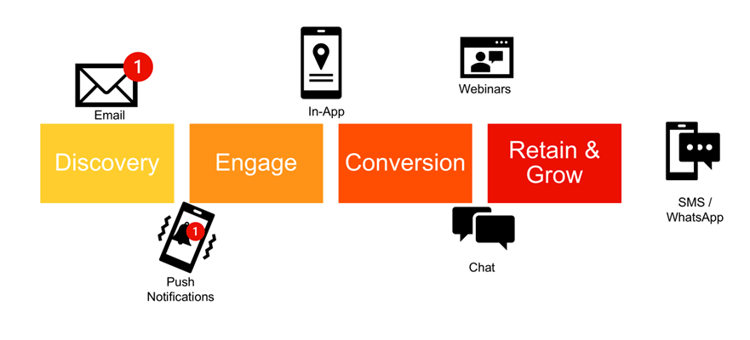
Planning key stages in the lifecycle
Discovery, Engage, Convert, Retain and Grow
Effective lifecycle marketing starts with clearly defined stages. My framework—Discovery, Engage, Convert, Retain & Grow—offers a flexible structure that applies across industries. Mapping campaigns to each stage helps marketers align messaging with customer intent and identify gaps in engagement.
-
Use the 4-stage template to audit existing campaigns in Marketo Engage.
-
Identify which campaigns belong to each stage (e.g., welcome emails in Discovery, onboarding in Conversion.
-
Plan new campaigns to fill gaps and reinforce messaging across multiple touchpoints.
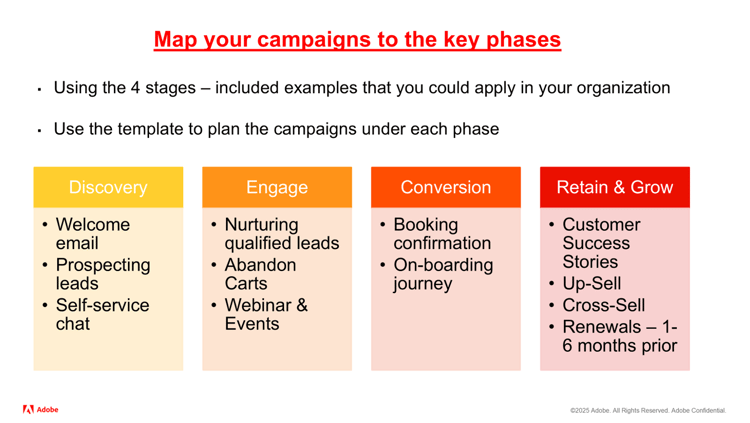
Applying the D3 strategy for channel selection
Decode Data, Define Audience, Determine Channels
The D3 Strategy—Decode Data, Define Audience, Determine Channels—helps marketers build a scalable framework for multi-channel engagement. This approach ensures that campaigns are data-driven, audience-centric, and channel-optimized.
-
Decode Data: Analyze website, app, and chat behavior to uncover intent signals.
-
Define Audience: Build personas and segment based on motivations and engagement history.
-
Determine Channels: Pilot new platforms based on ROI, user behavior, and campaign goals.
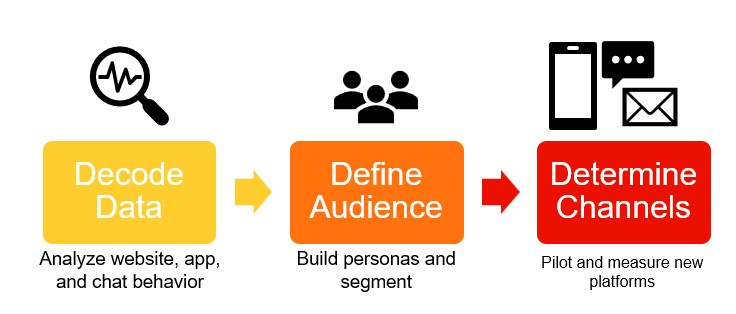
Discovery stage
At Discovery, after applying D3 to determine the channels you can use examples of these campaigns (Prospecting Leads, Welcome emails with in-app and push notifications) to start nudging your audience
New users often stall at the Discovery stage after signing up via newsletters or events. By decoding behavioral signals and layering in-app and push notifications, marketers can nudge users forward in their journey—especially when phone numbers are missing or email engagement is low.
-
Use Munchkin tracking and app analytics to identify inactive users.
-
Segment users who haven’t booked or engaged with onboarding content.
-
Send push notifications or in-app messages using Marketo Mobile Engagement to prompt action.
Engaged stage
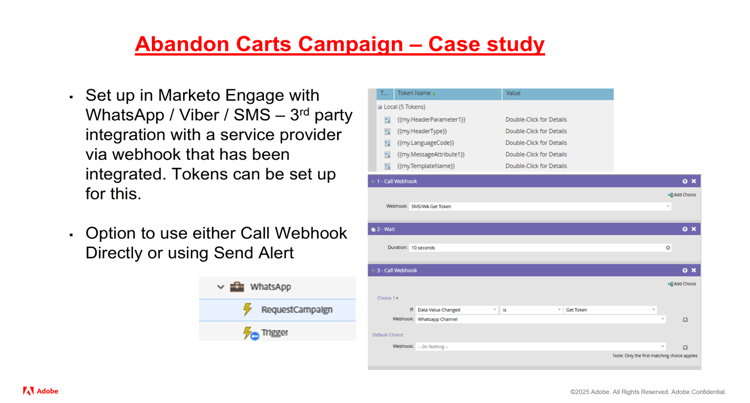
Using WhatsApp as a channel for Abandoned carts
Email campaigns for abandoned carts may plateau over time. By integrating WhatsApp or Viber, marketers can re-engage users through high-impact, preferred channels—especially in regions with high mobile penetration and messaging app usage.
-
Identify users who received cart abandonment emails/renewals but didn’t convert.
-
Collaborate with country teams to determine preferred messaging channels.
-
Use webhook or alert flow steps in Marketo to send WhatsApp messages via a third-party provider.
Conversion stage
Onboarding Journey for your audience with Interactive Webinars
Interactive webinars are a powerful tool in the Convert stage of the lifecycle. By combining live engagement with automated follow-ups, marketers can guide users through onboarding journeys that feel personalized and responsive. This is especially effective for users who have booked but might require preparation, reassurance, or assistance before taking the next step. Webinars allow you to address common concerns, showcase value, and build trust—all while capturing interaction data that fuels smarter automation.
-
Set up an interactive webinar and track engagement using polls, quizzes, and Q&A features.
-
Create smart campaigns that trigger tailored messages based on user interaction during the webinar.
-
Create follow-up content that delivers onboarding messages aligned with user behavior and webinar engagement level.
Retain and grow
Example: use WhatsApp / Push notifications to attract audiences
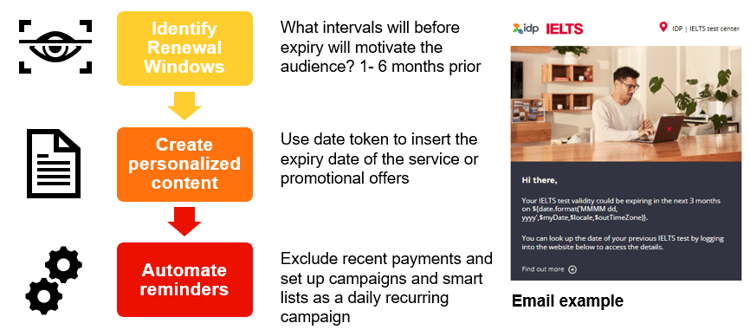
Renewal campaigns are critical for subscription-based services or products with recurring usage. They help maintain customer loyalty and prevent churn by reminding users of upcoming expirations and offering incentives to renew early. A well-structured renewal strategy ensures continuity and creates opportunities for upsell or cross-sell.
-
Identify renewal windows: Use Marketo smart list to segment customers whose subscriptions / services / certification expires in 1- 6 months
-
Create personalized renewal content: Promotional offers could be included for marketing with tokens to tailor the expiry date of the service
-
Automate reminders across channels: Set up multi-channel campaigns using email, push notifications and WhatsApp to reinforce the renewal message at key intervals, for example 6 months, 3 months, 1 month and day after the expiry
Results and impact
Across all campaigns, using non-email channels led to a 123% increase in conversions and a 420% increase in GA sessions over an 8-month period. These results highlight the power of meeting users where they are and reinforcing messages across multiple touchpoints.
-
Track performance across channels using attribution models.
-
Compare engagement rates between email-only and multi-channel campaigns.
-
Scale successful tactics across other lifecycle stages.