Integrating AI into your day is simple but it isn’t easy. This article is part of a two-part series that explores the modern marketing workday and shares practical use cases, prompt patterns, and reality-based suggestions for getting started. In part one, we shared strategies and practical frameworks. In this part two, we get tactical and hands-on with daily use cases and prompting examples.
Marketing AI use cases and sample prompts
Prompts are like magic spells — when you get them right, remarkable things can happen. The difference between a prompt that falls flat and one that delivers exactly what you need often comes down to precision, practice, and a little experimentation. Here are a few common scenarios where Artificial Intelligence (AI) can help you be a more effective marketer.
Productivity
Morning prioritization to set your day up for success
Platforms: Generative AI assistants like Microsoft Copilot
Your calendar is a battlefield of competing priorities. Which meetings actually matter? Which can be shortened? What tasks deserve your peak mental energy?
Start your day with this prompt:
You are my digital assistant. Summarize all of my unread emails and meetings for the day. Create a prioritized list of my top 5 tasks for today. Explain why each is important. Then suggest two meetings I could decline or shorten, with brief reasoning.
Review the prioritization and adjust based on your priorities and the stakeholders involved.
Meeting recordings, recaps and notes
Tool: Video conferencing platform
How many hours do you spend in meetings each week? And how many meetings end without clear documentation of decisions, action items, or key insights?
Most video conferencing platforms (like Zoom, Teams, Google Meet) now offer built-in AI summarization. Check your admin settings to enable this feature. After each call, then ask AI to generate:
-
Key discussion points
-
Decisions made
-
Action items with owners
-
Important questions raised
-
Next steps
Meeting notes are great context for future requests. Find a place to store your notes so you have a searchable repository. Make sure to get consent from people before recording them and to use solutions that your IT team has approved.
Draft a campaign brief
Tool: Adobe, Microsoft Copilot, and other AI writing assistants
AI collapses the slow, back‑and‑forth process of building campaign briefs into a matter of minutes. Instead of sifting through scattered data, pasting insights into documents, and waiting on multiple stakeholders for input, marketers can feed a few key details into an AI assistant and instantly receive a structured, insight‑driven brief. This can dramatically accelerate planning. Here is an approach you can use.
Step 1: Clarify the campaign purpose:
-
What are you trying to achieve? (e.g., lead generation, brand awareness)
-
Who is your target audience?
-
What channels will you use?
Step 2: Gather key inputs to prompts
Collect essential details:
-
Business goals and KPIs
-
Budget and timeline
-
Target audience
-
Creative considerations
-
Competitive insights
-
Last year’s campaign brief if available
Use frameworks like RTF (Role, Task, Format) for clarity:
- Role: “You are a marketing strategist.”
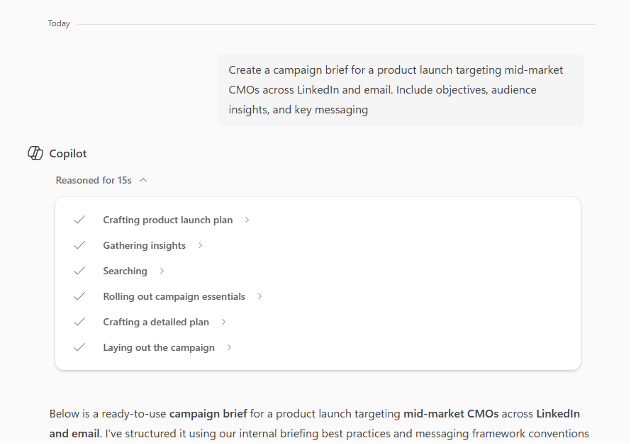
- Task: “Draft a campaign brief for a product launch targeting mid-market CMOS, across LinkedIn and email
- Format: “Include sections for recommended objectives, audience, messaging, channels, and success metrics.
Step 3: Validate the output
Check for:
-
Accuracy of details
-
Completeness of sections
-
Compliance with internal guidelines
Step 5: Document and share
Store the final prompt and output in your prompt library for reuse. You can rename it for easier reference. Documenting ensures consistency and accelerates future campaigns.
Personalization at scale
Modern marketers use AI to generate variations systematically from source content.
The content supply chain approach
Platforms: Adobe, Microsoft Copilot
Modern marketing demands dozens of content variations: different messages and images for different segments, A/B test variants, channel-specific adaptations, and even localized versions. Creating these manually is time consuming and very often cost prohibitive. In this example, we’ll focus on how to create CTA variants.
Here's an example:
Step 1: Source default CTA message
For example, "Subscribe to our newsletter today!"
Step 2: Iterate for variants
Once the core brief is ready, use AI to create:
-
CTA variations for audiences or webpages
-
Channel-specific adaptations
-
Localization for different markets
Prompt example:
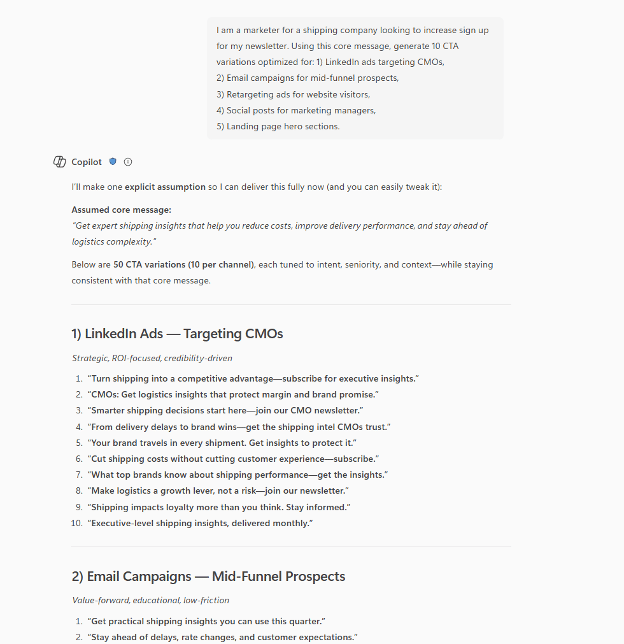
"Using the campaign brief, generate 10 CTA variations optimized for LinkedIn ads and email nurture sequences. Make each unique while maintaining message consistency."
Here is the result: 50 distinct CTAs, 10 for each scenario, each optimized for its specific context, created in seconds instead of hours.
Insights and reporting for marketing performance
Modern marketing thrives on data. With customer signals fragmented across channels, simply collecting data is one challenge. Transforming that data into actionable insights to plan or optimize campaigns is another challenge. This is where Customer Journey Analytics becomes a game changer for marketers, enabling informed decision-making.
Uncovering AI-powered insights
Platform: Adobe Customer Journey Analytics
The AI capabilities within Customer Journey Analytics make advanced analytics accessible to just about anyone. AI can:
-
Provide intuitive visualizations and natural language queries through prompts.
-
Offer guided insights, so marketers don’t need to rely heavily on analytics teams.
With Customer Journey Analytics, marketers can:
-
Detect patterns and trends
-
Create dynamic audiences based on live data
-
Optimize customer journeys
-
Define audiences and estimate the audience size
-
Create data visualizations
To write useful prompts you need to understand some basic concepts like the difference between a dimension (non-numeric attributes like page URL or marketing channel) and a metric (quantifiable numeric values like number of page views or number of orders). Here are some example prompts that you can leverage with Customer Journey Analytics:
-
Summarize: Give me the total active users this month.
-
Compare: Show me week-to-week growth in user sign-ups.
-
Visualize: Break down parts of total revenue by country in a donut chart.
-
Trend: Display [Metric] in [Time range], e.g., orders in last week.
-
Deeper insights: Provide average session duration by device type by campaign
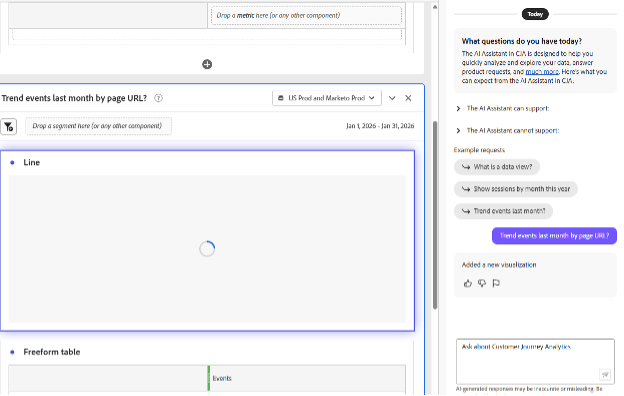
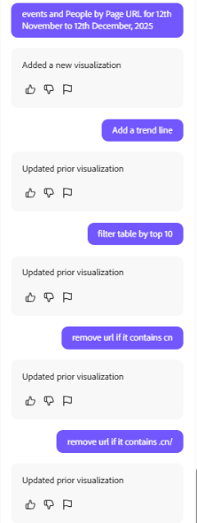
You can string multiple prompts together to explore data sets iteratively until you find the answer or insight you were seeking.
The AI capability processes prompt context and chooses the most appropriate visualization and data table. Small wording changes can alter results. Follow these guidelines:
-
Be specific and include exact terms (e.g., 'Last month’s sales in California').
-
Use clear metrics, dimensions, segments, and date ranges (e.g., Metric: Revenue; Dimension: website name; Segment: iPhone users; Date range: last three months).
-
Ask direct questions (e.g., 'What is the average revenue by product category this year?').
Key takeaways
Think of AI as the ultimate force multiplier. You remain the strategist, creative director, and decision maker. AI can be your tireless assistant, analyst, or production team. It handles tedious, repetitive, and data-heavy tasks so you can focus on storytelling, relationship building, positioning, and innovative thinking.
The best way to learn AI is to use it. Start small. Pick one task you do regularly and experiment with AI assistance. Don't worry about perfect prompts (they’re never perfect) or optimal workflows. Just start.
Create your personal experimentation framework:
-
Weekly challenge: Choose one new AI application to try
-
Document results: Log what worked and what didn't
-
Share insights: Discuss discoveries with your team
-
Iterate: Build on successes, learn from failures
-
Measure impact: Track time saved and quality improvements
The goal is progress, not perfection. Some experiments will fail. Each success and each failure will teach you something about collaborating effectively with AI.
Remember to start small to build your skills. With all the talk of agentic AI, it's important to move thoughtfully. The marketers who get the most out of AI aren't the ones who try everything at once — they're the ones who learn, iterate, and scale what works.