View: user Job Role percentage of FTE availability
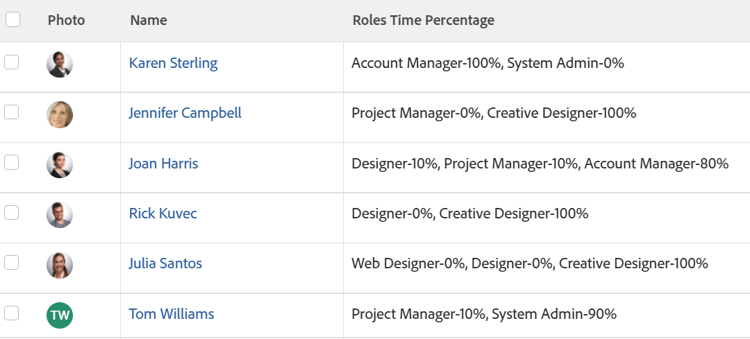
You can add a column to the view of a user list to display a list of the Job Roles the user is associated with as well as the percentage of FTE availability for each job role, as defined in the user profile.
For information about defining the percentage of FTE availability for users, see Edit a user’s profile.
Access requirements
| table 0-row-2 1-row-2 2-row-2 3-row-2 layout-auto html-authored no-header | |
|---|---|
| Adobe Workfront package | Any |
| Adobe Workfront license |
Contributor or Request to modify a view Standard or Plan to modify a report |
| Access level configurations |
Edit access to Reports, Dashboards, Calendars to modify a report Edit access to Filters, Views, Groupings to modify a view |
| Object permissions | Manage permissions to a report |
For more detail about the information in this table, see Access requirements in Workfront documentation.
View user Job Role percentage of FTE availability
-
Go to a list of users.
-
From the View drop-down menu, select New View.
-
In the Column Preview area, click Add Column.
-
Click the header of the new column, then click Switch to Text Mode > Edit Text Mode.
-
Remove the text you find in the Edit Text Mode box, and replace it with the following code:
code language-none displayname=Roles Time Percentage listdelimiter= listmethod=nested(userRoles).lists textmode=true type=iterate valueexpression=CONCAT({role},'-',{timePercentage},'%') valueformat=HTML -
Click Done, then Save View.
-
(Optional) Update the view name, then click Save View.