Override user billing rates at the project level
As a project manager, you can specify what the billing rate is for a user on a specific project. This project-level billing rate overrides the billing rate at the system level for this user. Workfront uses the project-level billing rate of the user to calculate revenue, instead of using the system-level billing rate.
This article describes how you can override the system user billing rates for a project.
For general information about overriding billing rates for projects and calculating project revenue, see Overview of overriding billing rates and calculating revenue on a project.
For more information about calculating revenue on the project, see Overview of revenue and cost hierarchy and the Revenue Calculations for Tasks Based on User and Role Assignments section in the article Overview of Billing and Revenue.
Access requirements
| table 0-row-2 1-row-2 2-row-2 3-row-2 layout-auto html-authored no-header | |
|---|---|
| Adobe Workfront package | Workflow Ultimate |
| Adobe Workfront license | Standard |
| Access level configurations |
Edit access to Projects and Financial Data You must also have one of the following:
|
| Object permissions | Manage permissions to the project that includes Edit Financial Data |

For information, see Access requirements in Workfront documentation.
Override User Billing Rates at the project level
When you override the billing rate of a user on a project, you can assign effective dates and each date range has a different rate. If you do not assign effective dates, then the billing rate override you enter is used for the entire duration of the project to calculate revenue.
To override a user billing rate for a project:
-
Go to the project you want to override billing rates for.
-
Click Rates in the left panel. You might have to first click Show More.
-
Click the Billing tab if it is not already selected.
-
Click Add Billing Rate > New User Billing Rate.
The New User Billing Rate box opens.
-
In the User field, select the user you want to change the billing rate for.
-
Select the Currency for the billing rate override.
-
In the Billing Rate field, enter the first billing rate override.
-
(Optional) Click Add date effective rate to add more billing rate overrides.
-
(Conditional) If you are adding multiple billing rate overrides, specify the following information for each row:
- Billing Rate: the value of the billing rate during the specified time period.
- Start Date: the date when the billing rate override begins.
- End Date: the date when the billing rate override ends.
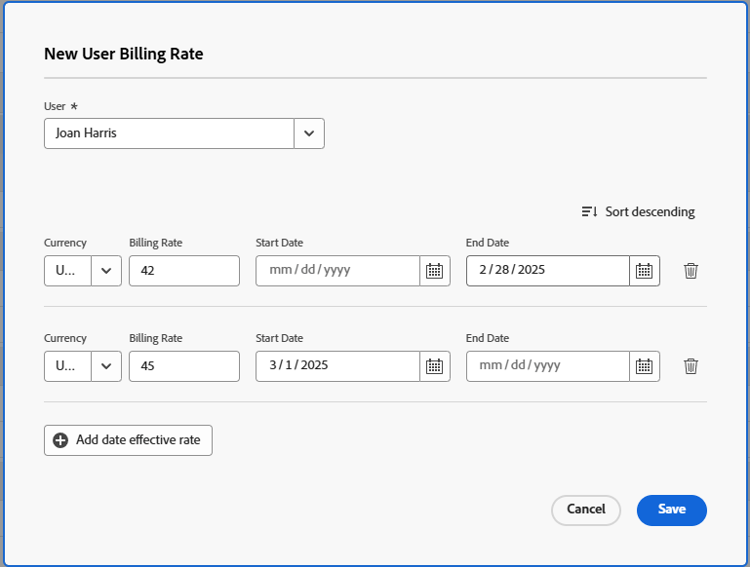
Workfront applies the override user rate to the hours that occur during these time frames when calculating revenue on the project.
Workfront allows you to leave gaps between override timeframes, but you will receive a warning to confirm this is intentional.
You are not required to specify a Start Date for the first override rate, nor an End Date for the last override rate.
If you enter only one billing rate override, that rate applies for the entire duration of the project. If you add multiple date-effective overrides, Workfront assumes that the first override applies to all hours before its End Date, and the last override applies to all hours after its Start Date.
Workfront assumes that the first override rate is applied for all hours with a date older than the End Date of the first override, and that the last override rate is applied for all hours with a date newer than the Start Date of the last override.
If an hour is logged before the Planned Start Date of the project, the very first billing rate is used.
If an hour is logged after the Planned Completion Date of the project, the very last billing rate is used.
-
Click Save.