Enable Adobe cloud storage for your organization
Adobe cloud storage is a unified storage solution for all Adobe products. It is a cloud-based storage solution that serves as the central repository for assets across Adobe enterprise products.
Adobe cloud storage is enabled by default for new customers and can be enabled for existing customers upon contract renewal.
For more information about Adobe cloud storage, see Adobe cloud storage overview.
Access requirements
| table 0-row-2 1-row-2 2-row-2 layout-auto html-authored no-header | |
|---|---|
| Adobe Workfront package | Any Workflow package |
| Adobe Workfront license |
Standard Plan |
| Access level configurations | You must be a Workfront administrator. |
For information, see Access requirements in Workfront documentation.
Enable Adobe cloud storage for your organization
To enable Adobe cloud storage for your organization:
-
Click the Main Menu icon


-
Select System in the left navigation, then select Preferences.
-
Scroll down to the Storage preferences section.
-
In the Default drop-down menu, select Adobe cloud storage.
-
(Optional) If you want to use a combination of Adobe cloud storage and Legacy Workfront Storage, select the Allow user to select storage provider checkbox.
note NOTE Enabling this option allows users to select the storage provider when they create a new project. Adobe cloud storage is labeled as “New project” since it is the default storage provider. Legacy Workfront Storage is labeled as “Legacy project”. 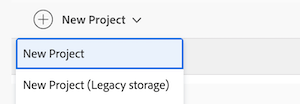
-
In the Applies to drop-down menu, choose one of the following options:
- Entire organization: This option applies the default storage provider to your entire Workfront environment. Any time a user creates a new project, the default storage provider will be used.
- Specific groups: This option applies the default storage provider only to specific groups within your organization. Any time a user in the specified groups creates a new project, the default storage provider will be used

-
Click Save.
note NOTE Existing projects keep the storage model they were created with. For example, projects that use Adobe cloud storage continue to use Adobe cloud storage after you change the default storage preference.
Adobe cloud storage in sandbox environments
Adobe cloud storage is available in Workfront sandbox environments, allowing you to test the functionality described in this article before rolling it out in production. However, the Frame.io viewer is not available in sandbox, so the full unified review and approval experience must be validated in production.
If you have a Custom Refresh Sandbox, you must refresh it after upgrading to a version of Workfront that supports Adobe cloud storage. The refresh gives the sandbox access to the Adobe cloud storage functionality so you can begin testing it. For more information, see The Adobe Workfront Custom Refresh Sandbox environment.