Share a rate card
You can share a rate card with users, job roles, groups, teams, companies, and business profiles.
Access requirements
| table 0-row-2 1-row-2 2-row-2 3-row-2 layout-auto html-authored no-header | |
|---|---|
| Adobe Workfront package | Workflow Ultimate |
| Adobe Workfront license | Standard |
| Access level configurations | View or higher access to Rate Cards |
| Object permissions | View permissions or higher to the rate card you want to share |
For information, see Access requirements in Workfront documentation.
Share a rate card
-
Click the Main Menu icon


-
In the left panel, click Rate cards.
-
Select the check box next to one or more rate cards in the list, and click the Share icon

-
In the box that displays, under Grant rate card access to, start typing the name of the entity you want to share the rate card with, then select it from the list of options.
-
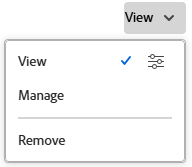
Click the drop-down to the right of the entity name and select their permission level for this rate card:
- View: Can view and share the rate card.
- Manage: Can edit the rate card.
-
To adjust access, click the advanced options icon next to the permission level you’ve granted to configure specific permissions on the rate card.
-
Click Save.
For more information on sharing, see Share an object.