Chain multiple scenarios together
You can chain scenarios together, allowing one scenario to trigger another, and returning the data output by the second scenario to the first. This allows more modular scenario creation, where you do not have to duplicate scenario sections in multiple scenarios.
You can call multiple child scenarios from a parent scenario, and you can call a child scenario from multiple parent scenarios. You can also nest child scenarios, calling one from another.
When a parent scenario is waiting for a child scenario to return data, that time does not count against the parent scenario’s timeout. For example, a parent scenario calls 5 child scenarios, each of which takes 10 minutes to run, for a total of 50 minutes. The modules in the parent scenario itself take 15 minutes to run. The parent scenario does not time out, even though a total of 65 minutes has passed, which is over the timeout limit of 40 minutes.
For more information on Fusion’s performance guardrails, including timeouts, see Fusion performance guardrails.
For instructions on configuring Chain modules, see Chain modules.
For instructions on selecting existing modules in a scenario and moving them into a new child scenario, see Move modules to a chain.
Parent and child scenarios
- The parent scenario calls another scenario, using the Chain > Call a child scenario module. It receives the output of the child scenario, which it can process in later scenario modules.
- The child scenario is called by the parent scenario. Its trigger module receives data from the parent scenario, and returns output to the parent scenario.
The parent scenario requires a response from the child scenario. Child scenarios that do not return data are currently not supported.
Data structures in chained scenarios
Workfront Fusion uses data structures to transfer information from the parent scenario to the child scenario. The data structure is configured in the child scenario. When the child scenario is selected from the parent scenario, the fields for the data structure used as the child scenario’s input appear in the parent scenario. You can map values to these fields, which are passed to the child scenario when it is triggered.
For information on the modules to configure in the parent and child scenarios, see Chain modules.
For information on data structures, see Data structures.
Data flow
- Data flows through the parent scenario.
- Data reaches the Call a child scenario module. Data is mapped to the fields in the Call a child scenario module, which match the fields in the data structure used in the child scenario’s trigger module.
- Data from the Call a child scenario is passed to the child scenario.
- The child scenario processes data and performs actions.
- The child scenario ends with the Return response to parent module.
- The output of the Return response to parent module is passed to the parent scenario.
- The output of the Call a child scenario is the output of the child scenario. This output can be processed later in the parent scenario.
Use cases
Consider the following example use cases for chaining scenarios:
-
Reusable logic: You can chain scenario for repeated actions used across multiple scenarios. For example, if you have multiple scenarios that archive content, you can create a single child scenario called “Archive content” that you can then use as a child scenario for any workflows that archive content.
-
Error handling: It’s common for organizations to have the same error handling actions across multiple scenarios, such as an error handling route that sends an error log to a data store and creates a slack notification. You can create a child scenario with these actions and chain that scenario in error handling routes in multiple scenarios.
-
Extending time: You can use chaining for large batch operations where total processing time would exceed a single scenario’s 40-minute execution limit. However, treat this pattern with caution: a parent scenario that chains to multiple long-running child scenarios has no overall timeout boundary. If any child scenario hangs or a platform issue occurs, the parent waits indefinitely without surfacing an error.
Before using chaining to extend execution time, consider whether the batch size can be reduced, the frequency increased, or the design restructured to avoid long sequential chains. See Best practices below.
-
Replacing iterators Replacing iterators with child scenarios can reduce memory usage, such as in complex operations in an iteration that cause Out of Memory error. You can create a separate scenario for the complex operation and replace the iterator with Call a child scenario module
-
Search for and create a record: For example, you could create a scenario that searches for a user. If they exist, the scehario adds them as approver with access they need to review and approve. If they don’t exist, the scenario creates a request for the admin to onboard a new user.
Viewing execution history for chained scenarios
You can view execution history for chained scenarios by viewing the history of each scenario included in the chain. For example, the parent scenario’s execution history would include information about modules and data processed directly in the parent scenario. To view execution history for modules and data processed in a child scenario, open the child scenario and view the execution history there.
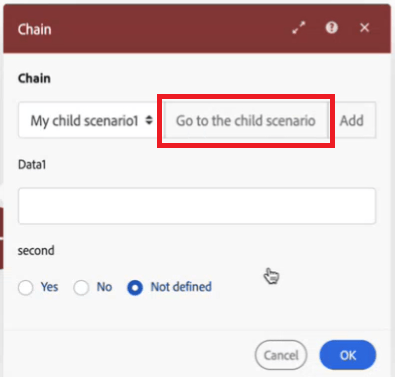
We recommend using the Go to the child scenario button in the Call a child scenario module to quickly go to the child scenario, where you can view its execution history. The child scenario opens in another browser window, allowing you to see parent and child scenarios at the same time.
Errors and incomplete executions
Error handling
If the child scenario errors out, that may affect getting data back to your parent.
We recommend configuring error handling in the child scenario to ensure that if something goes wrong in the child scenario, the parent scenario is not stuck waiting for the response from the child scenario.
Best Practices
Consider the following best practices when chaining a scenario.
Avoid recursion when chaining scenarios
Recursion occurs when a scenario triggers a new execution of itself, which triggers a new execution, and so on in an infinite loop.
Recursion can cause performance issues for both the organization that owns the recursive scenario, and to other organizations.
When chaining scenarios, follow these practices to avoid recursion:
- Ensure that child scenarios cannot trigger the parent scenario. For example, if a parent scenario is triggered when a request is created, ensure that the child scenarios do not create requests.
- Ensure that child scenarios do not call each other. For example, If child scenario A calls child scenario B, ensure that child scenario B does not call child scenario A.
- Ensure that a scenario cannot call itself. For example, a scenario is triggered when a task is created, and that scenario creates two tasks. The newly created tasks both trigger the scenario again, which create four new tasks. Every time a task is created, the scenario is triggered, and every time the scenario runs, the number of tasks doubles. The number of tasks grows exponentially.
- When a scenario is causing recursion, it is deactivated by the Fusion engineering team to prevent further performance issues.
- Because recursion is a result of scenario design, you must design your scenarios in a way that ensures that the scenario does not include actions that trigger the scenario.
- You can view a diagram of the relationships between parent and child scenarios.
For instructions, see View chained scenario relationships.
Use error handling to ensure a response
Because the parent scenario is waiting for a response from the child scenario before it can continue, you must ensure that the child scenario is built so that it will provide a response even if it encounters an error.
Do not use the “Commit Trigger Last (CTL)” setting
We do not recommend using the scenario setting “Commit Trigger Last (CTL)” with chained scenarios. If you need retry behavior on a scenario that uses chaining, implement it explicitly using an error handling route with a defined maximum retry count.
Limit nesting depth
Limit chained scenario networks to two levels of depth (parent → child). Scenarios nested three or more levels deep (parent → child → grandchild) significantly increase complexity, reduce observability, and make it difficult to diagnose failures without engineering support.
If your design requires deeper nesting, document the full chain map and ensure monitoring is in place before deploying to production.
Use Fire and Forget carefully
When Fire and Forget is enabled on the Call a child scenario module, the parent scenario dispatches the child and continues immediately without waiting for a response. The parent has no visibility into whether the child scenario ran, succeeded, or failed.
Use Fire and Forget only when:
- The child scenario performs logging, notifications, or audit writes that do not affect the parent scenario’s logic
- You have independent monitoring in place to detect silent child failures
Do not use Fire and Forget when:
- The child scenario performs writes that the parent depends on
- You need to know whether the child scenario succeeded before the parent continues
- The workflow is transactional or requires exactly-once processing guarantees
Avoid calling child scenarios inside iterators at high volume
Placing a Call a child scenario module inside a BasicFeeder or other iterator dispatches a child scenario for every item processed. At high item counts (hundreds or more per run), this creates significant dispatch overhead and increases exposure to platform reliability issues.
Before using this pattern:
- Consider whether the child scenario’s logic can be inlined directly into the parent scenario as modules
- Pre-compute any lookups that return the same value for every iteration outside the iterator, rather than dispatching a chain call per item
- Confirm the realistic maximum item count and review with your administrator before deploying to production