Integrate Target with Experimentation Accelerator
Experimentation Accelerator helps administrators manage how Adobe Target workspace activities are organized and displayed in the application. By mapping each Target workspace to the appropriate Experimentation Accelerator sandbox, teams can view experiments from Adobe Target and Adobe Journey Optimizer in one place.
➡️ Learn more about Adobe Experimentation Accelerator
Before you begin
Before you set up sandbox assignments, confirm that you have the required permissions. To access Administration in Experimentation Accelerator, you must have the Manage configuration permission.
Users can assign Target workspaces to sandboxes only when both conditions are met:
- The user has the Manage configuration permission in Experimentation Accelerator.
- The user is a Target product administrator.
Set up sandbox assignment for Target workspaces
Before you assign workspaces, note that Target workspace can be assigned to only one sandbox to prevent duplicate entries for the same test.
To choose which sandbox each Target workspace appears in:
-
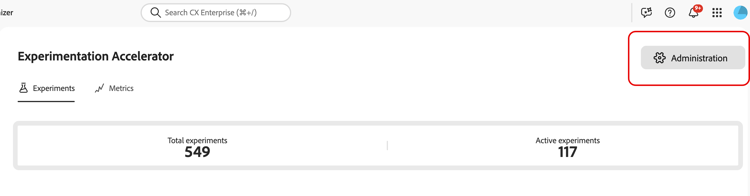
In Experimentation Accelerator, open Administration.
-
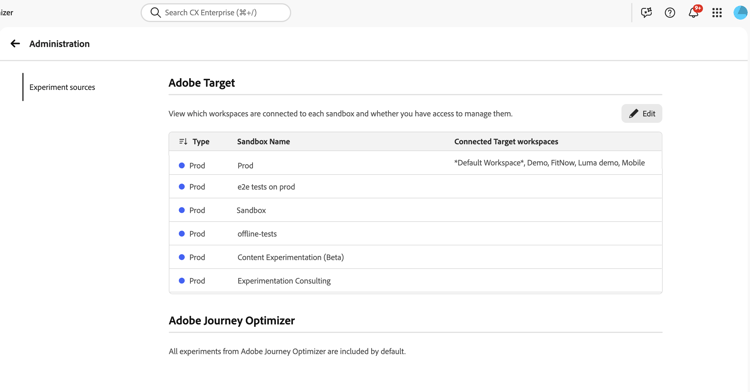
Review the table of current Target workspace-to-sandbox assignments.
-
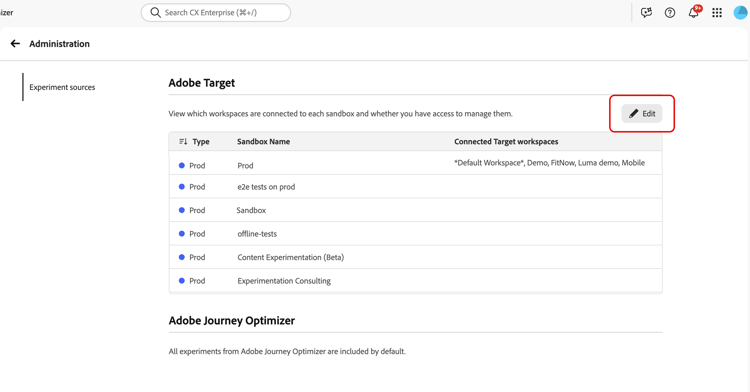
Click Edit.
-
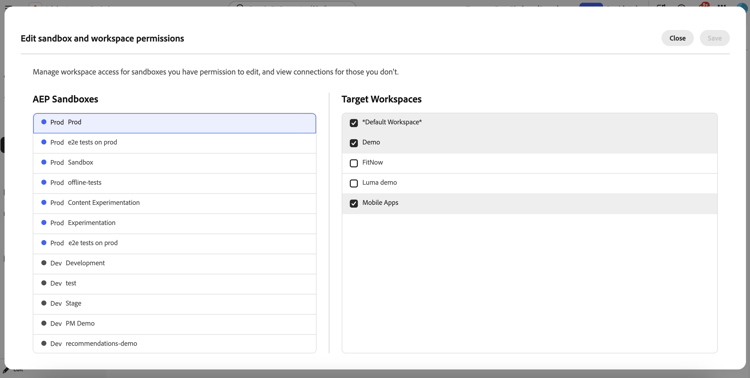
For each sandbox, assign the appropriate Target workspaces.
-
Click Save to apply your changes.
After the initial connection is created for a Target workspace, allow up to 30 minutes for updates to propagate across the system.