Keyshot
Keyshot 6.1.72Download Example Scene
Substance Painter Export
-
For Keyshot, you will need to configure an export preset using Diffuse, Reflection, Metallic, Roughness and Normal (direct X).
Advanced Material Setup
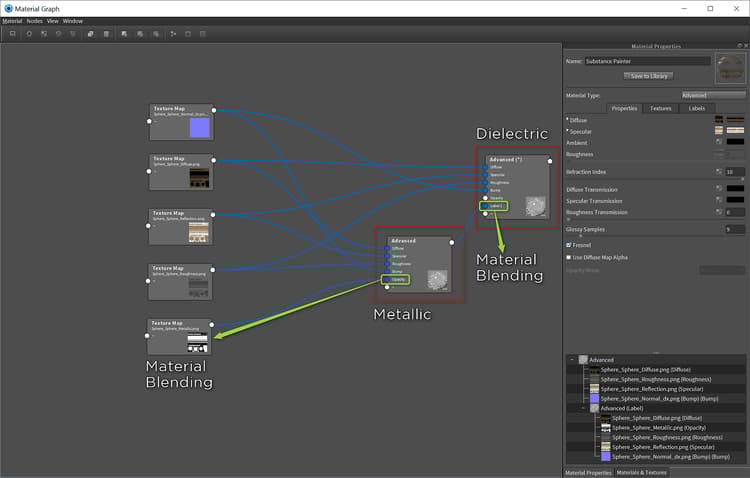
You will use 2 advanced materials. One will be for metallic and the other will be for dielectric.
-
Set your material to Advanced and graph the material.
Metallic:
a. Set the Refraction Index to 10
b. Set the maps as indicated in the table belowtable 0-row-2 1-row-2 2-row-2 3-row-2 4-row-2 5-row-2 Substance Painter texture Advanced Material Channel Diffuse Diffuse Metallic Opacity Normal Bump *Normal Enabled Roughness Roughness Reflection Specular -
Create a new Advanced Material
Dielectric:
a. Set the Refraction Index to 1.5
b. Set the maps as indicated in the table belowtable 0-row-2 1-row-2 2-row-2 3-row-2 4-row-2 Substance Painter texture Advanced Material Channel Diffuse Diffuse Normal Bump *Normal Enabled Roughness Roughness Reflection Specular -
Take the output of the Metallic Advanced Material and add it to the + of the Dielectric Advanced Material. This will create a Label field on the material.