Custom Materials
The Substance plugin supports the Unreal, Unity and glTF custom materials. Before you load an sbsar file, you can select which shading mode you would like to use.
Table of Contents
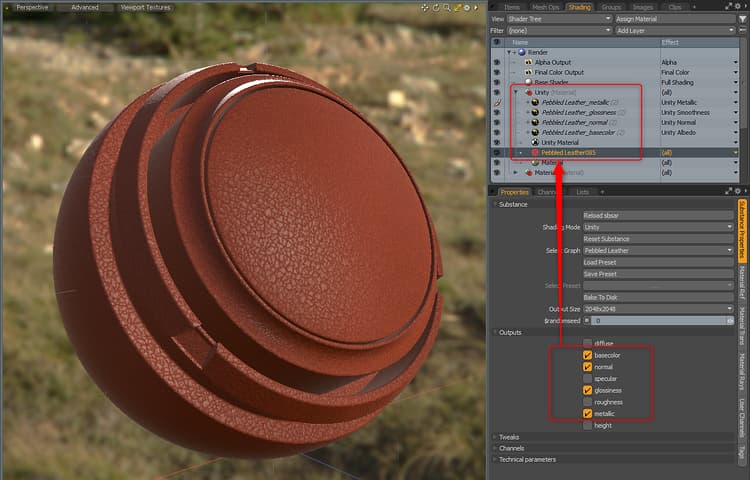
Unity Material
When using the Unity Material, the Material Layer Effect will be set automatically. The Substance Plugin will place the Unity Material directly above the Substance Item Material.
Unreal Material
When using the Unreal Material, the Material Layer Effect will be set automatically. The Substance Plugin will place the Unreal Material directly above the Substance Item Material.
{width="600px"}
You may need to invert the normal. You can do this from the Tweaks menu if the Substance has a control for normal orientation. If not, this can be done on the texture itself. For more information, please see the “Working with Normals” page.
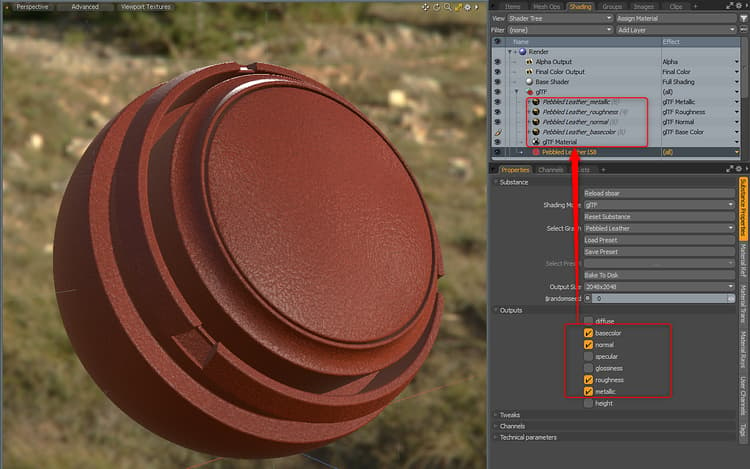
glTF Material
When using the glTF Material, the Material Layer Effect will be set automatically. The Substance Plugin will place the glTF Material directly above the Substance Item Material.
You may need to invert the normal. You can do this from the Tweaks menu if the Substance has a control for normal orientation. If not, this can be done on the texture itself. For more information, please see the “Working with Normals” page.