Water

In: Wear and Finish
Description
Use the Erode filter to wear away at high spots on your material.
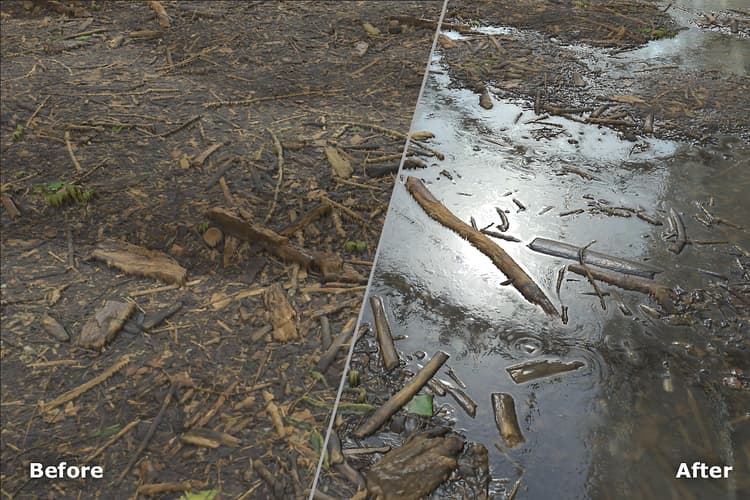
Parameters
Basic parameters
- Random Seed:
The random seed determines the random values of other parameters that use randomness in this filter. - Water Level: 0-1
Adjust the height of the water. - Water Darkness: 0-1
Make the water lighter or darker. - Edges Wetness: 0-1
Adjust how far above the water line the material appears wet. - Enable Dirt on Water: toggle
Add dirt to the top of the water by modifying the roughness map slightly. The Dirt section only appears if this parameter is enabled. - Custom Mask: toggle
When enabled the following additional control appears:- Mask: image/brush
Select an image to use as a custom mask or use the brush to paint a mask directly in the 2D view.
- Mask: image/brush
Dirt
This section only appears if Basic parameters > Enable Dirt on Water is enabled
- Dirt Quantity: 0-1
Adjust the amount of dirt floating on the waters surface. - Distortion Intensity: 0-1
Control the amount of distortion of the surface dirt based on the intersection between the water and the rest of the material. - Dirt Border Intensity: 0-1
Manage the strength of the surface dirt near borders of the dirt mask. - Dirt Border Distance: 0-1
Control the distance of the dirt border from the intersection between the wet and dry areas of the material. - Border Precision: 0-1
Adjust the precision of the dirt border. - Border warp: 0-1
Warp the border to break up the uniformity of the dirt surface.
Advanced Parameters
- Edges Wetness Distance: 0-1
Control how far into dry areas the edge wetness extends. - Depth Blur Amount: 0-1
Adjust how much the base color is blurred for areas that are underwater. - Depth Blur Opacity: 0-1
Adjust how transparent the water appears. - Sludge Color: color select
Change the color of the dirt that sits on top of the water’s surface. - Sludge opacity: 0-1
Adjust the transparency of the sludge.
recommendation-more-help
substance-3d-sampler-help-guide