Paint

In: Wear and Finish
Description
The Paint filter lets you cover your material in a layer of paint of varying thickness.
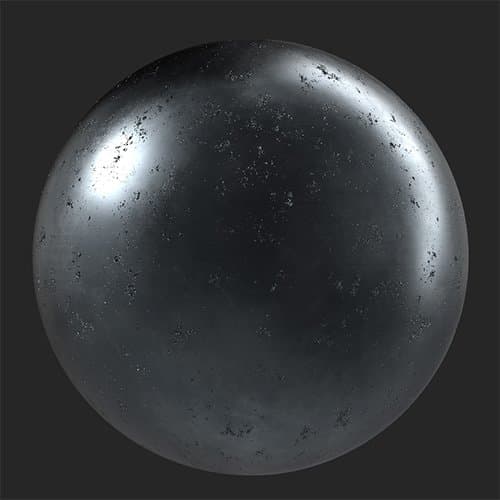
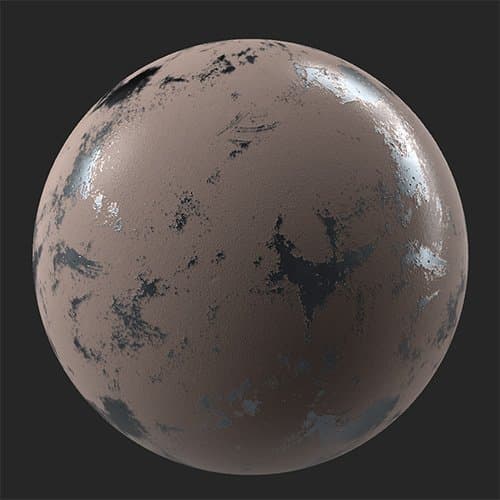
A metal material with worn paint added on top of it.
| table 0-row-2 0-border-0 1-border-0 2-border-0 html-authored no-header | |
|---|---|
|
|
Parameters
Basic parameters
- Random Seed:
The random seed determines the random values of other parameters that use randomness in this filter. - Color: color select
Set the paint color. - Roughness: 0-1
Set the roughness of areas that the paint covers. - Thickness: 0-1
Adjust the viscosity and thickness of the paint. This impacts how much of the underlying height and normal information is visible through the paint. - Peel: 0-1
Add patches where the paint has peeled away from the underlying material. - Grain: 0-1
Change the grain of the surface of the paint. - Grain Size: 1-5
Adjust the scale of the texture used to create the grains.
Mask
-
Cavity Mask: toggle
Create a mask based on the cavities found in the height map. If enabled the following parameters appear:- Cavity Size: 0-1
Adjust the height range used to create the cavity mask. - Cavity Intensity: 0-1
Adjust the opacity of the mask based on cavity depth. - Cavity Invert Mask: toggle
Invert the cavity mask to change whether it affects high or low points.
- Cavity Size: 0-1
-
Use Custom Mask: toggle
Enable or disable the use of a custom mask. If enabled the following parameters appear:- Mask: image/brush
Select an image to use as a mask or use the brush to paint a custom mask directly in the 2D view. - Custom Mask - Blur: 0-1
Blur the mask. - Custom Mask - Invert: toggle
Invert the mask.
- Mask: image/brush
Advanced Parameters
-
Base Color: toggle
Set whether the base color channel is affected by the filter. -
Metallic: toggle
Set whether the metallic channel is affected by the filter.- Metallic Value: 0-1
Adjust metallic value of the painted areas.
- Metallic Value: 0-1
-
Roughness: toggle
Set whether the roughness channel is affected by the filter. -
Normal: toggle
Set whether the normal channel is affected by the filter. If enabled, an additional control appears:- Normal - Intensity: -1 to 1
Adjust the intensity of the normals.
- Normal - Intensity: -1 to 1
-
Height: toggle
Set whether the height channel is affected by the filter. If enabled, an additional control appears:- Height - Intensity: 0-1
Adjust the contrast of the height map.
- Height - Intensity: 0-1
-
Opacity: toggle
Set whether the opacity channel is affected by the filter. If enabled, an additional control appears:- Opacity - Value: 0-1
Change the opacity of the material.
- Opacity - Value: 0-1
-
Emissive: toggle
Set whether the emissive channel is affected by the filter. If enabled, an additional control appears:- Emissive - Color: color select
Set the color of the emissive channel.
- Emissive - Color: color select
-
Ambient Occlusion: toggle
Set whether the ambient occlusion channel is affected by the filter. If enabled, the following additional controls appear:- Ambient Occlusion - Intensity: 0-1
Adjust the strength of the generated AO. - Ambient Occlusion - Radius: 0-1
Adjust the radius of the AO effect.
- Ambient Occlusion - Intensity: 0-1