Erode

In: Wear and Finish
Description
Use the Erode filter to wear away at high spots on your material.
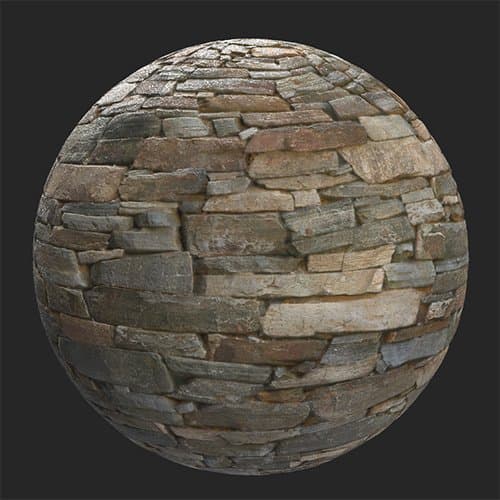
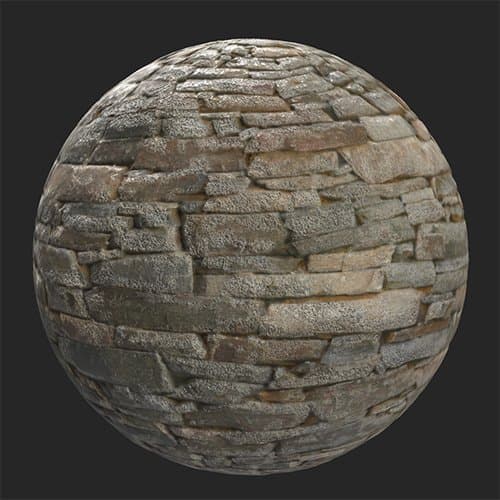
The images below show how the Erode filter can be used to add erosion to a stone wall.
| table 0-row-2 0-border-0 1-border-0 2-border-0 html-authored no-header | |
|---|---|
|
|
Parameters
Basic parameters
-
Random Seed:
The random seed determines the random values of other parameters that use randomness in this filter. -
Erosion Color: color select
Set the color of the eroded areas. -
Grooves Dust Color: color select
Set the color of the dust. -
Quartz Color: color select
Set the color of the Quartz revealed by the erosion. -
Erosion Area Size: 0-1
Modify how widespread the erosion effect is. -
Erosion Roughness: 0-0.63
Change the roughness of the material as a result of the erosion. -
Erosion Intensity: 0-1
Adjust the strength of the erosion effect. -
Rain Effect Intensity: 0-1
-
Grooves: 0-1
-
Grooves Dust Intensity: 0-1
-
Grooves Scratches Intensity: 0-1
Adjust the impact of the grooves on the normals and height maps. -
Micro Grain Density: 0-1
Adjust the density of the groove scratches. -
Quartz Intensity: 0-1
Adjust the visibility of the quartz areas. -
Quartz Roughness: 0-1
Adjust the roughness of the quartz. -
Quartz Normal Variation: 0-1
Modify the normals of quartz areas. -
Use Custom Mask: toggle
Enable or disable the use of a custom mask. If enabled the following parameters appear:- Mask: image/brush
Select an image to use as a mask or use the brush to paint a custom mask directly in the 2D view. - Custom Mask - Blur: 0-1
Blur the mask. - Custom Mask - Invert: toggle
Invert the mask. - Custom Mask - Opacity: 0-1
Adjust the strength of the custom mask.
- Mask: image/brush