Atlas Splitter
In: Tools
Description
The Atlas Splitter is a useful tool to organize and view the elements of an atlas.
The images below show the Atlas Splitter in action.
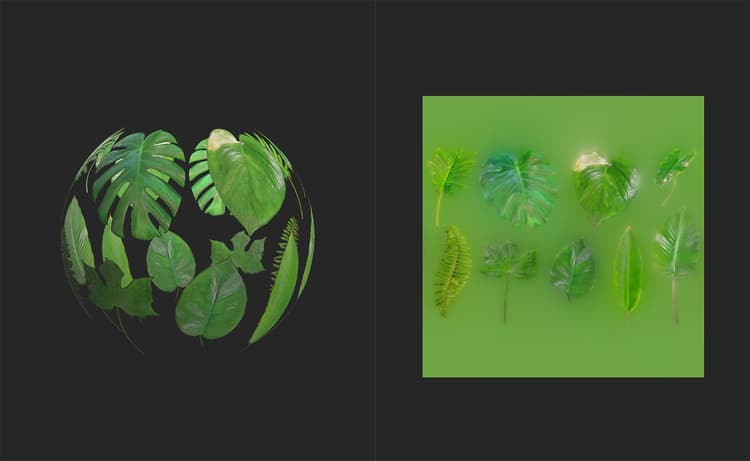
The above image shows an atlas material added to the layer stack. use the Atlas Splitter to select specific elements from the atlas.
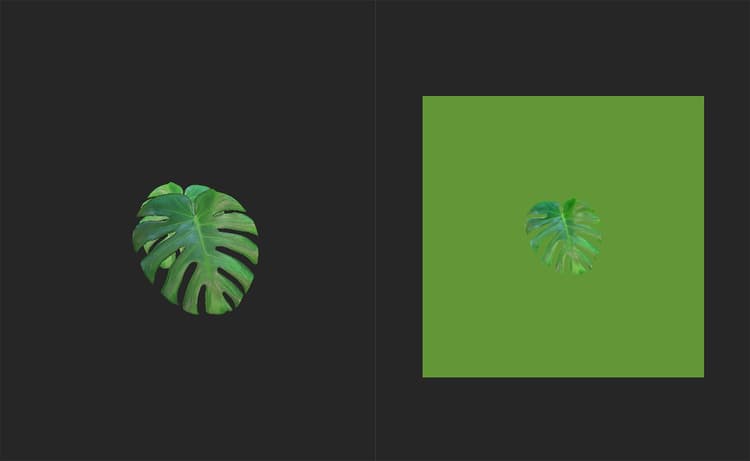
With the Atlas Splitter added to the layer stack, it’s possible to focus on a single leaf, or any other element of the atlas material.
Parameters
Basic parameters
-
Grid View: toggle
Switch between grid view and individual view of elements. If enabled the following additional parameters appear:- Grid Opacity: 0-1
Modify the opacity of the grid - Grid Selection Opacity: 0-1
Modify the opacity of the border around the selected element - Auto Scale: toggle
Switch whether atlas elements are scaled to fill each grid square or not.
- Grid Opacity: 0-1
-
Auto Crop: toggle
Select whether to adjust the crop of the selected shape. If enabled an additional option will appear:- Auto Crop Mode:
Choose how the selected element is cropped to fill the space of the material.
- Auto Crop Mode:
-
Shape Selection: 1-10
Change which element of the atlas is selected. For atlases with more than 10 elements, you can type a number into the Shape Selection value to change the range of the slider. -
Rotation: 0-1
Rotate elements
Advanced Parameters
- Small Shape Tolerance: 0-1
Adjust the minimum size of shapes to be picked up by the Atlas Splitter. This is useful for filtering out artifacts - Auto Rotation: toggle
If enabled, elements will be automatically rotated to have similar orientations. - Downscale Opacity Mask: 0-4
Adjust the scale of the opacity mask. Note that increasing this value can decrease the quality of the opacity mask. - Shape Detection Precision:
Select which shape detection algorithm to use. - Dilation Width: 0-32
Modify the dilation - this extrudes the colors of the element borders into the masked area to help avoid transparency issues at the edge of atlas elements. View the base color channel in the 2D view to see the results. - Custom Background Color: toggle
If enabled, a control appears to modify the background color of the normal channel:- Normal Bg Color: color select
Select the custom background color of the normal channel in transparent parts of the material.
- Normal Bg Color: color select
- Height Bg Color: 0-1
Adjust the background color of the height channel. It is generally a good idea to have the height background match the average height of the borders of atlas elements to avoid artifacts at the borders of elements.