Invert

In: Adjustments
Description
Invert individual channels of the material.
In the images below you can see the impact of inverting the roughness channel of a tile material.
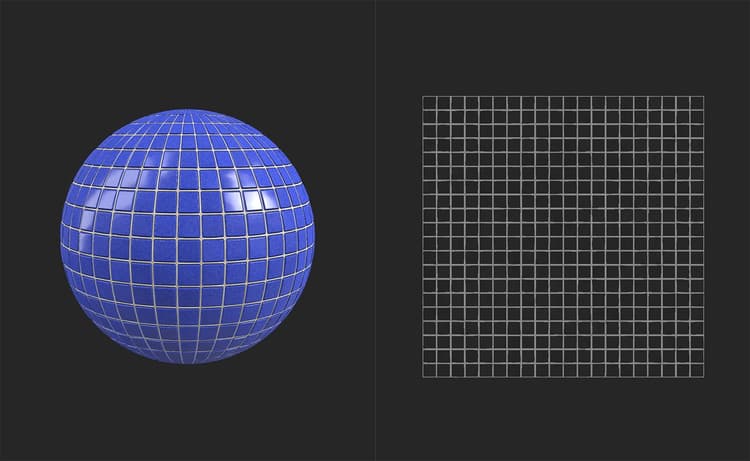
Before inverting, the tiles are shiny and reflect the environment light clearly.
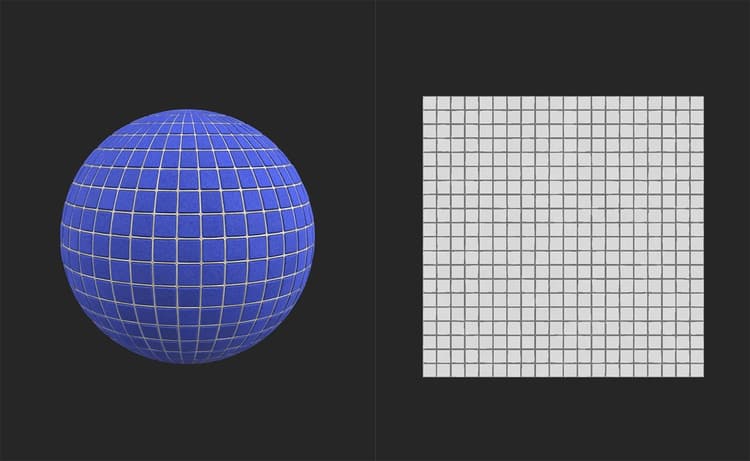
After inverting, the tiles are matte and don’t have strong specular highlights.
Parameters
Basic parameters
Each channel can be inverted independently through use of a toggle. Enable the toggle to invert the channel. If results aren’t visible in the 3D view, select the channel at the bottom of the 2D view to see the impact.
Mask
-
Use Custom Mask: toggle
Enable or disable the use of a custom mask. If enabled the following parameters appear:- Mask: image/brush
Select an image to use as a mask or use the brush to paint a custom mask directly in the 2D view - Custom Mask - Blur: 0-1
Blur the mask - Custom Mask - Invert: toggle
Invert the mask
- Mask: image/brush