JavaScript and Python plugin menus
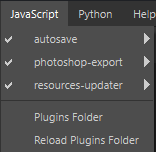
The JavaScript and Python menus list all the plugins that are loaded by Painter at startup. Plugins are separated into two menus based on the scripting API they are using (Javascript or Python).
Each plugin discovered by the application will add an entry in the respective menu to access additional functions. In the menus, each plugin has the following options:
- disable/enable: toggle the plugin on or off.
- reload: reload the plugin in case the script was updated while the application was running.
- configure: if supported by the plugin, displays the function/window to configure the plugin.
- about: if supported by the plugin, displays information about the plugin.
To learn about the default plugins provided with Painter or how to create new plugins yourself, see the dedicated Plugins page.
recommendation-more-help
substance-3d-painter-help-guide