Activation and licenses
This page has information on how to activate and manage your licenses so you can start using Painter.
Activation process per application type
The activation process depends on where you purchased or have access to Painter:
Standalone Activation steps
The activation wizard
The Activation wizard appears in certain legacy version of Substance 3D Painter.
If you have a perpetual license file downloaded from the Substance 3D website prior to 30 Sep 2022, you can still use it to activate eligible versions of Substance 3D Painter through the Activation wizard. More information about legacy Substance licenses and accounts is available here.
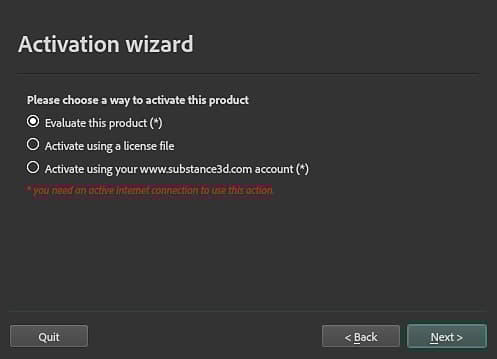
The Activation wizard has 3 options:
- Evaluate this product: Legacy trials are no longer available. Instead, you can start a 30 day trial for each Substance 3D application here or with Creative Cloud Desktop.
- Activate using a license file: activate the product with a license file (*.key) downloaded from your account page on the Substance 3D website before 30 Sep 2022.
- Activate using your account: Legacy substance accounts can no longer be used for activation.
Manual activation
You can manually activate Substance Painter by putting the license.key file in the following folder:
Environment variable
You can override the location that Painter checks for the license.key file with an Environment Variable.