Color correction

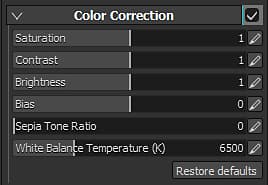
Color correction parameters :
Setting
Description
Saturation
Controls the intensity/saturation of the color in the viewport. Use a saturation at 0 to get a grayscale render.
Contrast
Controls the difference between bright and dark colors.
Brightness
Controls the brightness/luminance of the colors.
Bias
Globally offsets the luminosity of the viewport.
Sepia tone ratio
Advanced parameter to give a sepia effect to the viewport.
White Balance Temperature (K)
Temperature of the colors, in Kelvins. Default is 6500K, corresponding to daylight. See Wikipedia for more information.
recommendation-more-help
substance-3d-painter-help-guide