MatFX Water Drops
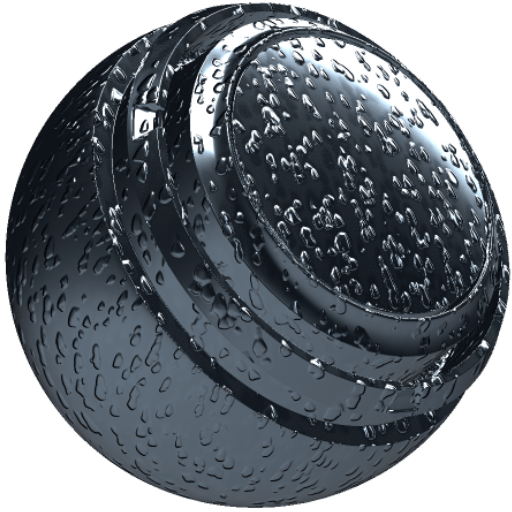
In: Effects/blur, grayscale
Description
The MatFX Water Drops filter creates water droplet and runoff effects on a material.
It is used on texture layers or material stacks to add droplets, directional streaking, and wet-surface variation.
Inputs
Input name
Description
Ambient Occlusion: Grayscale
Use the baked ambient occlusion map.
World Space Normals: Color
Use the baked world space normals map.
Position: Color
Use the baked position map.
Parameters
Parameter name
Description
Drops Amount:
Adjust the amount of water drops.
Drops Scale X:
Adjust the X scale of the drops.
Drops Scale Y:
Adjust the Y scale of the drops.
Drops Scale Random:
Adjust the amount of random scale variation in the drops.
Drops Direction Intensity:
Adjust the directional intensity of the drops.
Position
Parameter name
Description
Influence X:
Adjust the X influence of the position input.
Influence Y:
Adjust the Y influence of the position input.
Influence Z:
Adjust the Z influence of the position input.
Water Accumulation
Parameter name
Description
Intensity:
Adjust the intensity of the water accumulation.
Spread:
Adjust the spread of the water accumulation.
AO Based Intensity:
Adjust how much ambient occlusion affects the water accumulation.
World Space
Parameter name
Description
Masking Intensity:
Adjust the intensity of the world-space masking.
Top Intensity:
Adjust the intensity of drops on upward-facing areas.
Bottom Intensity:
Adjust the intensity of drops on downward-facing areas.
Front Intensity:
Adjust the intensity of drops on front-facing areas.
Back Intensity:
Adjust the intensity of drops on back-facing areas.
Right Intensity:
Adjust the intensity of drops on right-facing areas.
Left Intensity:
Adjust the intensity of drops on left-facing areas.
Material
Parameter name
Description
Drops Base Color Warp Intensity:
Adjust the warp intensity applied to the base color under the drops.
Drops Rotation Vector Map Multiplier:
Adjust the multiplier applied to the drop rotation vector map.
Drops Height Intensity:
Adjust the intensity of the drop height effect.
Drops Roughness:
Adjust the roughness of the drops.
Drops Roughness Blending:
Adjust how the drop roughness blends with the material.
Drops Metallic:
Adjust the metallic value of the drops.
Drops Metallic Blending:
Adjust how the drop metallic value blends with the material.
Normal Intensity:
Adjust the intensity of the normal effect.
recommendation-more-help
substance-3d-painter-help-guide