MatFX Peeling Paint
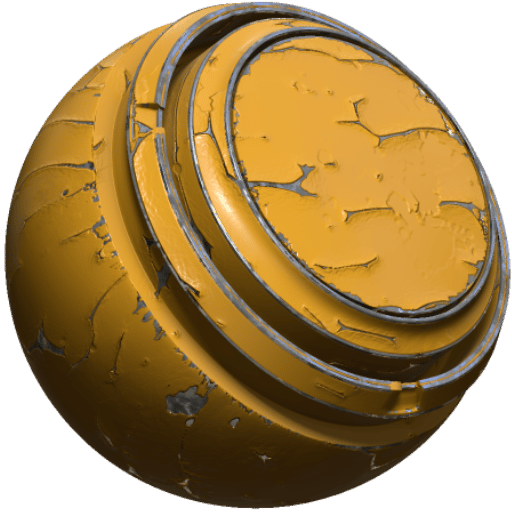
In: Effects/blur, grayscale
Description
The MatFX Peeling Paint filter creates flaking and peeling paint effects.
It is used on texture layers or material stacks to simulate peeling paint, chipped coatings, and expose underlying material.
NOTE
In order to expose an underlying material, use the MatFX Peeling Paint inside a group. Layers outside the group and below it in the layer stack will be exposed where the peeled paint pulls away from the surface.
Parameters
Parameter name
Description
Blur Intensity:
Adjust the strength of the blur effect.
Blur Wrap:
Toggle blur wrapping. When enabled, the effect samples pixels from the opposite side of the texture.
Peeling Level:
Adjust the overall peeling level.
Peeling Distance:
Adjust how far the paint appears to peel away.
Flake Level:
Adjust the amount of flaking.
Air Bubble Density:
Adjust the density of the air bubbles.
Flaking Density:
Adjust the density of the flaking.
Flaking X Amount:
Adjust the amount of flaking along the X axis.
Flaking Y Amount:
Adjust the amount of flaking along the Y axis.
Use Curvature:
Toggle use of the curvature input.
Curvature Distance:
Adjust the curvature sampling distance.
Curvature Contrast:
Adjust the contrast of the curvature input.
Technical parameters
These parameters allow you to modify the top surface of the peeled material.
Parameter name
Description
Luminosity:
Adjust the luminosity.
Contrast:
Adjust the contrast or falloff of the result.
Hue Shift:
Adjust the hue shift.
Saturation:
Adjust the saturation.
Normal Intensity:
Adjust the normal intensity.
Height Range:
Adjust the height range used by the effect.
Height Position:
Adjust the height position used by the effect.
Ambient Occlusion Intensity:
Adjust the intensity of the ambient occlusion.
recommendation-more-help
substance-3d-painter-help-guide