Channel specific filter

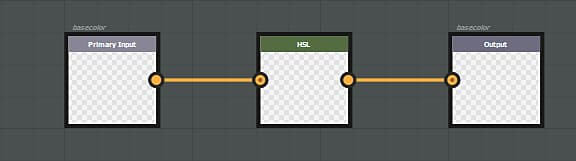
An effect can be specific to a particular channel. In that case, if you want to affect a specific channel, you need to create an input AND an output which identifies this channel. As a general rule, the input / output structure should always respect a 1:1 rule. If you want to input a specific channel, you have to output the same channel.

Example of a filter affecting the basecolor channel only :
NOTE
It is not possible to combine generic setup (input/output nodes) and specific channels (basecolor/basecolor).

Alpha component management

Channels stored as RGBA support alpha (basecolor for instance). For these channel, the alpha Input/Output can be stored directly in the Substance color output. However, the Substance engine does not support Alpha for grayscale images: it has to be managed using a secondary map. To get the alpha component of a specific channel in a substance graph, create a grayscale input named ‘channelname_Alpha’, example: basecolor_Alpha, roughness_Alpha and so on.
To output this alpha component, create an output node with the same name convention.

NOTE
The specific “_Alpha” output per channel doesn’t work with regular materials. To hide a channel with a mask, a specific output must be created with the following naming convention :
  • Identifier : channels_Alpha
  • Usage : channels_Alpha

List of input/output usages and identifiers

NOTE
It is possible to use either the usage or the identifier in an input node (the usage has the priority).
Channel name
Usage
Identifier / Identifier Alpha
Ambient Occlusion
ambientOcclusion
ambientOcclusion / ambientOcclusion_Alpha
Anisotropy Angle
anisotropyangle
anisotropyAngle / anisotropyAngle_Alpha
Anisotropy Level
anisotropylevel
anisotropyLevel / anisotropyLevel_Alpha
Base Color
basecolor
baseColor / baseColor_Alpha
Blending Mask
blendingmask
blendingmask / blendingmask_Alpha
Diffuse
diffuse
diffuse / diffuse_Alpha
Displacement
displacement
displacement / displacement_Alpha
Emissive
emissive
emissive / emissive_Alpha
Glossiness
glossiness
glossiness / glossiness_Alpha
Height
height
height / height_Alpha
IOR
ior
ior / ior_Alpha
Metallic
metallic
metallic / metallic_Alpha
Normal
normal
normal / normal_Alpha
Opacity
opacity
opacity / opacity_Alpha
Reflection
reflection
reflection / reflection_Alpha
Roughness
roughness
roughness / roughness_Alpha
Scattering
scattering
scattering / scattering_Alpha
Specular
specular
specular / specular_Alpha
Specular Level
specularlevel
specularLevel / specularLevel_Alpha
Transmissive
transmissive
transmissive / transmissive_Alpha
User 0
user0
user0 / user0_Alpha
User 1
user1
user1 / user1_Alpha
User 2
user2
user2 / user2_Alpha
User 3
user3
user3 / user3_Alpha
User 4
user4
user4 / user4_Alpha
User 5
user5
user5 / user5_Alpha
User 6
user6
user6 / user6_Alpha
User 7
user7
user7 / user7_Alpha

Examples

{width="650px"}

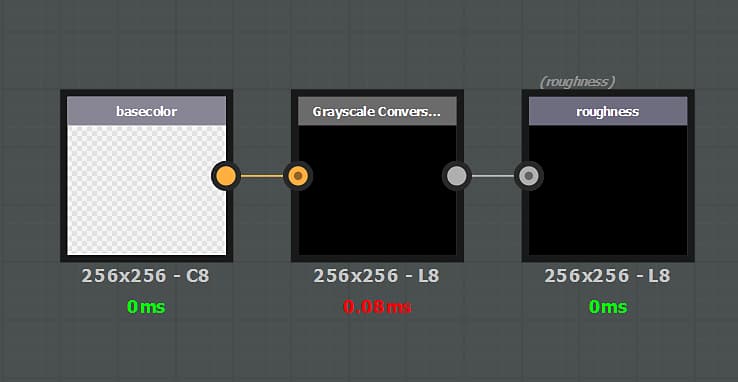
In this example the Base Color alpha channel is extracted via a grayscale node to overwrite the Roughness channel.
{width="650px"}

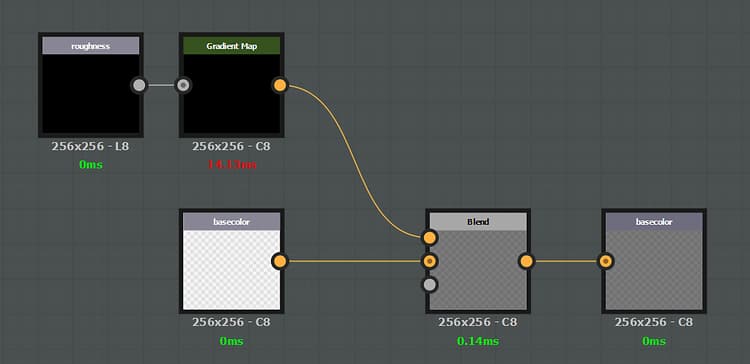
In this example the Roughness channel is multiplied over the Base Color.

recommendation-more-help
substance-3d-painter-help-guide