Grid atlas color
In: Generator > Pattern
Description
Pack up to 16 color images on a grid of adjustable XY size.
The output atlas image can be sampled from by a Shape splatter v2 or a Shape splatter mapper color node.
See also Grid atlas grayscale.
Inputs
Input 1 Color
The color image input #1.
Input 2 Color
The color image input #2.
Input 3 Color
The color image input #3.
Input 4 Color
The color image input #4.
Input 5 Color
The color image input #5.
Input 6 Color
The color image input #6.
Input 7 Color
The color image input #7.
Input 8 Color
The color image input #8.
Input 9 Color
The color image input #9.
Input 10 Color
The color image input #10.
Input 11 Color
The color image input #11.
Input 12 Color
The color image input #12.
Input 13 Color
The color image input #13.
Input 14 Color
The color image input #14.
Input 2 Color
The color image input #15.
Input 2 Color
The color image input #16.
Outputs
Output
The output color grid atlas.
Parameters
Grid size X Integer
The size of the grid on the X axis.
I.e. the number of images being packed on the X axis.
I.e. the number of images being packed on the X axis.
Grid size Y Integer
The size of the grid on the Y axis.
I.e. the number of images being packed on the Y axis.
I.e. the number of images being packed on the Y axis.
Output size mode Integer
The method of defining the size of the output image according to the node’s ‘Output size’ base parameter:
- Manual: Use the size as is.
- Automatic ratio: Adjust the image ratio according to the grid size in order to minimise the image size. Deformation will occur for non-square grids using 3 rows or columns, e.g. (3, 2), (4, 3)
- Manual: Use the size as is.
- Automatic ratio: Adjust the image ratio according to the grid size in order to minimise the image size. Deformation will occur for non-square grids using 3 rows or columns, e.g. (3, 2), (4, 3)
Examples
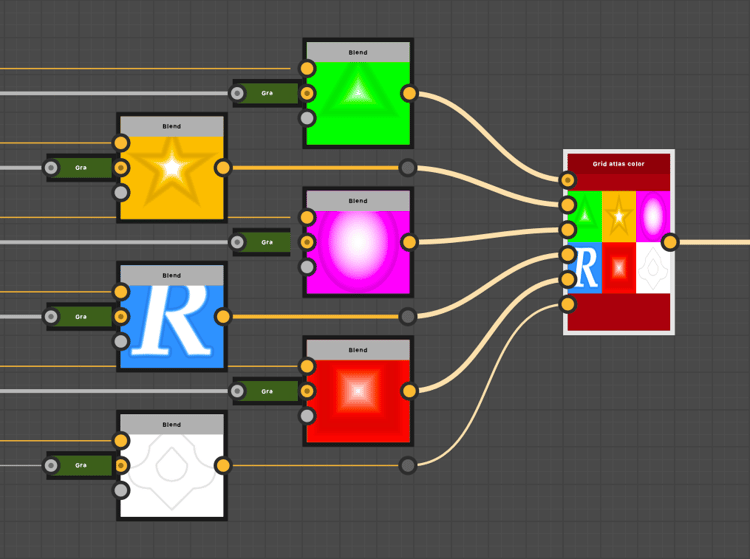
Grid atlas color node in context of a graph
recommendation-more-help
substance-3d-designer-help-guide