Shortcuts
On this page you can find an overview of all shortcuts for Substance 3D Designer.
Keymaps
Windows
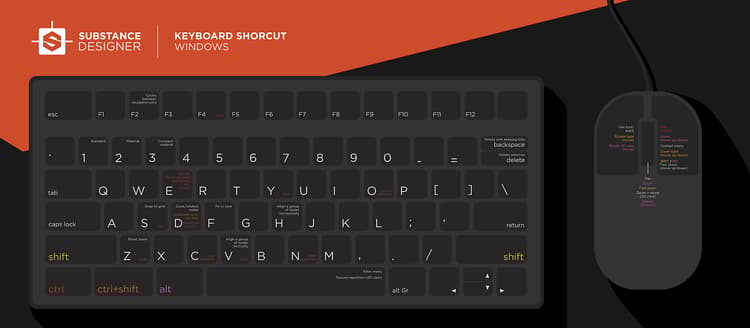
macOS
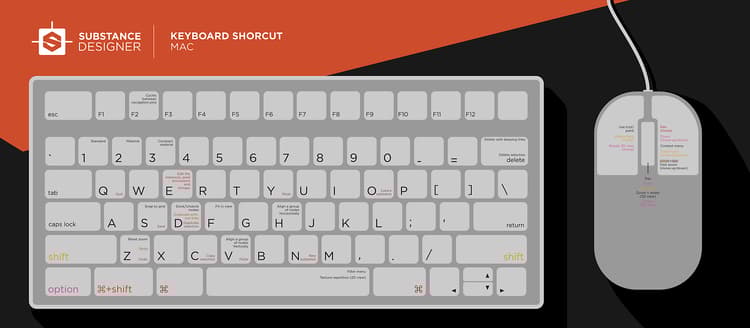
Shortcuts lists
Global
Action
Windows
macOS
Load package
Ctrl + O
⌘ + O
Close selected package(s)
Ctrl + F4
⌘ + W
Save package
Ctrl + S
⌘ + S
Undo
Ctrl + Z
⌘ + Z
Redo
Ctrl + Y
⌘ + Y
Graph View
Viewport
Action
Windows
macOS
Zoom
MouseWheel
Alt + RMB + Drag
Alt + RMB + Drag
MouseWheel
⌥ + RMB + Drag
⌥ + RMB + Drag
Fast zoom
⇧ + MouseWheel
⇧ + Alt + RMB + Drag
⇧ + Alt + RMB + Drag
⇧ + MouseWheel
⇧ + ⌥ + RMB + Drag
⇧ + ⌥ + RMB + Drag
Pan
MMB + Drag
Ctrl + RMB + Drag
Ctrl + RMB + Drag
MMB + Drag
⌘ + RMB + Drag
⌘ + RMB + Drag
Reset zoom
Z
Z
Fit in view
F
F
Copy
Ctrl + C
⌘ + C
Paste
Ctrl + V
⌘ + V
Contextual menu
RMB
RMB
Node menu
Spacebar
Spacebar
Link creation modes
NOTE
Learn about link creation modes in this page of this documentation.
Mode
Windows
macOS
Standard
1
1
Material
2
2
Compact material
3
3
When an object is selected in the graph
Action
Windows
macOS
Copy selection
Ctrl + C
⌘ + C
Duplicate selection
Ctrl + D
⌘ + D
Duplicate without links
Ctrl + ⇧ + D
⌘ + ⇧ + D
Delete selection
Delete
Delete
Delete selection and preserve links
⌫
⌫
Dock/undock node
D
D
Disable node(s)
⇧ + D
⇧ + D
2D View
Action
Windows
macOS
Zoom
MouseWheel
Alt + RMB + Drag
Alt + RMB + Drag
MouseWheel
⌥ + RMB + Drag
⌥ + RMB + Drag
Fast zoom
⇧ + MouseWheel
⇧ + Alt + RMB + Drag
⇧ + Alt + RMB + Drag
⇧ + MouseWheel
⇧ + ⌥ + RMB + Drag
⇧ + ⌥ + RMB + Drag
Pan
MMB + Drag
Ctrl + RMB + Drag
Ctrl + RMB + Drag
MMB + Drag
⌘ + RMB + Drag
⌘ + RMB + Drag
Reset to 100% scale
Z
Z
Fit in view
F
F
Toggle tiled display
Spacebar
Spacebar
3D View
Action
Windows
macOS
Dolly camera (Forward/backward pan)
MouseWheel
Alt + RMB + Drag
Alt + RMB + Drag
MouseWheel
⌥ + RMB + Drag
⌥ + RMB + Drag
Orbit camera
LMB + Drag
LMB + Drag
Truck & pedestal camera (Lateral & vertical pan)
MMB + Drag
Ctrl + RMB + Drag
Ctrl + RMB + Drag
MMB + Drag
⌘ + RMB + Drag
⌘ + RMB + Drag
Rotate environment
Ctrl + ⇧ + RMB
Ctrl + ⇧ + RMB
Temporarily switch to Point Light 1 controls
⇧ (hold)
⇧ (hold)
Orbit Point Light 1
LMB + Drag
LMB + Drag
Dolly Point Light 1
RMB + Drag
RMB + Drag
recommendation-more-help
substance-3d-designer-help-guide