Fastly (BYOCDN)
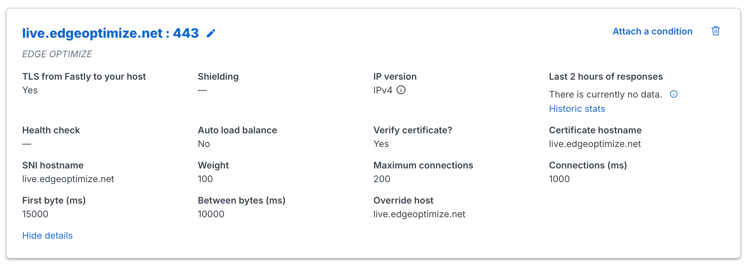
This configuration routes agentic traffic (requests from AI bots and LLM user agents) to the Edge Optimize backend service (live.edgeoptimize.net). Human visitors and SEO bots continue to be served from your origin as usual. To test the configuration, after the setup is complete, look for the header x-edgeoptimize-request-id in the response.
Prerequisites
Before you set up the Fastly VCL rules, ensure you have:
- Access to Fastly for your domain.
- An Edge Optimize API key retrieved from the Adobe Brand Visibility UI. For steps, see Retrieve your API keys.
- (Optional) To test staging routing, see Staging API key.
Configuration
Add the following three VCL snippets to your Fastly service. These snippets handle routing agentic requests to Edge Optimize, cache-key separation, and failover to your default origin.
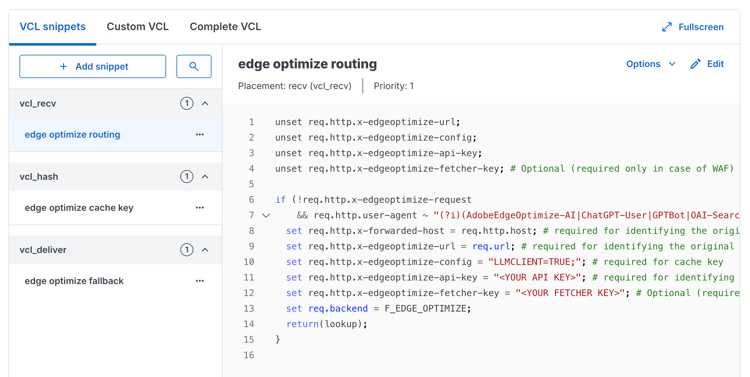
vcl_recv snippet
unset req.http.x-edgeoptimize-url;
unset req.http.x-edgeoptimize-config;
unset req.http.x-edgeoptimize-api-key;
unset req.http.x-edgeoptimize-fetcher-key; # Optional (required only in case of WAF)

if (!req.http.x-edgeoptimize-request
    && req.http.user-agent ~ "(?i)(AdobeEdgeOptimize-AI|ChatGPT-User|GPTBot|OAI-SearchBot|PerplexityBot|Perplexity-User|ClaudeBot|Claude-User|Claude-SearchBot)") {
  set req.http.x-forwarded-host = req.http.host; # required for identifying the original host
  set req.http.x-edgeoptimize-url = req.url; # required for identifying the original url
  set req.http.x-edgeoptimize-config = "LLMCLIENT=TRUE;"; # required for cache key
  set req.http.x-edgeoptimize-api-key = "<YOUR API KEY>"; # required for identifying the client
  set req.http.x-edgeoptimize-fetcher-key = "<YOUR FETCHER KEY>"; # Optional (required only in case of WAF)
  set req.backend = F_EDGE_OPTIMIZE;
  return(lookup);
}
vcl_hash snippet
if (req.http.x-edgeoptimize-config) {
  set req.hash += "edge-optimize";
  set req.hash += req.http.x-edgeoptimize-config;
}
vcl_deliver snippet
if (req.http.x-edgeoptimize-config && resp.status >= 400) {
  set req.http.x-edgeoptimize-request = "failover";
  restart;
}

if (req.http.x-edgeoptimize-config) {
  return(deliver);
}

if (!req.http.x-edgeoptimize-config && req.http.x-edgeoptimize-request == "failover") {
  set resp.http.x-edgeoptimize-fo = "1";
}
Failover
The vcl_deliver snippet handles failover automatically. If Edge Optimize returns a 4XX or 5XX error, the request is restarted and routed back to your default origin so the end-user still receives a response. Failover responses include the x-edgeoptimize-fo: 1 header.
2XX4XX or 5XXx-edgeoptimize-fo: 1.Allow Optimize at Edge through firewall rules (optional)
If your CDN uses a WAF or Bot Manager:
-
Allowlist the
*AdobeEdgeOptimize/1.0*user agent in your WAF or Bot Manager so the Optimize at Edge service can fetch your origin content. -
If your firewall requires additional verification beyond user agent, generate a secret (for example,
openssl rand -hex 32) and:- Add
x-edgeoptimize-fetcher-keywith the secret in your routing rules alongside the otherx-edgeoptimize-*headers. - Add a WAF or Bot Manager rule to allow requests where
x-edgeoptimize-fetcher-keymatches the same secret.
- Add
-
Optimize at Edge forwards this header as-is — you own the full key lifecycle.
Verify the setup
After completing the setup, verify that bot traffic is being routed to Edge Optimize and that human traffic remains unaffected.
1. Test bot traffic (should be optimized)
Simulate an AI bot request using an agentic user-agent:
curl -svo /dev/null https://www.example.com/page.html \
  --header "user-agent: chatgpt-user"
A successful response includes the x-edgeoptimize-request-id header, confirming that the request was routed through Edge Optimize:
< HTTP/2 200
< x-edgeoptimize-request-id: 50fce12d-0519-4fc6-af78-d928785c1b85
2. Test human traffic (should NOT be affected)
Simulate a regular human browser request:
curl -svo /dev/null https://www.example.com/page.html \
  --header "user-agent: Mozilla/5.0 (Macintosh; Intel Mac OS X 10_15_7) AppleWebKit/537.36"
The response should not contain the x-edgeoptimize-request-id header. The page content and response time should remain identical to before enabling Optimize at Edge.
3. How to differentiate between the two scenarios
x-edgeoptimize-request-idx-edgeoptimize-fo1)The status of the traffic routing can also be checked in the Adobe Brand Visibility UI. Navigate to Customer configuration and select the CDN configuration tab.

To learn more about Optimize at Edge, including available opportunities, auto-optimization workflows, and FAQs, return to the Optimize at Edge overview.