Enrich Product Detail Pages
AI agents can only recommend products they can fully understand. On most commerce storefronts, product pages are designed for human shoppers. As such, these products rely on JavaScript-rendered tabs, expandable panels, shopping wizards, interactive modals and links to surface product variants, specifications and features. AI agents do not parse through the depths of the Product Detail Page, which means this rich product data is never seen by the LLM crawlers that power AI-driven discovery,even when it is fully visible to human visitors.
The Enrich Product Detail Pages opportunity identifies product pages in your Adobe Commerce catalog where this visibility gap exists. Powered by the Adobe Commerce Catalog, it compares what AI agents can access on the storefront against the full product data available in your catalog and surfaces all the attributes, variants, and the depth of your product characteristics which are missing from the AI agent view.
It surfaces the following key metrics at a glance:
- Product Pages — The list of all product detail pages identified with a catalog data visibility gap.
- Agentic Traffic — The total visits and interactions on a site that are initiated and driven by autonomous AI agents (such as LLM-powered assistants or bots) acting on behalf of users to discover, retrieve or engage with content.
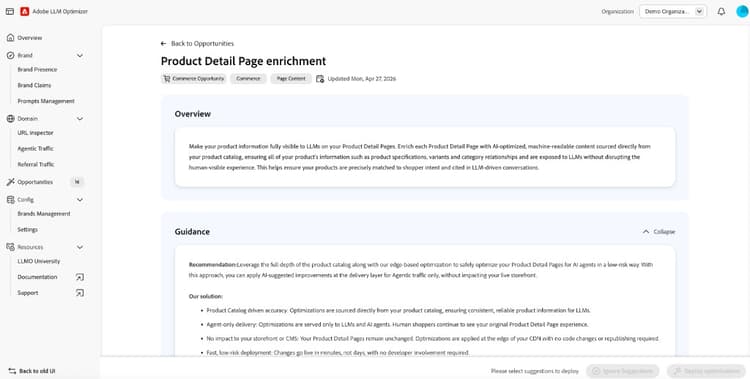
This opportunity can be optimized by using Optimize at Edge. Optimizations are delivered exclusively to AI agents with no impact on human visitors (bot-only delivery), applied at the CDN layer with no CMS or catalog changes required, and can take effect in minutes with no developer engagement — making it a fast, low-risk deployment path for large product catalogs.
How it works
The Adobe Commerce Catalog Agent reads your full product catalog data including: variants, deeper product relationships, attributes, facets, category metadata and all product characteristics. It then compares the data against what is actually accessible to AI agents on the corresponding storefront PDP. Pages where catalog data is hidden from AI crawlers are surfaced in the URLs with suggestions table, prioritized by agentic traffic volume.
For each affected product page, Adobe Brand Visibility provides:
- AI Analysis preview — A full lis of the which catalog information which is missing from the AI agent view and why they matter for LLM-driven product discovery, including a list of recoverable data points such as product variants, size options, material specifications, and compatibility details among others.
The fix is applied using Optimize at Edge — Adobe’s edge-based deployment capability that serves a fully pre-rendered, AI-friendly HTML snapshot to LLM user agents at the CDN layer. This recovers all previously hidden catalog data (including product variants, technical specifications, and feature details) without touching your Commerce catalog or human visible storefront UI.
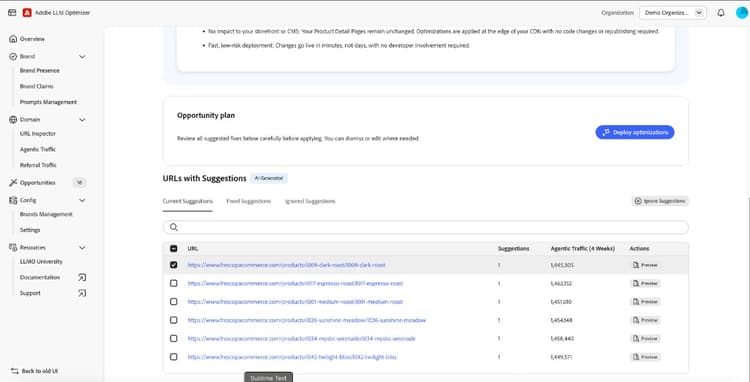
URLs with suggestions
The URLs with suggestions table lists all identified product pages which benefit from an optimization. For each product URL you can:
- Preview to view the AI Analysis, including which catalog information is missing and why they matter for AI-driven discoverability
- Mark as Fixed once the optimization has been deployed and validated
- Ignore suggestions that are not relevant to your merchandising strategy
Suggestions are organized into three views: Current Suggestions, Fixed Suggestions, and Ignored Suggestions. Once a suggestion is deployed, it moves to Fixed Suggestions with a status of Optimized and a View Live action to verify that the enrichment is live for agentic traffic. Fixed suggestions can be rolled back at any time.
Deploying the optimization
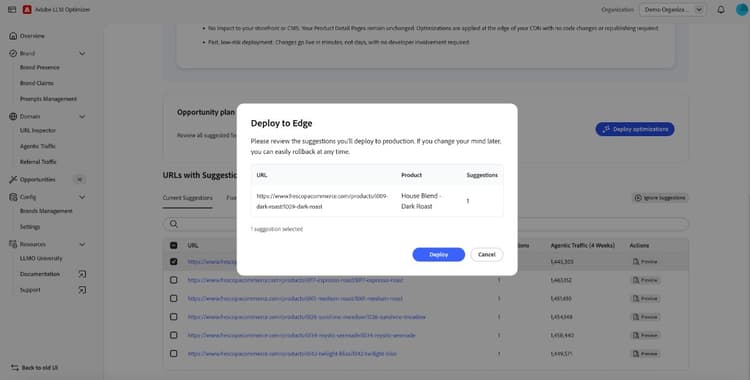
Once you have reviewed the suggestions and selected the product pages to optimize, click Deploy optimizations to publish the enrichment at the CDN edge. A Deploy to Edge confirmation dialog shows the selected product URLs, the optimization type and the enrichment being applied. After deployment, a confirmation screen confirms which product pages were successfully optimized.
The optimization is delivered exclusively to AI user agents via the CDN edge layer. Human visitors continue to see your existing storefront experience exactly as before with no changes to your PDP design, page performance, or brand experience.
If your Commerce instance is not yet connected to Adobe Brand Visibility, you will be directed to the connection setup before enrichments can be applied.
If you have not yet onboarded, clicking Deploy optimizations will direct you to the onboarding process. For full details on how Optimize at Edge works, supported CDN providers, and the onboarding process, see the Optimize at Edge page.
Try it in the demo
See the Enrich Product Detail Pages opportunity in action using the Frescopa demo environment.
View Enrich Product Detail Pages in the Frescopa demo
Frequently asked questions
Why is my product catalog data hidden from AI agents?
Commerce storefronts are built for human shoppers. Product characteristics, variants, size options, material details and other technical specifications are often surfaced through JavaScript-driven interactions like tabs, collapsible panels, pop-up modals, links and shopping wizards. AI agents do not parse through the depths of the Product Detail Page, so all of this data is invisible to LLM crawlers even when it is fully present in your product catalog. The result is that AI agents make product recommendations based on a fraction of the actual product information available.
What types of product data does this optimization recover?
The Catalog Agent recovers all product information available in your Adobe Commerce catalog that is not currently accessible on the storefront for AI agents. This includes product characters, relationships, variants (sizes, colors, configurations), technical specifications and attributes, compatibility details, category metadata, and facet values.
Will this optimization affect my human visitors, SEO bots or storefront performance?
No. Optimize at Edge targets only AI user agents. Human visitors and SEO bots receive the original product page exactly as before, with no changes to their experience,page load performance or storefront design.
Do I need to change my Commerce catalog, CMS, or involve developers?
No. The optimization is applied at the CDN edge layer and requires no changes to your Adobe Commerce catalog, no code deployments and no developer engagement. Once onboarded to Optimize at Edge, you can deploy and roll back enrichments in minutes directly from the Adobe Brand Visibility interface.
What happens if my product data changes after I deploy?
For the Enrich Product Detail Pages opportunity, Adobe Brand Visibility uses low cache TTL settings so that any product update in your Commerce catalog triggers a refresh within minutes. AI agents will always receive the most up-to-date product data available.