Training Data Access connector in Adobe Learning Manager
Introduction
The Training Data Access connector allows you to create a headless learning experience that can be stand-alone or integrated into a custom interface built with Adobe Experience Manager (AEM) Sites. This connector helps you retrieve and display up-to-date training content to learners, with search and filter capabilities.
- This feature is available only if Adobe Learning Manager is sold as an add-on to Adobe Experience Manager.
- Course data retrieved through this connector is refreshed every 24 hours
- This connector is not self-serve for building a headless or AEM-based non-logged-in experience. Please contact Adobe to plan the right approach for your use case.
How it works
Once the connector is enabled, Adobe Learning Manager exposes a set of public APIs that deliver training metadata such as courses, learning paths, and certificates. You can use these APIs to build a custom, branded front-end that displays training content and supports search and filter functionality.
Configure the Training Data Access connector
You can integrate Adobe Learning Manager with your data storage and search system to push training metadata to AEM Sites or other headless experiences.
To configure the connector:
-
Log in to Adobe Learning Manager as an integration administrator.
-
Hover over the Training Data Access tile and select Connect.
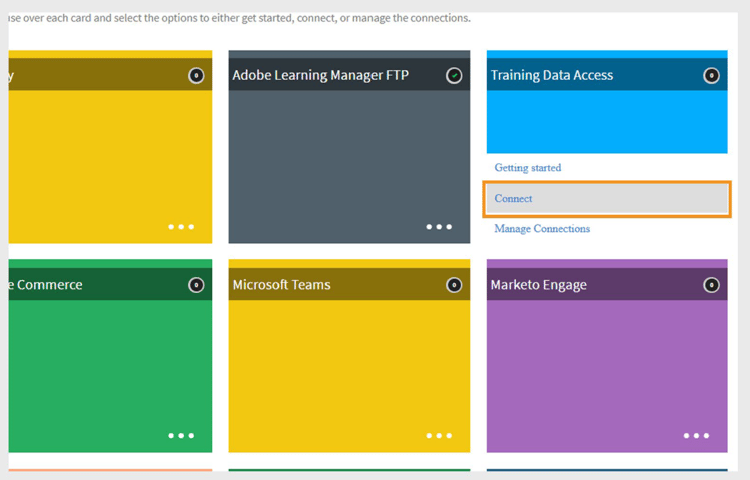
Select Connect to configure Training Data Access connector -
Type a Connection Name.
-
Select the Type of Interface:
- Native Learning Manager: Standard logged-in experience, available by default.
- Headless Interfaces: Premium option that exposes public APIs for a non-logged-in, headless front-end.
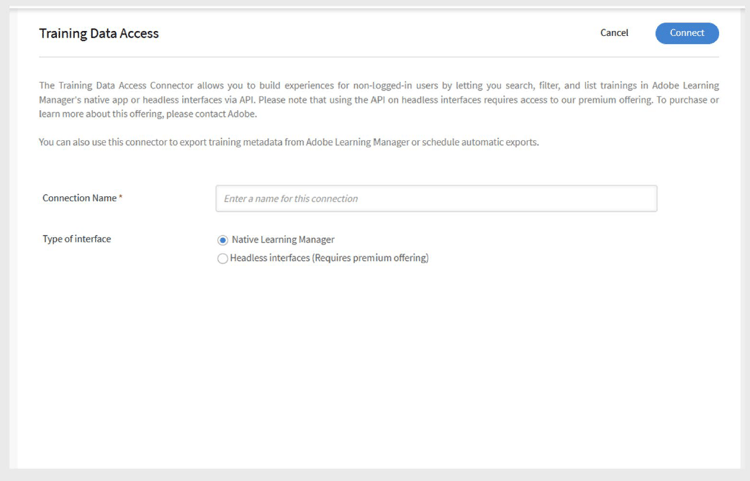
Type the required details for Training Data Access connector configuration -
Select Connect. Adobe Learning Manager generates the Base URL and CDN URL automatically. You’ll use these URLs in your custom site or app to fetch training data.
Export training metadata
To export training metadata:
-
Select Export Training Metadata on the connector page.
-
Select Enable training metadata export using this connection to start pushing your training data to the search and retrieval system.
-
Select Enable schedule and set the start date, time, and interval.
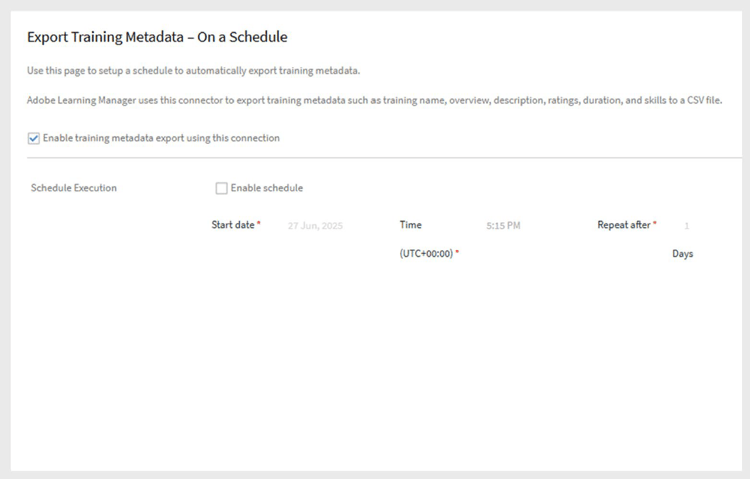
Schedule export for training metadata -
Select Save.
- This automatically uploads all course, learning path, and certificate images to the CDN.
- It also exports the associated metadata to your search system.
On-Demand Exports
- Run exports on demand: Go to On Demand, set the Start Date, and select Execute to run an export when needed.
- Check execution status: View the export progress and history on the Execution Status page.
Build and publish the website in AEM
To display training data on a headless or AEM Sites-based website:
- Install the AEM package from Adobe’s GitHub repository (prerequisite).
- Use the Base URL, CDN URL, Client ID, Client Secret, and Admin Refresh Token to create a configuration in AEM.
- Build the site using AEM components.
- Publish the site for learners.
- For complete setup details, see the this article and this article.
Learner experience
Once the site is live:
- The website displays all Courses, Learning Paths, and Certificates retrieved from Adobe Learning Manager through the search system.
- Learners who are not logged in can browse and view course details.
- When a learner clicks to enroll in a course, learning path, or certificate, they are prompted to log in to complete the enrollment and start training.
Non-logged-in experience
The non-logged-in experience allows you to create a real-time experience for non-logged-in users. For example, a non-logged-in experience serves as a landing page for marketing campaigns to encourage sign-ups.
The non-logged-in experience in Adobe Learning Manager can be configured using the Training Data Access connector. The connector provides the following offerings:
- Standard offering
- Premium offering
Standard offering
The standard offering is to build the native version of Adobe Learning Manager. Users can build a demonstration-only, non-logged-in headless experience. The demonstration headless experience is unscalable and should not be used in a production environment.
Premium offering
The premium offering helps users build a headless interface, which is configured by the Training Data Access connector. This allows users to get real-time data on course and learning path details such as name, description, author, skills, duration, etc. For blended learning scenarios, you also get real-time seat limits, seats occupied, waitlist limits, and waitlist counts. Customers can use these APIs to create search and filter capabilities and a complete course summary for non-logged-in learners.
Customers can purchase a premium plan to build this highly scalable non-logged-in experience.
After a user buys a plan, the CSM team will activate the premium plan for them. Using the Training Data Access connector, users can set up a non-logged-in experience with the features mentioned earlier.